Failed to finish
List of movies I could not finish, usually because they're bad or because I can't follow the plot
My thoughts about Mirco.Camp and what I learned
Micro.Camp 2023 is over. I had fun, enjoyed listening and participating, and got exciting new ideas to explore. For me, these include mainly three categories. books, photos, and movies.
Books
Micro.blog (MB) has an excellent book integration built into the left sidebar. You can find a book there and import it directly into a post. My problem with books is that I can’t get myself through reading one. I turned to the book lovers of MB for advice and got several good tips. Here they are in no particular order:
- Audiobooks: Listening to a good narrator reading a book can help and improve the experience
- Don’t be afraid to jump somewhere in the middle of a book and start reading to spice things up a bit. Books are slow; most chances are you won’t spoil everything if you read a page or two.
- Push yourself to read at least 10% of a book before putting giving up. Many books take their time to get interesting. On the other side of this coin (I’m adding this as a personal note), if a book still sucks after that 10%, don’t force yourself to keep reading it. There are plenty of other books to read.
- If you read a book and find yourself glazing over pages or reading the same line over and over, put it down and read something else. Reading a book is a skill. Develop it on something lighter for a bit (like magazines or blog posts) before trying for a whole novel.
Photos
The MB community is very active around photos. There’s a dedicated photo page by default in most themes and an option to upload photos to short and long posts, which can also be re-posted to other services automatically, like Flickr.
Lurking in the chatroom, I learned that Glass is now available on the web and on Android. I registered and quickly realized why it’s a photographer’s favorite. The interface is beautifully minimal and shows you nothing but photos. Unlike Instagram, you won’t find folks using posting pictures of text. Zero ads. You have to pay to use Glass, but I feel it’s worth it.
While Glass comes with an RSS feed that can be used with MB (go to your Glass profile URL and add /rss at the end), it doesn’t allow much customization. The MB team is looking into ways to improve Glass’ integration, but for now, it seems there’s not much to work with from Glass’s side.
Still, the resourceful MB community came up with a couple of plugins and themes that work better with photos (I’m experimenting with one of them right now, under the photos page.) This is a good place to mention Jean’s post about Discovery, prompting people to make sure their photos include a description (via the “alt” HTML tag).
Movies
Weird/indie/rare films are something I tried to get into in the past and failed. I knew there were movie lovers on MB, and I feel lucky I stumbled upon Chris Campbell’s presentation. Chris uses letterboxd is a movie professional, and listening to him about the benefits of letterboxd sold me within a minute. I had a profile on letterboxd I haven’t really used, but I intend to fix this now.
Letterboxd calls itself “a global social network for grass-roots film discussion and discovery.” It’s a free service that offers a clean browsing experience (almost no ads) and a lot of information. And yes, it also comes with an RSS feed.
It seems like I have a couple of movies to catch up on…!
When I joined MB, I was looking for a place to save me time messing around with Hugo. But MB proved to be more than a blogging solution. It’s a community of passionate individuals with similar interests to mine. The true value of this place is the interaction with the community, something I learn to appreciate a bit more every day.
Thanks to Micro Camp 🏕️, I learned Glass is now available on Android and the web. It’s also not as expensive as I thought it was.
Trying it out: glass.photo/jtr121 📷
View during lunch 📷

Privacy vs Convenience on the Mac
With GrapheneOS installed, I am motivated to lock down the Mac a bit further. I dusted off my privacy geek hat and put it on last night, and did two things:
- Installed little snitch
- updated and tried to fix1 my Linux VM on Windows
There are technical challenges, but I find that the biggest hurdle is convenience. For example, I could disable Spotlight on the terminal level and block it from communicating with Apple servers (I see this is possible, at least to a point), but do I really want to stop using Spotlight?
The same issue exists with LibreWolf, my go-to privacy browser. Every session I start is a clean slate, but do I really want to deal with typing my credentials and having my settings reset for frequent websites each time?
If my Mac is my main productivity machine, perhaps I can utilize a Linux VM for privacy. It’s geared better toward privacy anyway. But what do I use where? What should be private, and what doesn’t need to be?
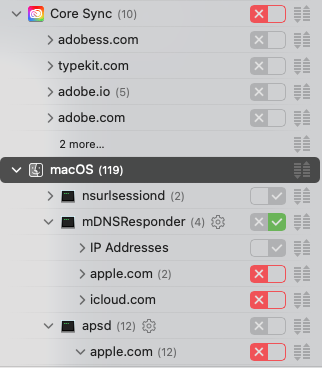
- My Linux VM has and audio/video issue. The refresh rate rate of the screen can be really bad, with parts of a staying frozen on the screen long after I drag it away. And for now, there’s no audio at all, even though I reinstalled my audio drivers on the host.
Trying out GrapheneOS
Update: I now have this process documented on my wiki.
GrapheneOS is a hardened Android OS variant. It essentially strips out all the “Google stuff” from the device. The concept itself is a bit confusing: how can you have a Google-based phone (Android) without Google components?
In short, since Android is an open-source operating system just like Linux (as a matter of fact, it’s built on Linux), anyone can take it and customize it. The familiar Google apps (like contacts, Maps, camera, etc.) just sit on “the top,” so they can be stripped out of the operating system. This is an over-simplification (Google also has many built-in core components in Android that users do not see), but it’s good enough for now.
But why do that?
That’s a bit harder to answer. I’ve been exploring online privacy for a long time, at one point leaning toward making information security my career (now I just learn things for fun). You can read some of my privacy-related posts on the old blog, starting with this one which I brought over here.
As I rely more on my Mac and iPhone, I wanted to “balance” things out a bit. I gave up my Fitbit a while ago and decided against buying an Apple Watch, and having GrapheneOS on my Android was the next step.
In a way, being more private feels like stepping back a decade or so. I need to carry around a wallet again. I might need to write things on paper. I should rely on signs and announcements in subway stations instead of using my phone.
That’s not a coincidence: we live in an age where big tech is only possible by selling off our personal information; the more it progresses, the more information it needs to sell to sustain itself. When we don’t use big tech products, we also step back in time.
Company of Heroes 3 is Fun
I was skeptical about buying Company of Heroes (CoH) 3 🎮 because of the mixed reviews. I’m glad I did, the game is a lot of fun so far.
For those unfamiliar, CoH is a WW2 RTS game, and in my opinion, one of the only ones still worth playing. It has the correct balance of micro squad management without drowning you in details. I’ve been playing CoH since the first one came out in 2006. In case you’re curious, CoH2 should work on Linux and Mac too, and it still looks excellent by today’s standards.
I haven’t encountered serious bugs in the game (but there are a few minor ones), and I tried both Windows and Linux (using Proton). CoH3 presents a campaign map (Italy) where you take over cities and bases from the occupying Nazi forces. These give you bonuses and experiences for your units which in turn give them bonuses in real-time battles, like airstrikes, additional units, abilities to heal, etc.
I haven’t played a skirmish game against AI yet, which is where I spend most of my time in CoH games - over 2,000 hours alone on Steam in CoH2. The big additions to the series in CoH3, the campaign map and the ability to pause mid-battle to assign orders to your units, don’t work in skirmishes, so I wonder if the game will lose some of its appeal when I play in these modes.
So far, the third game adds plenty of variety while being less complex (so far anyway) during real-time battles, which is an improvement over the first two games.
Is there anyone who thinks encryption on a social network is a good idea? Twitter in particular? The only “up” side, the way I see it, is that encryption is popular enough these days for Twitter to implement it.
Twitter’s Encrypted DMs Are Deeply Inferior to Signal and WhatsApp wired.com

Currently reading: Entangled Life: How Fungi Make Our Worlds, Change Our Minds & Shape Our Futures by Merlin Sheldrake 📚
Yesterday, I went to visit a bookstore 📚 I thought I had been to before. Turns out it’s the wrong store, but it was still the very right one.