
After market tumult, Trump exempts smartphones from massive new tariffs - Ars Technica
The dispensation for smartphones and computers will be especially welcomed by Apple as the bulk of its supply chain is centred on China. Analysts estimate about 80 percent of its iPhones are still made in the country even as the tech group worked to diversify production to India in recent years.
Man, I thought it would take the Clown on Chief another week or so. What a disappointment!
Why a US-made smartphone is not going to happen soon
Anyone who’s remotely familiar with how electronics are built knows a US-made phone is not feasible, at least not in the time span of the current administration, but 404 media’s Jason Koebler wrote a pretty thorough article explaining why.
A 'US-Made iPhone' Is Pure Fantasy 404media.co
This is behind a paywall, so I’ll sum up the three main reasons:
- No workforce (not enough American workers are trained for this job, and they’d cost too much anyway)
- No materials (Apple’s supply chain lists roughly lists 80 different countries)
- No Factories (the machines for these factories are also manufactured overseas)
Some of the quotes I liked in this article:
The Reshoring Institute put out a paper that said American machine operators made an average of $43,000 annually in 2022; Vietnamese machine operators made less than $5,000 annually.
‘Factories require machinery and components from other countries, so if machinery gets really expensive you’re going to have less manufacturing, not more. So I think this is very unlikely to yield the results that they want.’
It is also worth considering that Foxconn, which manufactures iPhones and other devices, got billions of dollars of funding to build a factory in Wisconsin, failed to do so, and totally abandoned the site. Foxconn failed in Wisconsin for many reasons (chief among them, it did not ever actually build a factory, which was covered best by The Verge), but an executive there explained that it was not feasible for the company to find workers only from the local communities: “It is not feasible to tap into just Mount Pleasant or Milwaukee alone to really build up the talent pool,” Alan Yeung, who helped lead the Foxconn project, told The Verge.
The quote below is from a different article by Jason, interviewing the CEO of a company that’s trying to make a 100% US-built phone, but it highlights the material problem:
One specific item is a type of crystal that needs to be put into phones, which is basically for keeping track of time and a few other measurement metrics. That crystal is something that only comes from China, and maybe I think you can get it from South Korea, which is where we either are sourcing or trying to source that last component from.
By the way, the phone, Liberty Phone by Purism, is a $2000 Android device with mid-specs that cannot compete with phones less than half its price. And It’s still not entirely made in the US.
I’m visiting my mom, who lives with her boyfriend of several years. As a New Yorker, this place is huge - a garage for two cars, two showers and a half, a dining room separate from a kitchen and a foyer, and more space that I don’t know how to name correctly. I’d say it’s a big house, not a huge house, somewhere in Pennsylvania where you can afford something like this on a mortgage without robbing a bank, I guess.
I’ve lived in NYC for over a decade, and I’m used to small spaces. My new bedroom is huge compared to anywhere else I’ve lived before, but the apartment itself is small, but not in a contrasting way, it’s comfy. I don’t understand why people need all this space.
Most people my age (40s) have a family and kids, so a few more bedrooms make sense, two bathrooms and showers, sure, but let’s say you only have one kid, or maybe the kid moved out, or maybe you just don’t have kids. I think (and I may be wrong?) most people live in houses, and these houses have space, and, well, what do you do with this space?
Over here, they love plants: 📷
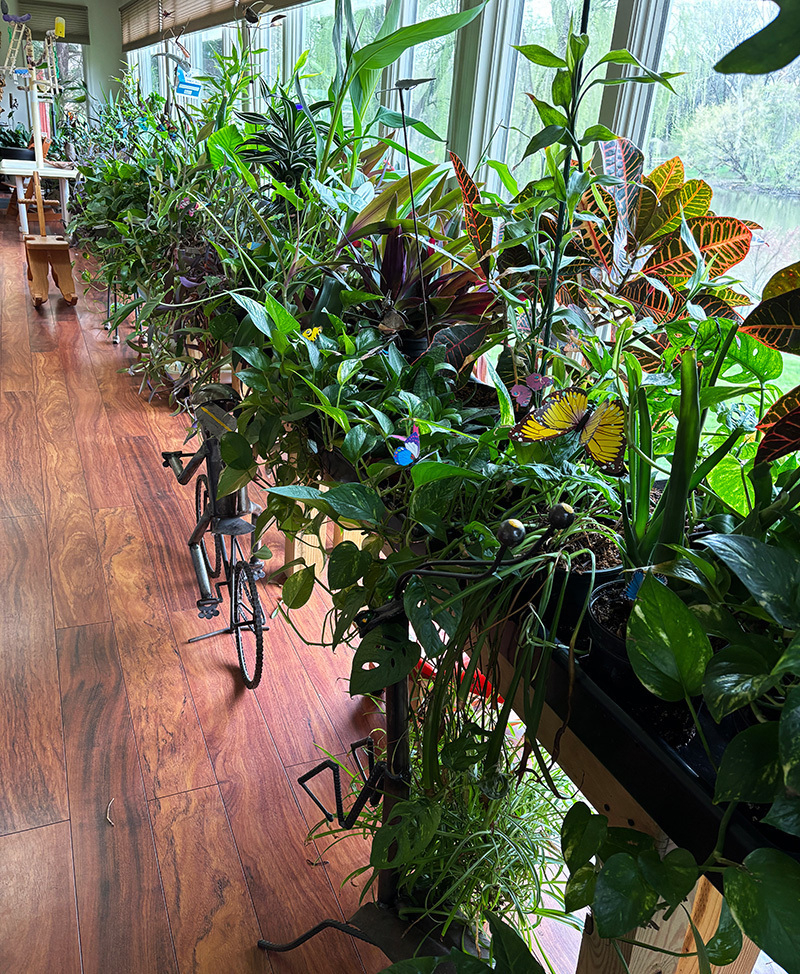
And then there’s the art they like to get, and the basement has a lot of tools and additional storage, and then there’s another old fridge in the garage, and the dining room has a table, but you can also eat in the kitchen - but why? I feel like I’m criticizing and not coming from the angle of “this is wrong,” I just don’t get it. Maybe if I were to live in a place like this for a while, I would. What do you get out of the extra space and extra stuff?
Taking down my S3 Videos
During my blog maintenance today, I stumbled upon a link to one of my S3 videos from two years ago. These were about 20-30-minute summaries of me going over my posts that week and explaining them in more detail, sort of offering an additional “behind-the-scenes” look. After watching the video, I decided to take all of those videos down.
The main reason for that is that I don’t feel comfortable talking to an audience in front of a camera. I don’t like how I sound, I don’t like the grammatical mistakes I make in speech (they happen more often in videos), and I don’t like all the “umms.” It’s different when I’m recording myself to family or friends, but publically, it feels different.
I write better today than I did two years ago and much better than I wrote five years ago. With recent developments in AI, mostly Grammarly in my case, I also get suggestions for clarity and precision, which help me bring out my ideas better. I prefer to express myself in writing than in speech—I always have—which is why I always had a blog.
Repeating the same things is another reason I would rather not have these videos up. I already write a lot of my thoughts down between this blog and my journal, and rehashing everything again a third time at the end of the week for the sake of having something in video doesn’t change the fact that it’s 90% the same thing.
When and if I do consider doing videos again, they would probably be instructional (like a how-to video) or a recording of a game playthrough. And when this happens, I think I will skip PeerTube altogether.
The server I uploaded my S3 video is shutting down, as the sole person behind it is running out of money and patience to maintain it. The instance I was on was already the third one I tried after two other ones failed on me, and moving large video files around for the sake of a free server somewhere is not worth it. Besides, I don’t like the fact that PeerTube, as awesome as it is, is just a recycled YouTube idea (classic YouTube, but still YouTube). There’s a lack of innovation in all these federated services, which build a copycat version of the proprietary platforms, be it Instagram, Twitter, Facebook, or YouTube. But that’s mostly just my grump.
In any case, I’m back here ranting as usual, still adding pieces from my old blog and my journal from time to time.
First week with Journelly
I’ve been testing out Journelly for the last week, and I have a lot of good things to say about it. Before we get there though, I want to start by explaining what it is - which is also the single piece of criticism I have about it at the moment.
Ramírez explains his app as “kinda like tweeting but for my eyes only,” which is true, but in my opinion, not the main point. After all, tweeting (X-ing?) or tooting or whatever is not new. At the same time, there are many excellent journaling apps for iOS, including Apple’s own Journal and the celebrated Day One. Putting Journelly against these apps is also misleading. This is partly why I didn’t understand the excitement around Journelly when I first heard about it, especially from an enthusiastic Emacs user1.
I would take a step further and say that the average iPhone user, who trusts Apple for all syncing and backup needs and doesn’t know what Emacs is, should skip Journelly and go with the other apps, at least for now.
But, if you’re reading this post in your org-mode category on your RSS reader, you are not a regular citizen of the internet. We are Emacs org-mode users. So let me tell you why this application is amazing.
Journelly is a front-end iOS app for org-mode. The notes you take with Journelly are written entirely in org-mode, in a single org-mode file, which you can sync to your Mac with iCloud or another method that works with both iOS and macOS.
Every note you take, which you create by tapping a large “+” sign in the app, starts with an org-mode header made of a time and location (which you can disable), like so:
* [2025-04-08 Tue 14:28] @ 123 Sesame St
On the app, these entries look very polished:
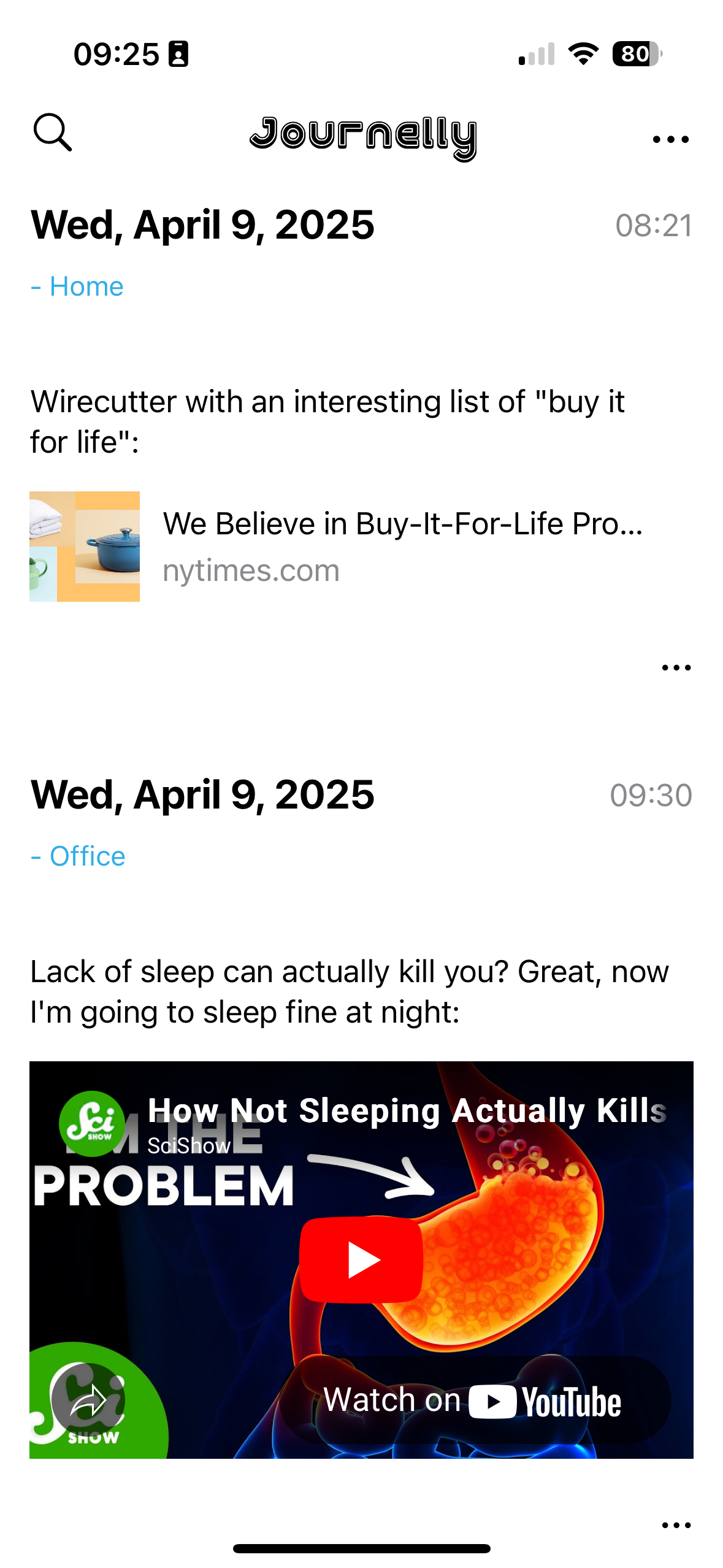
Behind the scenes, Journelly also adds the following in the header’s properties drawer (I removed the values below, but Journelly populates them automatically):
    :PROPERTIES:
    :LATITUDE:
    :LONGITUDE:
    :WEATHER_TEMPERATURE:
    :WEATHER_CONDITION:
    :WEATHER_SYMBOL:
    :END:
You won’t see these properties (including the weather, which is included in the app when you take a note) on the app in the default view, but you can switch views to the “Markup” to see raw org-mode syntax. Speaking of org-mode syntax, let’s talk about some Journelly magic.
I use iCloud to sync a Desktop folder for org files to my Mac. This is also where I told Journelly to store its org file (which is called Journelly.org - at this point, it doesn’t seem like you can change this file name). This means that after making an update in Journelly, I can visit the org file with Eamcs on my Mac within seconds.
Then, through Emacs, I can make whatever changes I want to this org file: fixing typos, adding emphases (say, make certain words show in italics or bold), adding links, whatever. The next time I launch Journelly on my iPhone, it will notify me of the file change and prompt me to reload it. One tap and everything is rendered with the same polished look you see above as if I wrote it from within Journelly itself. The whole thing is so freaking seamless and visually appealing it’s addicting, as I found out quickly.
Since Journelly’s org file is included in my org-mode agenda (the folder it’s in is defined in my agenda files in Emacs on the Mac), I can easily refile entries from Journelly.org into my big journal.org file which I’ve been updating since 2018. This means that notes I take on the fly, with timestamps and location (and weather!) data, are added to my journal within seconds. After doing this for a couple of days, a thought occurred to me: why stop there?
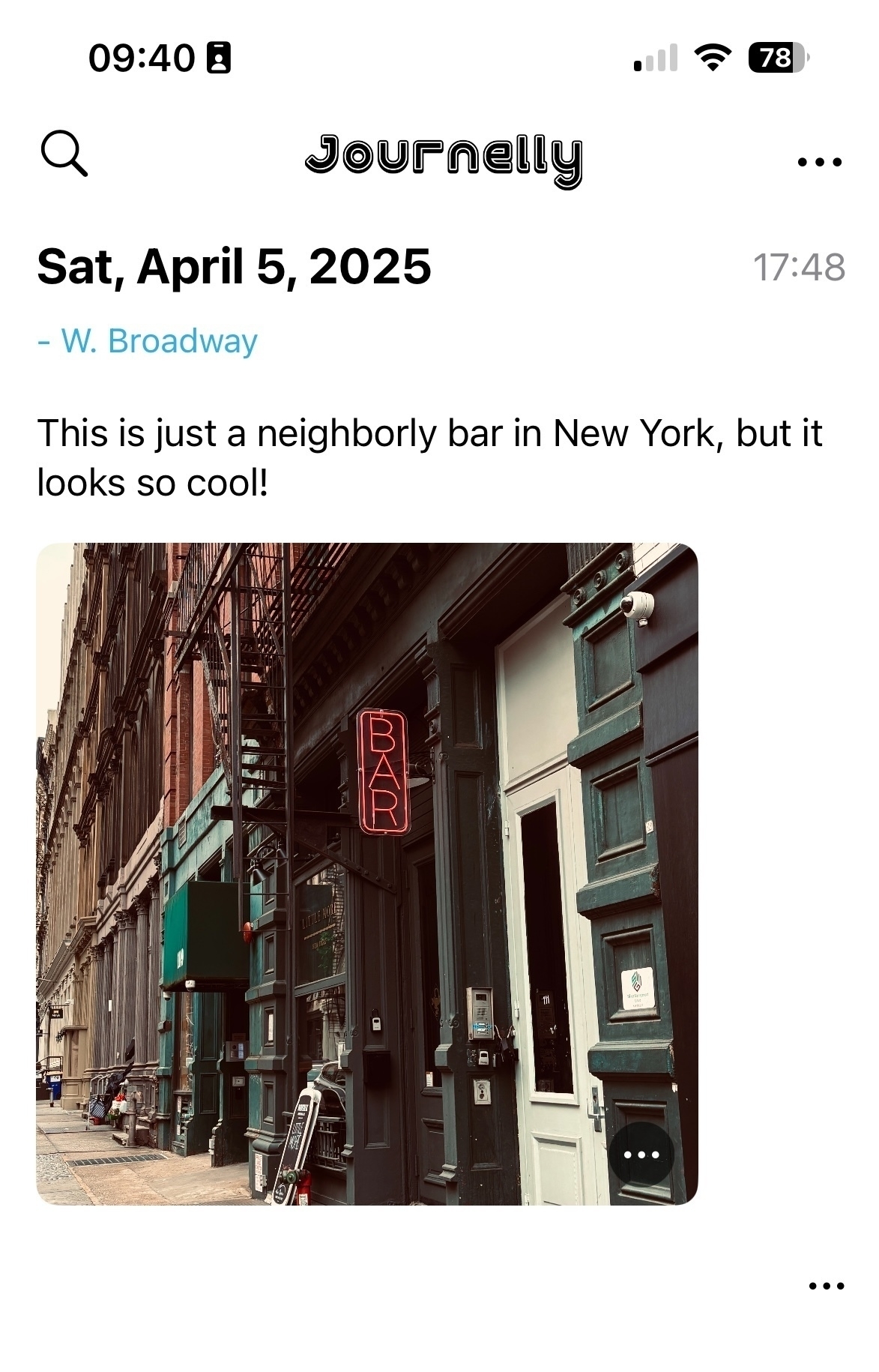
As you can see, Journelly knows how to deal with photos well. They are stored in an images folder inside Journelly.org.assets, which is easily accessible if you sync the app’s org file. So, if it’s so easy to use for notes and pictures, why not use Journelly for my project notes and meetings?
My favorite way to work with Journelly so far is by dictation: I talk to write. This last part is what caused me to change how I think of project notes in general. Instead of writing notes for each project in Emacs, why not just write or dictate them in Journelly? I can easily refile headings into related projects later if I wish, whether it’s a work task, a personal journal entry, or a link from the internet.
I don’t have to think of what goes where as I take notes. it all goes to one place where it’s easy to see and a pleasure to work with. This concept is not new to me (and it’s well documented in productivity systems like GTD as “inbox” or what have you) - I used to have an OhSnap.org to capture everything. But on my phone, through Orgzly on Android or Beorg on the iPhone, it’s not easy to see nor a pleasure to work with. These apps are geared toward tasks and to-do lists, and that’s part of the problem: when I capture information, I don’t usually know if it’s a task yet, just a note, a workflow, and where it goes. If I do know, then I’d put this task directly into the org file it belongs, so what’s the point? And it all looks so bland and boring and uninviting. On other org-mode apps, writing notes is a chore.
Journelly blows this mental challenge away. It invites me to take notes and just notes. It’s the opposite of a chore. “Go ahead,” it winks at me, “spill the beans. Snap some pictures. We’ll work on the details later.” Suddenly, I’m free to let my mind go.
Later on Emacs, I refile personal headers with their notes into my journal, minutes from meetings into my project files, and use org-attach to move the images from Journelly2 to their correct place where they are also stored for backup.
This makes me wish Journelly would have the ability to attach voice memos, which would work great in a journalling app. I hear from Ramírez this is on his list and will come soon (judging from how responsive he is, we won’t wait long). Who knows, perhaps other files could be added, like video clips and even PDFs for flight or train ticket scans. For now though, the app is still in beta, and Ramírez is working overtime to get version 1.0 out. I will be one of his first customers, that’s for sure.
In the few days I’ve used Journelly, it has transformed from a nice way to keep a journal to an essential mind dump tool for saving anything I need. I now reach for my phone whenever I want to capture thoughts because it’s just so pretty and easy. If you’re an org-mode user on an iPhone, I highly recommend you give it a try as soon as it’s out.
Footnotes
1 - I do tend to miss details, and while the Mac Observer review I read does mention Journelly is based on org-mode, it’s somewhere toward the bottom where my quick scan of the article missed.
2 - at this point, Journelly stores full-resolution images, which can quickly add up in space on the iPhone. This is easy to resolve with a Shortcut on iOS or a script with ImageMagick. I prefer to do some slight editing to my images anyway (a bit of cropping, some levels adjustments, etc), but these are also things you can do on the phone and automate the compression.
I want to write more about Journelly, but the problem is that it’s too effective at what it does. Creating notes with it is so easy and streamlined that it’s starting to change my entire workflow for project notes, and that’s a pretty big change.
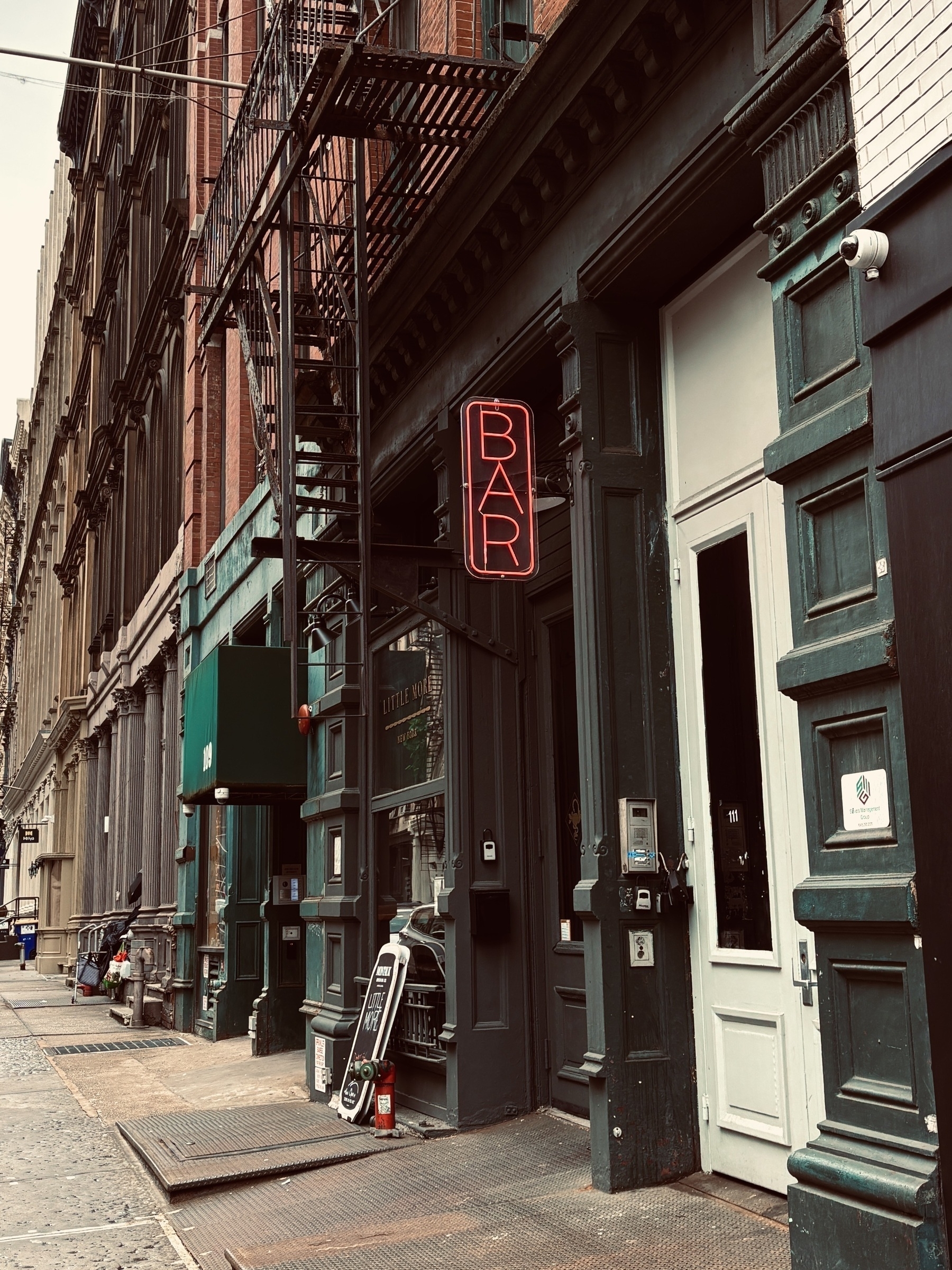
Walked from Canal to WTC to catch the path. Good weather for a brisk walk. I like the style of the area 📷

Via Hacker News: free technical books from before 1964:
Technical books online tubebooks.org
I’ve found that most of the technical books published before about 1964 never had their copyrights renewed, so now are in the public domain. So I am endeavoring to digitize and post some selected books relating to the “vacuum tube age” of electronics here.
Very nicely done. Also interesting: how he does it (bottom of the same page) and other things he’s into.
Oh, thanks Wired! I did want to remove it
What Is the Meta AI Button in WhatsApp, and How Do I Remove It? wired.com
Wait, what’s that?
So, what if you are not interested in this feature? At the moment there is no way to disable or delete Meta AI from WhatsApp.
So why are you lying to me? What if I don’t want AI…??
Well then, you’re shit out of luck. AI’s here to stay. Get used to it.
Another quick note about Journelly -
Álvaro Ramírez was kind enough to grant me access to test the app after I found out it’s based on org-mode.
I just started playing around with it but so far I’m impressed, particularly with its ability to “talk to” Emacs back on my Mac. I can easily edit notes that I created on the phone, and these edits, including links, strikethroughs, and lists, show up on the app in turn.
There’s more to explore and the app is still in beta, so I will give it a couple of days before I write something more thorough.