Marie Curie’s Research Papers Are Still Radioactive a Century Later
If you want to look at her manuscripts, you have to sign a liability waiver at France’s Bibliotheque Nationale, and then you can access the notes sealed in a lead-lined box.
Your Sunday random cool fact 🤓
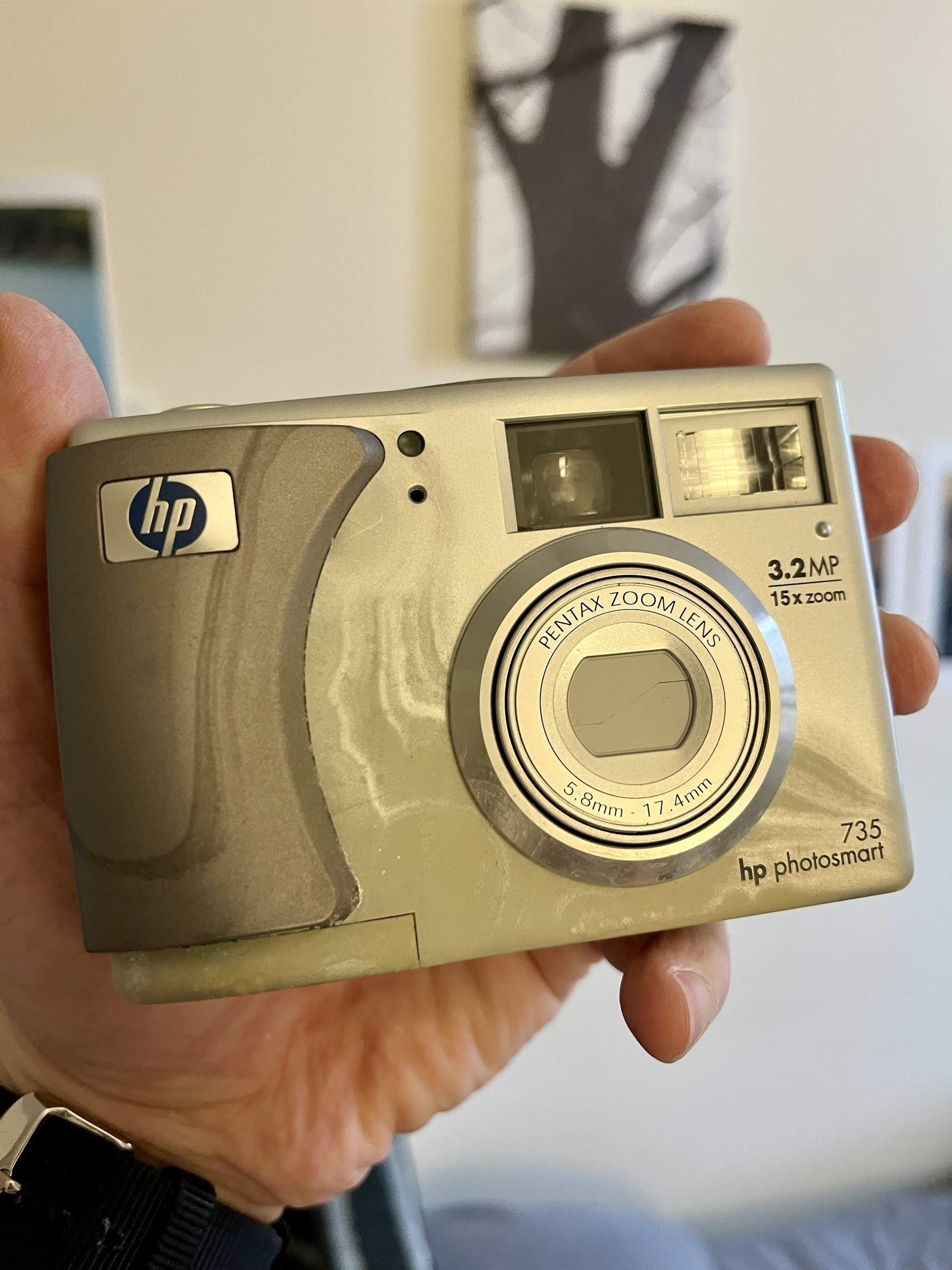
I found my first digital camera 📷 burried in my trunk of memories. I left the batteries inside so it’s probably not to be used again…
Why do you need a technical writer?
A sysadmin or an engineer may know what this means: “When users log on to Domain joined computers, they are automatically mapped to the X: Drive based on the Organizational Unit they are member of,” but the users will not.
Sorry for littering… I found a video game review site, backloggd (inspired by letterboxd), which allows RSS feed. This means I can use it to review games and post to my blog. Still working out some of the issues.
World of Warships (2015) - ★★½
On my Gaming PC, I renamed World of Warship’s desktop shortcut to Sad Addiction. That’s a good summary of what I think about this game.
It is a solid, tactical, and balanced game for the most part. Each ship class you choose plays differently, and there are differences between different ships of the same class. You can upgrade and add special weapons and tactical bonuses to your ships, choose different captains, and more. Technically, the game is stable, the servers rarely lag, and the graphics are excellent. And, being a Wargaming game, it’s also free to pick up and play.
Here comes the but.
Being a multiplayer online game, your fun from it depends mostly on who you play with. Unfortunately, this usually means bad experiences are more common than good ones, at a ratio of about 3:1. What’s worse, the developers understand most of their gamers are teenage hornballs (or at least they act like ones) and target that constantly. Game updates are explained in video clips presented by sexualized women. Avatars are anime and even hentai-oriented characters. Many in-game events emphasize stuff from Megadeath to Transformers. So yes bro, there’s no surprise that the gaming experience often feels like a bad high school reunion.
On the technical side, the game includes huge patches every month or so, with 70% of things you won’t care about (Sailor Moon captains anyone?) or won’t affect your gameplay directly (a ship that costs 60 US dollars). There are also other questionable practices, like an annoying Windows system notification that warns you if you switch away from the game to a different program for a minute or a broken reporting system that colors your name in the game pink (Oh no! Not pink! What would friends say?!) for the most idiotic things, like choosing to play a plane carrier, since some players hate this class of ship so much they report you if you play them.
Since I already commented on the price of some of the ships: the game is free, yes, but that means Wargaming will do whatever it can to get you to buy stuff. A premium account, a season pass, a ship with an advantage in the game, etc. In fact, if you play this game long enough and get to high-tier ships, it becomes nearly impossible to progress without spending at least a little bit of money to move up.
So, if this review reads more like a vent, it’s because it is. I love the game, and I hate the game.
World of Warships (2015) - ★★½
On my Gaming PC, I renamed World of Warship’s desktop shortcut to Sad Addiction. That’s a good summary of what I think about this game.
It is a solid, tactical, and balanced game for the most part. Each ship class you choose plays differently, and there are differences between different ships of the same class. You can upgrade and add special weapons and tactical bonuses to your ships, choose different captains, and more. Technically, the game is stable, the servers rarely lag, and the graphics are excellent. And, being a Wargaming game, it’s also free to pick up and play.
Here comes the but.
Being a multiplayer online game, your fun from it depends mostly on who you play with. Unfortunately, this usually means bad experiences are more common than good ones, at a ratio of about 3:1. What’s worse, the developers understand most of their gamers are teenage hornballs (or at least they act like ones) and target that constantly. Game updates are explained in video clips presented by sexualized women. Avatars are anime and even hentai-oriented characters. Many in-game events emphasize stuff from Megadeath to Transformers. So yes bro, there’s no surprise that the gaming experience often feels like a bad high school reunion.
On the technical side, the game includes huge patches every month or so, with 70% of things you won’t care about (Sailor Moon captains anyone?) or won’t affect your gameplay directly (a ship that costs 60 US dollars). There are also other questionable practices, like an annoying Windows system notification that warns you if you switch away from the game to a different program for a minute or a broken reporting system that colors your name in the game pink (Oh no! Not pink! What would friends say?!) for the most idiotic things, like choosing to play a plane carrier, since some players hate this class of ship so much they report you if you play them.
Since I already commented on the price of some of the ships: the game is free, yes, but that means Wargaming will do whatever it can to get you to buy stuff. A premium account, a season pass, a ship with an advantage in the game, etc. In fact, if you play this game long enough and get to high-tier ships, it becomes nearly impossible to progress without spending at least a little bit of money to move up.
So, if this review reads more like a vent, it’s because it is. I love the game, and I hate the game.
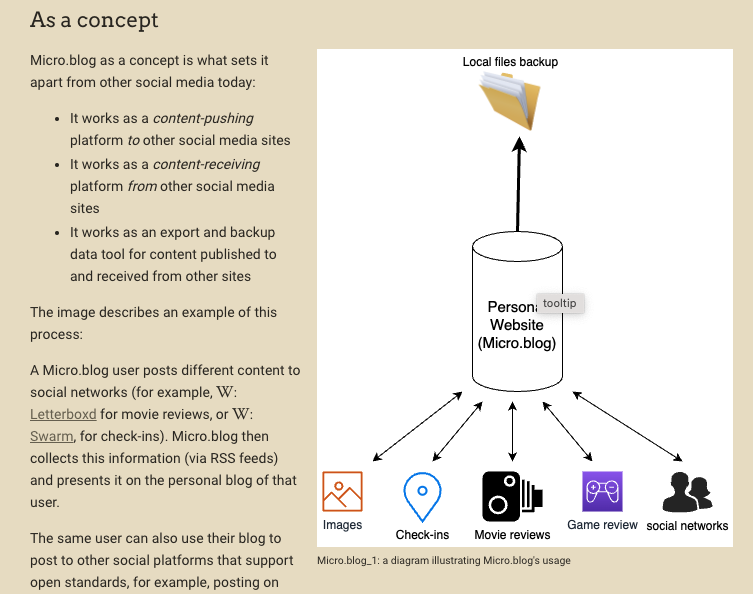
I’m rewriting some parts about Micro.blog in the wiki now that I have a better idea of how it stands out conceptually.
I’ve had a weird Stage Manager problem on the Mac for a while. When I switch from a full-screen app (like my browser) to the left to a stage in Stage Manager (using ctrl + arrow ) Stage Manager switches one stage further.
Does Stage Manager has a “command + tab” for stages?
Why doctors in America earn so much
TLDR: the article claims it’s a closed market geared at profiting a small group of surviving insiders.
More than 100 million people today live in an area without enough primary-care doctors (the problem is particularly bad in rural areas)
And:
Nurse practitioners and physician assistants have been given responsibilities typically reserved for doctors, such as writing prescriptions. Foreign-trained doctors have filled some of the gap too.
Yet, the length of training and the cost of becoming a licensed doctor in the US makes it impossible for many.
Another Manhattan sticker-covered manhole. Lafayette Street. 📷