
Emacs org-mode
Welcome to the Emacs org-mode category.
You can subscribe to this category only via RSS!
I am working on restoring some of my related posts from my old blog, so keep checking here for new content.

Emacs and mental challanges
As part of a trip to see her friend, my mom went to a show of Porsche cars last week. This is a group of enthusiastic Porsche owners from different years. One of the stories she shared was about a proud Porsche owner who drives in countries that require the driver’s seat on the right (I’m assuming the UK or Ireland?) The driver, instead of abandoning his Porsche, had his beloved car set up with an adjustable steering wheel that can shift to the right or left side of the driver’s seat.
Emacers already know where this is going. We are all, in our own way, drivers just like this guy. The difference, of course, is that we drive Emacs, not a Porsche (though I’m sure there are a few of you out there who drive both!). I find this story inspiring because the laws that dictate where the driver should sit in the car are imposed. There’s nothing the driver could do about the law itself, so they came up with their own solution to work with the law in a clever way. Again… Emacs.
Emacs is not easy to drive in 2025. It has a steep learning curve, especially if you don’t have a good computer background. The other big problem is the outside restrictions. This blog is riddled with challenges I have with Emacs and different workarounds I came up with. I think this post I wrote earlier this year summarizes it well. To recap quickly: my work environment forces me to use applications that don’t play nice with Emacs. The biggest issue I have is with emails (only Outlook is allowed), but other cloud-based software is also problematic, usually because the only interaction with it is through the browser.
There are several community solutions for these issues. One of those is Emacs Everywhere, which I need to try to play with again (the issue I have there is creating a keyboard shortcut invoking a terminal command in macOS, which proved more challenging than I thought it would be), and there are more. But there’s also a bigger issue: there are plenty of new shiny apps out there, and next to Emacs, integration is always easier and nicer. Some of those, if I go deep into the rabbit hole, survive a day or two, even a weekend - but usually I go back to Emacs gasping for air. The overall issue with other apps is that they work nice, as long as you play by their rules and restrictions. As soon as you need to customize something, you’re out of luck. They are usually also all cloud-based, which is something else I don’t like. I know I’m old-fashioned, but I like that the cloud is there as a secondary place when I need it, not forced on me to use.
Some notable examples I visited again recently are both Apple tools: Notes and Journal. Notes got a few more tweaks, making it a useful as a personal database. I love how you can scan documents directly into the App, which works seemingly with the iPhone, and I love how I can now use it on my Apple Watch to check off items when I go grocery shopping. But I would never trust Apple to store my private notes on their servers. Journal has the same issue. The app itself matured nicely, with the addition of a macOS app. It comes with useful reminders, a map to see where entries were entered, a timeline, and a surprisingly good export option to HTML, including all the entries. But it’s also a good reminder of my point above: the date format.
I don’t like the US date format, especially in my personal notes. Org-mode automatically writes dates in a yyyy-mm-dd format, which has always made more sense to me (by the way, if you know a good app that can do that for the top menu in macOS, let me know. I’m surprised Apple doesn’t include that option natively. I’ve tried to change the region and play with the clock options in the past.)
The mindset that long-time Emacs users share with the Prosche driver is what got us into Emacs in the first place. We need things working out our way. In my case, I always liked checklists and bullet points, and I used several tools to help me organize things until I discovered Orgzly, and from there, org-mode and Emacs. I mentioned several times before that I owe my current professional successes (which include promotions at work, beyond just staying sane in a pretty chaotic environment) to org-mode, but that’s not exactly true. It’s the other way around: Emacs org-mode is a tool that enables me to use my mind the way I need to use it to work out information. I believe that if there were other tools that allowed me to change things as much as I can in Emacs, I would work with those too. But, in the age of the cloud, the opposite is true. Workflows are imposed, and customization to fit personal needs usually ends up being limited to dark and light themes.
Emacs is a rare tool that allows you to do whatever you want if you just look under the hood and tweak it to your needs. There aren’t many other programs like it, and I suspect that for most people, they are not needed. But for someone like me, adjusting to other tools doesn’t work well. And it’s not a good thing. I tried to force it a couple of times; believe me, if I were happy with Outlook, OneNote, and SharePoint, my work life would be much simpler. But I get disorganized, and I can’t work without my tools. If I like tinkering with something like Emacs, it’s not just for fun: if I don’t, I’m going to “glitch” until I fix it. It’s a battle uphill, a challenge—always was, and always will be. The benefit, however, is that it keeps me on my feet, and when I get something that works for me, it really works. Better than any other easy solution offered.
I found a potentially useful package that creates a visual calendar inside Emacs. It seems to be mostly abandoned, at least in its current form. It now requires ugly workarounds in order to work.
Does anyone know something like it that works currently?
Update: From the comments, I’m learning that taking the requirements for compat seems to be the official fix. This is a pretty nice package. I’m exploring it more in depth, and I might change some workflows I have accordingly. I find it amusing that I stumbled into it by chance, as I was writing my other post.
HTML export to work with TiddlyWiki
Two weeks ago, I wrote about some of the challenges I have when working with TiddlyWiki. In a nutshell, TiddlyWiki is better when you want other people to read technical documentation you otherwise much more comfortable writing inside Emacs org-mode.
My problem is that converting org-mode to WikiText (the way TiddlyWiki works) is a friction point, and I am not willing to leave the comforts of org-mode in favor of TiddlyWiki’s UI and hotkeys. They are OK, but they do not compare to Emacs and good muscle memory.
The solution (or rather, a workaround) that I found is to export my org-mode buffer to HTML with org-mode, and then let TiddlyWiki handle the rest. I documented this process in my wiki as part of recording the workflow.
There are still a few issues, of course. Certain HTML tags still need to be converted to WikiText (as I noted in the example in the wiki article) to reflect CSS options that otherwise do not trigger with the raw HTML code yet; this is something I can probably fix down the line. The other issue is that certain TiddlyWiki functions, such as integrated macros and lists, cannot be written inside org-mode because they contain square brackets that serve as links within org-mode.
Fortunately, it’s easy enough to fix those in the exported temporary HTML buffer before pasting back into a TiddlyWiki tiddler.
It’s been fun going back to TiddlyWiki and seeing some of the recent and exciting changes they’ve introduced. I will always have a soft spot for TiddlyWiki, since it was the first personal database I tried, before I discovered Emacs org-mode.
A quick rundown about how I write instructions in org-mode
On Reddit, someone asked how to write software documentation in org-mode, and I had a lot to say. Reddit, being Reddit, however, wouldn’t let me post my long comment. That’s fine, I don’t like spreading knowledge in silos anyway.
Here’s what I said:
Hi, my job involves writing technical documentation (instructions mostly), and I use org-mode for it all the time. I polished my process over the years, and it’s a loooong answer to a lot of stuff you probably didn’t ask, but I’ll try to break down the major parts.
First, I use Denote to write all my documentation, one file per tool or procedure if possible. Denote allows me to auto-associate files with keywords (for example, instructions for macOS vs Windows) and also shows me when I wrote the file automatically (it’s in the file name), so I know how old the information is. In the org-mode file itself, I often add notes using C-c !, an inactive timestep, so if there’s an update to a part of the instructions, I know what happened when. Something I don’t use for work but in my own notes is Denote’s dynamic blocks (a block of code with dynamic links to other org files), which serve as an index to quickly view related notes.
In the org-mode file, besides the Denote options, I add options in the meta part to get rid of TOC (table of contents) and display images inline: #+STARTUP: inlineimages and #+OPTIONS: num:nil. I often use annotated images, which I embed into the org file and attach to the headers (so the images are connected to the files).
A couple of years ago, I decided to adopt and use the Microsoft Style Guide (look it up, see if it’s for you) mostly to keep consistent. I don’t like Microsoft, but they have some documentations that make sense, and my work environment is Windows-based, so they cover what I need. There are other style guides out there; whatever you find, stick with it. The style guide is what tells you what words should be in bold (UI elements and buttons) vs what gets italicized (things you want to emphasize) or why you should use “select” over “click” or “tap” (because it’s more generic and applies to more UIs). It’s up to you how crazy you want to get. I find that it helps immensely, and it’s already become an integral part of my writing.
When I write in org, I often use comments (# followed by a space and the comment) as a reminder of what I still want to cover as ideas come to me under the paragraph I’m currently writing. For example, in this long post, I had a # what about images? under what I was writing until I got to it as a reminder.
I don’t use headers right away, unless it’s something obvious from the start, like an Introduction explaining what a certain tool is (first header) and then the process to use it (second header). I prefer numbered lists and quick steps in my instructions; each line describes one action, unless it’s something simple. I use links often - and here’s another important tip: I have (setq org-export-with-broken-links t) in my settings because org-mode expects nice normal links, but Microsoft products don’t always have them, and org-mode won’t let me export with what it considers broken unless I turn it off. I validate links later, in the finished product (by the way, always use target=blank in your links so when someone selects a link, it doesn’t hijack their window but opens another window or a tab).
I don’t use in-document links (anchor links, forget what they’re called) because these don’t always work well. It’s better to tell your users something like “for uninstall instructions, see header name below,” and let them go there. Anchor links are confusing and can break when you export.
When I’m done with my lists, I see if the sections make sense. I sometimes break into sub-sections, but if I go beyond 2nd level headers, I need to consider if I should expand into another article because it tells me the instructions are getting too complex.
I got to expand a bit more about Images. Using images is almost always better, as long as they are clear and use consistent annotations (write your own style guide). I prefer arrows over circles because I find they draw the eye better, and I like using callouts with text (like in speech bubbles in comics), pointing to what I’m talking about in the images. I try to use the same text from the instructions in the images. So if step 3 in the instructions says “select submit,” I will use a bubble pointing to that button in the image, and it will say “select submit” exactly the same way. There’s more to say about images, but this goes beyond org-mode, so I’ll stop here with this.
When I export, I use pandoc . I don’t like to use Emacs HTML exporter. The reason for that is that pandoc comes with more options and the ability to have a “template” Word document that will automatically stylize your document with the right colors, font, font sizes, etc. You tweak it once in Word and it’s good forever. I don’t like to use html from org-mode because it comes with a lot of extra “fluff” you need to strip away (it’s possible, you need to find the options in the Emacs manual and specify, I just got lazy), and also everyone at my workplace uses Word or SharePoint, so it’s just easier. I love Pandoc, and I highly recommend looking into it if you’re writing a lot.
I can keep going… There are spell checkers and grammar checkers (not the same thing), and Emacs doesn’t really have a good built-in grammar check, in my opinion. I blogged about Harper not too long ago, and it’s a good tool that can be integrated into Emacs (especially if you’re on a Mac), but if you’re writing for large audiences, you might need something better. There’s more to say about videos vs images, and depending on what system you store your articles in, it affects what you want to do there (or don’t want to do there), as in if it’s a wiki or a ticketing system or some other content management system.
But it’s time to grab some dinner.
If you have specific questions, feel free to ask. I love talking about these things if it’s not obvious!
Thinking about organizing my RSS stuff
Today, I stumbled upon Moly White’s Curate your own newspaper with RSS.
To the readers of this blog, there’s nothing really new here. RSS is how we have been reading our articles for a very long time. This is true (maybe especially true) for social media; I can see if there’s anything worth logging in for on Reddit before I expose my eyeballs to pesky ads. By the way, I just learned Bluesky offers RSS too, as they should.
However, reading this article and thinking more about how I read stuff made me realize that my current state of content consumption is chaotic.
I mostly read RSS feeds on my Android, because I just happen to have it nearby whenever I’m not on the computer doing something. It’s easy to grab when I need to use the bathroom or before I go to sleep. I know I’m going to read mostly interesting things because, as Moly says, it’s my own newspaper. But I also read RSS feeds on Emacs using Elfeed, and the feeds I have there are not the same as I have on Feeder. Meanwhile, I have another database in Feedly on my iPhone, which I use less, but still.
Having different feeds on different devices is problematic enough, but there’s another somewhat related issue.
Micro.blog, where I host my blog, is a special social network and a collection of blog-related tools on top of being a place to host this website. One of those useful tools I use all the time is the platform’s “read it later” tool, which they call “Bookmarks.” Saved articles in Bookmarks are stripped of ads and annoying pop-ups for comfortable reading (similar to “reader mode” in other browsers). They are also stored automatically in the cloud, so I can get back to them much later, even years later, and it would still be there with the relevant images and everything. Though different from RSS, there’s yet more content I want to read. If RSS is the newspaper, Micro.blog’s Bookmarks are the drawers of my desk, containing clips from all kinds of news outlets, blogs, even stuff like manuals for home appliances when I’m too lazy to put them in org-mode.
My content consumption is literally all over the place(s).
This morning I was looking into some solutions in the form of an RSS server which will work well with Elfeed in Emacs. The reason integration with Emacs is important (besides the obvious answer, “duh, it’s Emacs”) is that this is also where I write my posts. Ideally, I could follow up on everything I read from inside Emacs, find my comments about it, and write a draft. And guess what! I just found out that Micro.blog offers an RSS private feed to each user’s Bookmarks page. I shouldn’t be surprised when it comes to Micro.blog, RSS is king1.
Having my devices “talk” to each other and figure out which articles I read and from where would be great, especially since I don’t necessarily have all my feeds in one place. For example, I follow Hacker News only on my iPhone, and my Android’s Feeder contains a few gems from Kagi’s small web RSS feed which I don’t have in Elfeed yet. I just need to figure out how to start organizing this mess.
Footnotes
1 : not directly related, but on the topic of RSS: Micro.blog allows you to integrate RSS feeds directly into your blog, which in my opinion is one of its killer features. I mentioned it before, but my Movies and Games categories, where I rate both, are not even written on this blog; these are posts from my letterboxd and backloggd accounts, which integrate into the blog and look like my posts.
Denote with a different root directory on Linux only
As some of you may be aware, I prefer to keep certain things private, which means I don’t use cloud services for those. So, I wanted to have a dedicated folder for private notes on my Linux desktop, which doesn’t sync to my Mac. This sounds simple enough, but my setup makes it a bit more complicated.
For my technical documentations and blog posts, I use Denote, an excellent org-mode note-taking package from Protesilaos Stavrou (AKA Prot). By design, Denote is set up to have one root folder to work from with an option for subfolders under that folder for organization, which is what I have: ~/Sync/Notes/ is the main folder, and under it I have ~/Sync/Notes/Info and ~/Sync/Notes/Blog/, which should make sense if you’re follwing along.
~/Sync/Notes/ is under my Sync folder which is synced between my devices with Syncthing. Usually this is a good idea, since I want to have my technical notes and blog posts available to me both on Linux and on the Mac - and for that matter also on the iPhone and Android, but that’s a different story.
You’re probably starting to see the problem here. Denote is using a synced folder for its root folder, so I can’t have a “just for Linux” folder under normal circumstances. I wanted that private Linux-only folder to be at ~/Documents/private on my Linux desktop, and here we have yet another problem: the Mac has a ~/Documents/ folder as well, which I’m syncing to iCloud. Again, usually this is good: some of my work files are there, and I have a few settings saved. But if this folder was synced between my Linux and the Mac, these files will quickly be uploaded to Apple’s servers. Not good.
While Denote’s documentation notes that the upcoming release will have the option to define several folders as a list for denote-directory, this is not in production yet. So my first attempt took me through Syncthing documentation.
I knew I could ask Syncthing to ignore files using ignore patterns, and these are robust enough to work on folders as well. After a few attempts, I managed to have a ~/Sync/Notes/private folder on my Linux desktop that did not sync to my other devices.
While this works, it’s a weird workaround to have an isolated folder inside a folder meant for syncing; it’s kind of counterintuitive. Another concern: if the .stignore file with the ignore pattern was to be deleted by mistake, Sycnthing would sync that folder and its contents everywhere.
Digging deeper into my old Denote configurations, I found the solution in a Denote function that could solve it:
    (defun jr-private-denote ()
         (interactive)
         (let ((denote-directory (expand-file-name "~/Documents/private/"))
               (denote-excluded-directories-regexp "data")
               (denote-prompts '(title keywords))
               (denote-org-front-matter "
    #+title:      %s
    #+creator: JTR
    #+date:       %s
    #+filetags:   %s
    #+identifier: %s
    #+STARTUP: inlineimages
    #+OPTIONS: num:nil
    \n"))
           (call-interactively 'denote)))
This function bypasses the regular denoate creation process (M-x denote) and changes the denote root folder to ~/Documents/private just for the purpose of this function. As well, I’ve included a few more options in the Denote front-matter, like the creator and the option to load images when the file loads. This function also excludes the /data subfolder under ~/Documents/private, which contains attachments, so I don’t create a note there by mistake.
This worked well, but it still leaves me with the problem I mentioned earlier. My configurations are stored in an org file synced inside my sync folder (so Emacs on my Linux desktop will run the same way as Emacs on my Mac, as much as possible), which means I could still run this function on the Mac, creating a private note in my Documentation folder there, and I don’t want a chance of that to happen. Besides, tweaking stuff is fun.
To fix that, I included a condition to help out:
    (defun jr-private-denote ()
      (interactive)
      (cond
       ((eq system-type 'gnu/linux)
        (let ((denote-directory (expand-file-name "~/Documents/private/"))
              (denote-excluded-directories-regexp "data")
              (denote-prompts '(title keywords))
              (denote-org-front-matter "
    #+title:      %s
    #+creator: JTR
    #+date:       %s
    #+filetags:   %s
    #+identifier: %s
    #+STARTUP: inlineimages
    #+OPTIONS: num:nil
    \n"))
          (call-interactively 'denote)))
       ((eq system-type 'darwin)
        (message "You're using your Mac"))))
Now I have the Denote org file creation process dependent on a condition that I am running on Linux: (eq system-type 'gnu/linux). In case I’m running on Mac, (eq system-type 'darwin), I will only get a reminder that I’m using my Mac, and that’s it, nothing further will happen.
In Emacs, when you press M-y, you can go through all the recent text snippets that are stored in your kill ring (aka “clipboard” in modern-day programs) via yank-pop. In two seconds, I found what I needed from yesterday, and I’m ready to go.
Emacs is just like that, once you learn to use it. Two seconds, you get what you need (for me, usually in org-mode), and you move on with your life. Everything is tailored to fit you, the user. That’s what happens when a bunch of productivity geeks sit together and build a program.
Sure, not all (and even most) programs that are open source end the same way, but Emacs is unique. It’s a shining example of what happens when different people have different needs and are provided with open tools to answer those needs. I’m not a Lisp coder, but I know that when I need to change something or tweak it, I can, and I have all the help documentation and a community behind me to help achieve what I need.
Launching a script with a keyboard shortcut on a Mac?
I wanted to try out Eamcs Everywhere for a while, and today I finally took the plunge. The package is on Melpa, so installing it was a breeze, and it worked straight out of the box. The problem, as it turns out, is to get macOS to run the needed command (a script) with a keyboard shortcut.
The idea behind Emacs Everywhere is simple. When you visit a non-Emacs text window on your Mac (say you want to post something on blue sky or Reddit, perhaps answer an email from Mail), you invoke an Emacs frame and write whatever you need. Then, with C-c C-c, just like a capture template, you close that window, and the text you wrote in that Emacs frame is copied into the window you have open. It basically saves you a couple of copy-pastes.
I spent some good time researching how to get a keyboard shortcut to run a script. Most recommendations on the package itself recommend using a third-party app like Alfred, of which I’ve heard many good things. But I don’t want to get yet another app just to have an experimental Emacs package going.
The traditional macOS way seems to involve Automator. You create workflow in there, create the script (it’s just "emacsclient --eval '(emacs-everywhere)'" - oh and yes, it does require you have Emacs server running, which I do) and then call this workflow as a service from MacOS’s keyboard shortcuts, under settings. The problem there is that I don’t see the workflow I created. I know it’s saved, because if I right-click somewhere to open the menu and choose “services,” I do see it, but it just doesn’t show under my keyboard shortcuts.
I also asked the sage advice of JCS from Irreal, who directed me in the direction of icanhazshortcut. I like the look of this one: it’s an app with the single purpose of creating keyboard shortcuts to do different things - just what I need. But it doesn’t seem to work either - it simply crashes whenever I launch the shortcut I created. It doesn’t look like this app has been updated in a couple of years, so it’s possible some new macOS security feature blocks it somehow.
I’m surprised it’s so challenging to create a custom shortcut on a Mac that will just run a script. It’s the very basic of automation in my opinion. I’m probably missing something simple.
Harper: quick, light and private grammer check for Emacs
I got some time to spend with Harper, a “free English grammar checker designed to be just right,” which can be integrated into Emacs.
Before I proceed, I want to note that while the description on the website from the creator states, “you can think of it as an open-source alternative to Grammarly,” I find this to be misleading. At least on Emacs on my Mac, Harper does not compare to what I get from my premium account on Grammarly1.
Still, if you’re looking for something free, open source, private, and fast, you should check out Harper.
To get Harper to work on a Mac, you want to install it from Homebrew, as the documentations show: brew install harper. Then for Emacs, Harper uses harper-ls, which is the Language Server Protocol server (LSP) for Harper. This is something that tripped me earlier: on Emacs, you do not interact with Harper directly, but with Emacs’ built-in client for LSPs, Eglot, instead. Confused? I sure was. The part to remember is that we’re going to run M-x Eglot commands when we interact with Harper on Emacs.
A diagram would look something like this: Emacs > Eglot (LSP Client) > harper-ls (LSP Server) > Harper.
To configure Eglot to recognize and run with Harper’s LSP server, harper-ls, we can add the basic configuration to our Emacs init as described in Harper’s documentation, with a minor adjustment:
    (with-eval-after-load 'eglot
      (add-to-list 'eglot-server-programs
                   '(org-mode . ("harper-ls" "--stdio"))))
I’ve added the org-mode part instead of text-mode as described originally because I want Harper to work in org-mode. The credit for this goes to Jakub, who wrote about this in his blog and was also kind enough to email me directly and explain things even further when I was confused; so thanks Jakub! You’re alright in my book.
Jakub is from Australia, so he included a dialect option for Australian and a hook to launch eglot when org-mode is loaded, so that he wouldn’t need to launch it manually. Check his config in the link above with his explanations.
I changed my config’s dialect to American, as an option described in the documentation. After some time with Harper, I also decided to remove the org-mode hook because Harper will happily mark everything that looks like a mistake in org-mode buffers. This includes the agenda, checklists, code segments, etc.2. I also prefer to separate my editing from my writing, as I find these green zigzags distracting.
When I launch Harper in org-mode with Eglot, it looks like this:
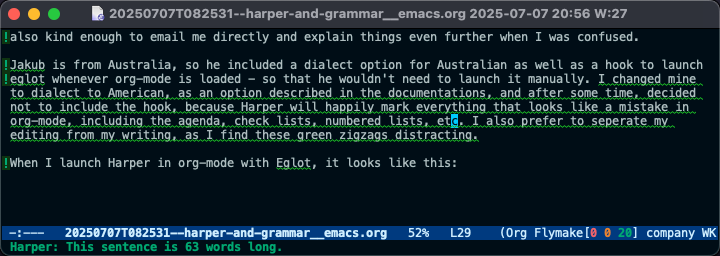
As you can see in the picture, I ran Harper on the draft of this post. It delimits every line with an issue with an exclamation point, then highlights the error with a green zigzag. When you hover over the grammatical error with the point (or the mouse cursor), Harper displays the error in the mini-buffer. In the case above, it lets me know I have a sentence that is too long.
You can correct mistakes directly with Harper by utilizing the correct Eglot commands (remember that you have to “talk” to Eglot to work with Harper). For example, you can use its Code Actions with eglot-code-actions, which will display a menu of available fixes to replace your text with. I’m quickly learning I should probably get a shortcut for this because I’m going to use this plenty. There are other aspects of Harper I’m still learning about; it comes with additional tweaks and configurations, including user dictionaries.
All in all, Harper does a decent job of catching most grammatical errors and spelling mistakes. However, I still find that I need to pass the text through Grammarly to catch some errors. For example, in this very post, the line where I wrote “It delimits every line with an issue…” was “It delimiters every line…” and Harper was okay with it. Harper also seems to miss my plural confusions, for example, “as an option described in the documentations,” is fine with Harper, but it should be “as an option described in the documentation.” Then there’s where, in my opinion, Grammarly shines next to other LLMs: style suggestions. I can ask Grammarly to make a part of the text shorter, more professional, more friendly, etc., and it will do so on the spot. Chat GPT and the like can do the same thing, but you have to do several copy-pastes to get to the same result, and even then, I find it’s not quite as polished. It’s also helpful to always have these versions in front of you so you can choose the style you want. Grammarly also highlights the errors it finds in different colors: definite issues will be in red, while suggestions for style will be in blue.
Many people don’t need this level of a “grammar nanny,” and I totally understand what Harper’s developers mean when they say Grammarly is overbearing. Add to that the fact that Grammarly sends all your private Emacs notes to the Grammarly servers, where they can do whatever they want with them, complete with the premium cost and… yeah, I totally get it. Meanwhile, Harper does most of the works, and fast, especially when compared to languageTool, which also requires you to install Java and deal with its weird updates. Oh, and those of you who use Obsidian: Harper has an official plugin, which I suspect works even better than what I wrote about here.
Give it a try, and if you’d like, let me know what you think. Meanwhile, I will see if I can make it my go-to grammar tool on my Linux Desktop.
Footnotes
1 : I get Grammarly through work. If that weren’t the case, I’m not so sure I’d rush to pay for it myself, which comes close to $30 a month.
2 : The reason Harper doesn’t know to ignore the org-mode syntax option for code (words between ~ ~) or other special characters is because org-mode is not yet officially supported. When this happens, I guess these issues will go away and I will try to launch Harper with a hook for org-mode again.
Installed Emacs again on Pop OS (I wiped it after my GPU issues), and now I realize I’ve had this weird issue in org-mode, where images are displayed in landscape mode. Some of my images are rotated 90 degrees in the wrong direction. Anyone familiar with this, what causes it, and how to fix it?