
Emacs org-mode
Welcome to the Emacs org-mode category.
You can subscribe to this category only via RSS!
I am working on restoring some of my related posts from my old blog, so keep checking here for new content.

- Define what is the “trigger” for a rule
- Define what guides or functions to follow for that trigger
- Define additional parameters (additional “tweaks”)
-
In general, I prefer Dired to open to the right. I want to open another Dired window. In that case, I want it to open under the existing dired window. I usually open two Dired windows when I work with dwim for file functions, like renaming/moving files from one place to another. I doubt I’ll need to open three dired windows, but if I do, the idea should be the same: keep opening more Dired windows under the existing Dired windows.
-
The width is fixed, and I find .80 to be OK, but sometimes, this is too much, especially when the overall Emacs window (the frame) is already small. If I call Dired, I want Emacs to increase the size of the entire frame if it’s under a certain size.
-
I want to make sure Dired doesn’t delete or occupy other existing Dired windows, since that defeats the purpose of working with dwim. Each Dired window should have its own window, as I stated above: the first to the right, and the rest under the existing ones.
Discovered Harper in this blog post but not sure how to get it to work. Installed with homebrew, evaluated the default lisp they have on their site and… ok, now what? I don’t see any Harper-related commands. Has anyone figured it out?
Short version: Harper is a frontend to Server Language Protocol (SLP). Emacs has a built-in SLP called Eglot. This means you use Eglot on Emacs to run Harper, so the interactive (M-x) command is Eglot (and it helps if you spell it correctly 🤦♂️). The E-Lisp configuration they have on their website (above) works fine, provided Eglot is configured to run and you have Harper installed.
I will expand later after I experiment some more.
Adjusting my org-mode workflow
One of the things that affects my workflow at work and Emacs recently is the source of my tasks and projects.
In the past, I worked almost exclusively with our ticketing system. My capture templates in org-mode contained properties for ticket numbers and user IDs to identify the users. Each task in org-mode I created this way included a scheduled date for that day, which I would move around later, depending on urgency.
This all went away when I moved to a more managerial position about a year ago, but it took me some time to realize that. My new position means that roughly 80% of my projects come from Emails while the rest come from meetings. I almost never have a ticket assigned to me directly, unless it has to do with my old position as a tech writer, which I still do now and then1.
Habits die hard, and I was trying to fit email chains and meeting notes into my task templates in org-mode with limited success. For example, I was struggling to figure out what properties I need, since emails don’t really point a user with a problem, but often describe a situation that requires a solution.
Meanwhile, I was swapped away by Journelly (and for a good reason) and started to use it in meeting notes, but realized that I tend to keep these notes in a certain manner that would fit nicely into a capture template. These notes, which consisted mostly of bullet points and questions, did not fit well visually with the rest of the journal. More so, since I often write down things to do in meetings, I needed an indicator to flag those meetings later, when I need to go through the notes and re-write those as tasks2. This quickly became cumbersome.
For my meetings then, I created this simple template (for more structured templates, I use org files rather than writing them directly into my settings):
    * MEETING %?
    %^T

    *Discussion:*
    -


    *To Ask:*
    -


    *To Do:*
    - [ ]
I write the points in the meetings as people discuss them. As I listen, I come up with questions/comments which go below (I tend to write the answers as nested items below the questions with a “+” rather than a “-” to indicate an answer). The To Do part is newer, usually containing large items (projects) that need to be broken down further into dedicated tasks. This is still a work in progress.
As for emails, I still don’t have something solid. I mostly rely on my existing project template, but it doesn’t fit as nicely as the meeting template above.
Emails in Outlook are usually a mess of “conversations” by the time I get to read them. I then need to spend time on reading and understanding what’s going on, which is often an issue in itself, as people require urgent answers for complicated matters (Emacs is amazing, but I don’t think it can help me with that). I was looking into a way to identify emails by their email ID and use these as properties, but this is something that can only be done on the back end, which I don’t have access to. I probably need to spend more time with Outlook and its filters, and that’s a mess in itself, as Microsoft tends to change options and controls across its different versions. If anyone reading this has any advice, I’m all ears.
Ideally, Emacs projects stemming from emails should contain the email subject or another identifier (ideally in the header itself), then the people involved (the askers and the doers), location, and then resulting ticket numbers for the tasks created - but this is all flexible.
Footnotes
1 : interestingly, my experience writing technical documents is helpful when I need to delegate work or explain a workflows in meetings - and org-mode is one of the best place I ever had to write such documents because it is an outline tool that breaks processes to steps by default.
2 : For about a week, I used Journelly’s tagging system to tag certain notes as meetings, which helped me realize how ridiculous this was. Journelly is a place for me to see pictures of people I spent time with or capture ideas when I get a chance to stop and think a little, often by dictation. Meetings are nothing like these things, and they shouldn’t. It’s easy for me to write now, clear as day, but a few weeks ago I didn’t know.
compressing mp4 files while keeping better quality with dwim in Emacs
I mentioned Rameriez’s dwim tools, and it’s only natural to do some IT for fun when I rest from IT at work on the weekend, Right…? Eh, don’t answer that.
One of the important and excellent things about Rameriez’s package is that it makes it easy to build something custom of your own using the “Lego blocks” he provided with the package.
For example, one of the commands that comes with the package is dwim-shell-commands-resize-video, which lets you resize the resolution of a video (and through that, its size). It does the job well, but I wanted something that compresses videos while retaining their resolution for quality. I know how to do this directly with ffmpeg, so I thought I’d give dwim a go, and got something working pretty quickly:
    (defun jtr/dwim-shell-command-compress-mp4-fast ()
      "Compresses mp4 down further using slow preset."
      (interactive)
      (dwim-shell-command-on-marked-files
       "Compresses MP4s with libx265 using slow preset to bring down size"
       "ffmpeg -i '<<f>>' -c:v libx265 -crf 25 -preset slow '<<fne>>_compressed.mp4'"
       :utils "ffmpeg"))
There are a couple of things at work here with ffmpeg:
First, libx265, which is a newer decoder than the default libx264. The newer version does a better job at retaining video quality when compressing, but at the cost of compatibility; some older systems might not be able to play the resulting MP4 file or say there’s something wrong with it until you install the needed decoder. If you’re playing with ffmpeg regularly, you probably won’t have a problem - but the people you send these videos to might, so keep that in mind.
Second, the slow preset. This increases the time it takes ffmpeg to work on the video as it combs through the frames more carefully. I forget exactly what it does, but I believe it grabs a smaller group of frames each time, so more frame groups (hence more time) with different compression values.
Lastly, the CRF value is at 25, a bit less than the default 28 for libx265, so a bit less compression. I can probably push it up a bit further, but the above already reduces the file size dramatically.
Journelly is having me try a new perspective
A couple of people wrote back to me regarding my last post about the challenges I have with Journelly (which, again, don’t really have anything to do with the app itself, but my workflow).
In an Email, HTH let me know that while Syncthing is not officially supported on iOS, there is an app that works and does the job just fine: SyncTrain. I tested it, and it successfully synced my files to my iPhone, iCloud not included. That’s an amazing find.
Meanwhile, I was thinking about how I can better streamline my process of refiling Journelly’s entries to my journal, where they are… archived. Duh! I can simply use org-mode to archive entries into my journal file. All I need to do is define the file I want them to archive into in the file options at the start of the file. Journelly even has an archive feature built in, but since I want to save my entries off the phone, it won’t work for me.
However, I realized I might not want to send my Journelly entries away. Journelly is convenient, and I use it constantly for notes. Having these available on my iPhone (where Journelly has an excellent search feature with tags) and on Emacs on the Mac at the same time is a boon to my productivity, not to mention, it just looks so nice on the phone.
So now I’m considering a different mental approach. Instead of refiling and moving entries away from Journelly, I’m going to try and expand on what I have there later. Some of this I already discussed before: things like meeting entries, for example, can be copied later to my dedicated meeting file, and activities can be copied to my event file, if I feel there’s more to add. The missing piece is expanding on “mind dumps” in Journelly that go into tangents. For that, I want to break the ideas into specific subjects with Denote later. For example, if I write an entry in the morning about Journelly and I’m realizing I’m rambling about the app and have ideas, I can later put these ideas into a “Journelly thoughts” note later with Denote, along with the appropriate keywords and attachments, as needed. This, I think, also covers the concern I have regarding privacy and iCloud, as the Journelly entry will just cover the initial nugget, where I will write some key points which I will later develop in a dedicated note off Apple’s servers.
This is all pretty new and raw in my head, so I’m going to try that out for the rest of the week and see how I feel.
I wish I could use Journelly's new location features, but...
Journelly keeps getting updated with good features. One of the latest features I noticed (I’m not sure if it was part of the latest patch) is that locations tagged with entries can be revisited in iOS Maps from the app. This makes Journelly a good spot to save locations and integrate them with personal memories, to be revisited later on the map. I would like to use this (instead of, say, a saved of locations on Google Maps), but I can’t - for two reasons.
The first one, which I can work around, is that the list of entries on Journelly quickly becomes long, and finding where you were a couple of weeks ago requires some scrolling. While Journelly has a search option, I usually don’t remember the name of the place I’m searching for, which is why I’m searching for it in the first place. Still, I could probably look for who I was with at the time, or even better, use the tagging feature, which was introduced a couple of weeks ago, for, say, “#cafes” to filter down cafes only.
The other issue is more challenging: I don’t keep my notes in Journelly. I keep refiling my entries into my main journal file. That file, while still on my Mac, is not synced with iCloud. Call me paranoid, but I don’t trust Apple’s iCloud with my personal notes along with my pictures throughout the years. As far as I’m concerned, Apple just has a better PR department than Google and Microsoft, and they only care about their users’ privacy as long as it’s what looks good in the news. Because of that, I am not comfortable with Journelly being my archive of notes. There could be other options besides iCloud, but as far as I know, they all involve a cloud company somewhere. On Android and macOS, I still use the excellent Syncthing, which doesn’t involve any cloud storage. However, Syncthing doesn’t work on iOS, so I’m out of luck.
Besides these two issues (which have nothing to do with the app), the app is terrific. It’s amazing how polished and responsive it is.
Coffee time.
I woke up wondering about .org-id-locations. You know, that Emacs file that keeps track of all of your org-mode IDs. How does it know where are the headers in the files it refers to? Is there a size limit? Can I use a different file (or files) if I want to for the hell of it?
What?? Don’t look at me like that. I often think about Emacs just before I fall asleep and when I wake up. Don’t you?

Two Eamcs tweaks I forgot about (most of you will know these):
Use Consult’s recentf to see a list of files that were edited recently:
(global-set-key (kbd "C-x C-r") 'consult-recent-file)
Consult’s org-agenda (jump to heading) is quicker than what I usually do, which is to list all ACTIVE keywords in emacs (this is how I list my projects), and then go down the tree to find the specific TODO header I want.
Since I often know what I’m looking for within active projects, I can use consult-org-agenda, which narrows headers dynamically as I search. Much faster and clutter-free:
(global-set-key (kbd "C-c C-h") 'consult-org-agenda)
Emacs' windows navigations and some Emacs zen
As I was looking more into widows management in Emacs, particularly viewing System Crafters’ video about the topic which I mentioned in my previous post, I learned a couple of things (or maybe re-learned? I probably used to know about them at some point in the past).
One of my issues with windows in Emacs right now is that whenever I open Dired, it takes over my current window. I often just want to view my files in the directory my current buffer is in.
The answer is simple: instead of opening Dired (C-x d), just “jump” into Dired in another window, which is dired-jump-other-window or C-x 4 C-j. This improves my workflows twice: first, I usually want to open Dired in the directory the buffer I’m working in is, and second, I want it in another window. With this command, I don’t need to specify the directory; it just takes me where I want1.
Also, as I was writing this post, I realized another problem with Emacs windows placement was actually my problem all along (user error dance, anyone?): C-x b is bound to consult-buffer-other-window on my system, which does what it says, opening the buffer I want in the other window. I thought this was the command to open a buffer, forgetting that there’s such a thing as opening a buffer in the other window. Using the logic I just learned, it would probably make more sense to bind consult-buffer-other-window to C-x 4 b (for me, it runs the default Emacs switch-to-buffer-other-window, which I don’t use2) and then consult-buffer (which is not bound to anything for me) to be C-x b. This will disrupt my muscle memory for a while, but eventually it will lead to a better workflow.
Another nice thing I didn’t know and learned from watching this video is that I can scroll up and down in the other window while still keeping the focus on the current buffer with M-pgup and M-pgdn. This is nice if I want to read help documentation while working on something, reading definitions with Emacs’ built-in dictionary, or maybe using Occur or something similar, where just reading for reference is enough.
Then we have a built-in way to move between windows that I was looking for a while: windmove. Turns out it’s been there since Emacs 21, which means that for me, it was there all this time, and I didn’t know about it. Windmove lets you switch between windows using the shift and arrow keys by default, so that S-up would move you one window up, while S-down will move you down. You need to enable it and then enable its default keybindings, or assign it alternative keybindings.
Looking at these key-bindings, I can see why it’s turned off by default. Shift plus an arrow key is used extensively in org-mode, for example, so you can’t use these keys. Using something else, say, C+M+left or C+M+right, is not good either because on Linux, this will “swish” your workplaces (“spaces” in macOS), while the meta key plus an arrow is also taken by something else in Emacs… you get the idea, finding the keys to use is getting a bit problematic. You need to figure out what you can give up, or find a creative shortcut that works for you specifically. However, this seems too useful to pass up, so I think I’m going to dedicate keys to it very soon.
The video also goes over windmove’s sibling, windmove-swap-states-[direction], which switches the windows in the direction you tell it. So if I am working on this post in a window that is above a list of links I’m using as reference in the window below in another buffer, I can use windmove-swap-states-down to switch. Now I will be working in the lower window, and the list of links will be in the window above. This is good if I want my list of files in Dired to the window to the right, but dired-jump-other-window opened it in the window below, for example. Nice, it saves a few C-x 0 and C-x 1 maneuvers.
Then there are the external packages, of course.
ace window is probably the most popular one, and this video provides a brief demonstration of it. The idea is that it numbers the windows for you on the screen, and then you select a number to jump to a window. Another package I learned about is winum, which is built on top of this idea, but it displays the window number in the minibuffer of each window all the time, and then it’s a matter of C-x # to jump to that window. It integrates into Emacs better in my opinion, and if you use many windows, it probably makes sense. I usually have no more than four windows open at once, so using the built-in windmove is probably better.
Alright, I’m off to rebind some keys and do some tweaking! Then we will see how much I need to mess with Emacs’s built-in logic for windows placement. It might just make a little more sense now.
Footnotes
1: it’s building on dired-jump (C-x C-j), which opens dired in the directory the buffer I’m in. So, if I’m working on bills.org, which is under ~/Documents/personal/, dired-jump will open dired inside ~/Documents/personal/. The problem for me is that it will take over my current buffer (where I have bills.org open), which I don’t want; this is where dired-jump-other-window comes in: it will open Dired in a separate window.
2: this Emacs keys and windows management rabbit hole makes me re-appriciate Emacs’s default key binding. They’re there for a reason. They might not make sense at start… or maybe for several years, depending on how often and how much you use Emacs and what for, but now I see how C-x 4 is an entire family of key combinations tied to “other window” functions and then other key bindings start to make sense. For some of you veteran Emacs users, this might be obvious, but for me, that’s a slap on the forehead with a “Ohhh! So this is why this keybinding is like this!”
Windows in Emacs probably come to you as second nature now, as it does to me, but imagine how it looks to people from the outside for a minute:
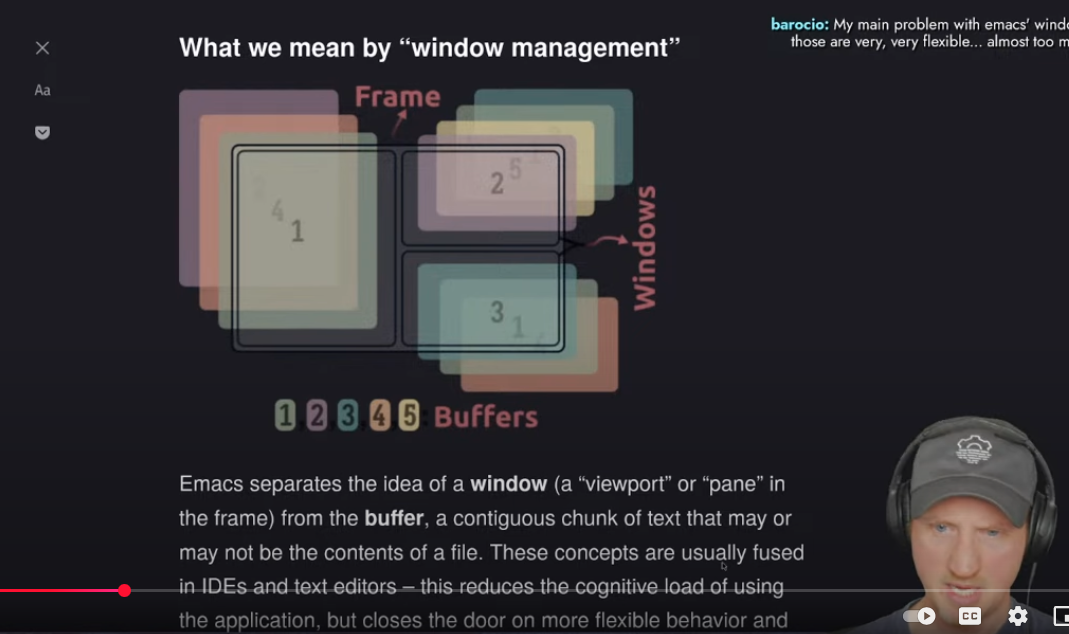
Look at the diagram on the screen. Read the explanation. Look at the “huh?” expression of David of System Crafters (awesome channel for Emacs learning by the way)… Need I say more? 😂
I love Emacs, don’t get me wrong, but when it comes to managing its windows…
Emacs window management tweaking
I didn’t sleep well last night (it was too hot and humid for what I’m used to), so as a way to quiet my brain down, I turned to Emacs tweaking as always. This time, something that’s been driving me nuts for a while: Emacs’ way of managing windows.
By default, Emacs’ usage of windows doesn’t make sense to me. New windows open in seemingly random places, and modes that are supposed to help with the current buffer (like help for example) start out of focus, meaning you have to switch to them (C-x b) to scroll and read. When using several windows, this mess can quickly get out of hand.
To organize Emacs windows the way I want them to, I need to play around with display-buffer-alist. By default, its value is nil— meaning Emacs does what it does by default.
Micky has a good article explaining how Emacs prioritizes its windows by default and how display-buffer-alist works, while Port has a helpful visual tutorial with examples.
I like how Prot explains that an alist is a “list of lists,” so what we’re working with here is giving Emacs lists as guides as to how to display its windows. The way it works for each list is basically:
Here’s what I have so far:
    (setq display-buffer-alist
          '(
            ;; trigger: when the major mode is dired-mode:
            ((derived-mode . dired-mode)
            ;; guides: show me the above (dired) in a side window:
            (display-buffer-in-side-window)
            ;; paramaters: what side? right. How wide? .80:
            (side . right)
            (window-width . 80)
          ))
    )
This works, but it has a couple of functional problems.
I’ve already been watching videos and reading for an hour and a half, and I’m getting sleepy again, so I think I’ll attempt to fill my sleep bank some more.