
Micro.blog
Testing Inkwell by Micro.blog
Inkwell’s development is going strong, and the beta app for Android was just released1. That’s what I was waiting on before trying it out - I usually read my RSS feeds on my Android, and I also wanted to see how it works as a central hub for syncing my RSS feeds across my two phones and my Mac.
It’s another smart addition to the Micro.blog suite of apps: it allows Micro.blog users to subscribe to the blogs they like and read them easily. To add to that point, Inkwell has a dedicated “Discover” section, which is “A curated list of personal and indie blogs from Blogroll.org2 and Micro.blog.” This is a nice touch, as it provides a good place to subscribe to blogs if you don’t know where to find them, and not just on Micro.blog.
My current setup for RSS feeds is with FreshRSS on Docker, which is probably overkill for most folks - especially the non-techie ones. I have FreshRSS synced with Elfeed, an Emacs RSS reader, but that means it’s desktop-only, while I do most of my reading on my phones.
I’m going to test Inkwell for a couple of days and see how I feel about it. I’m a heavy user of RSS feeds, and it’s good to see Micro.blog taking this direction as it’s one of the cornerstones of the indie web.
Footnotes
1 : I’m not sure if Manton is ready for more users to jump in beyond those on Micro.blog at this point, so I don’t want to give out the link at this point.
2 : blogroll.org is sponsored by Micro.blog.
Archive by month
So I guess I am on a roll?
Added a small square as a decorative element (a little square) for the dates in the posts. That’s the small change.
I also figured out why Manton’s plugin, for archive by month, didn’t work for me. It clicked when I realized what went wrong last time.
The plugin is meant to replace the default layouts/list.archivehtml.html, not the one I have, which is slightly modified by TinyTheme. So what I just went and snatched the code from the above and pasted it inside layouts/list.archivehtml.html, write after the condition to activate the microhook partials/microhook-archive-lead.html in there. Now I have an archive page built around years and months. Good stuff.
ISO dates are back
As if I didn’t have enough with fixing and tweaking my blog recently… Maybe it just gave me an appetite. With a bit of help from Claude (mostly as a pointer) I added two microhooks to my blog:
layouts/partials/microhook-post-list-byline.html and layouts/partials/microhook-post-byline.html
These change the date from the standard, nice American format to the ISO format, which I prefer (as was the case on my old blog). Computer folks should feel right at home, but for most of you, this may be a bit jarring, but not too hard to get used to. I hope.
The Hugo code for that (including a link that opens the post in its dedicated file):
layouts/partials/microhook-post-list-byline.html
<a href="{{ .Permalink }}" class="post-date u-url dt-published"><time datetime="{{ .Date.Format "2006-01-02" }}">{{ .Date.Format "2006-01-02" }}</time></a>
layouts/partials/microhook-post-byline.html
<a href="{{ .Permalink }}" class="post-date u-url dt-published"><time datetime="{{ .Date.Format "2006-01-02" }}">{{ .Date.Format "2006-01-02" }}</time></a>
The key that I forgot is that the .Date.Format elements actually need to use the year 2006. Why, well, I didn’t get it from the docs, but this Stack Overflow post explains it in a way I can follow better: the different elements of the date have saved locations defined by number:
    Mon Jan 2 15:04:05 -0700 MST 2006
    0   1   2  3  4  5              6
So 0 is for the day, which is Monday, Jan is for the month, which is 1… It kind of adds up, but still doesn’t. I need my coffee.
So I fixed my blog again
I’ve mentioned that some pages of my blog haven’t been working. I’ve since fixed those pages and reinforced two pre-existing notions of mine: first, AI (LLMs specifically) can be a great tool if you use it to learn and enhance your existing skills; second, my blog writing is more important than I realized.
What went wrong
As you may know, if you visit my blog (though I realize most of you probably read this via RSS readers), I have several pages on my blog (which effectively make it a website, right? Are all blogs websites? 🤔). Some of those correspond to categories (such as my Emacs org-mode page or my movie reviews), while others are informative, like my about page and archive, which also include a search option for the site. You know, the basic blog-owner stuff.
My website is hosted by Micro.blog, which utilizes Hugo to build its sites. I switched to Tiny Theme, which is made especially for Micro.blog and comes with a few extra features, two years ago. These features, called Microhooks, can further customize the theme if you’re willing to make a few technical adjustments.
In my case, I use Microhooks on some of the pages. The archive page, which displays categories and all posts by day by default, was modified to include the search plugin and additional information I added before the default page starts. Then, for the Emacs org-mode category, there’s an introductory text with an image I created a while back, and then the rest of the post that fits into that category.
About a week ago, those Microhooks stopped working. The pages I mentioned displayed the default theme, as if I never customized them with Microhooks.
The fix
I struggled for a couple of days trying to figure out what went wrong. I thought a recent update to the theme and the plugins broke something, but I didn’t know what. I looked into the Microhooks instructions, but as far as I could tell, everything was set up correctly. I have a test blog, and when I ran the same code on it, the issue with the archive page repeated, while the Emacs Org-mode page was fixed. I went back and forth a couple of times, but I couldn’t see anything that would cause the problem.
Over the weekend, I had more time, so I took a deeper look into the theme. I am far from a Hugo expert (in fact, I one of the main reasons I oppted for Micro.blog was to stop working with on my static blog directly) but I understand the general idea of how things are built: there’s one main page which calls other parts, and these parts call other parts in turn, each one is defined in a separate HTML file. I scanned the different HTML files of the theme and found where the Microhooks I used were activated.
For the archive and search page, there is layouts/_default/list.archivehtml.html, which includes the following lines:
    {{ if templates.Exists "partials/microhook-archive-lead.html" }}
    {{ partial "microhook-archive-lead.html" . }}
    {{ end }
That partial (which is Hugo’s sort of “functions” or quick plug-ins for the theme), microhook-archive-lead.html, is the microhook HTML I created to include the search plugin and the intro to the archive and search page. This looked OK to me at the time, until I saw that another page, layouts/list.archivehtml.html, contained no reference to this Microhook. This looked odd to me: both pages have the same name (and thus the same function, I guessed). One is called default, and the default one is the one that was modified with my changes? That didn’t make sense.
This is where I fired up Qwen3-Coder (through Kagi) to help me understand how these pages work in Hugo. I asked it which page Hugo uses first, and sure enough, it replied that layouts/_default/list.archivehtml.html page is the default, sometimes used as a fallback option when layouts/list.archivehtml.html is not present1. So, as it turned out, my files were flipped: the default file showed the changes, while the file meant for customizations showed the default. I copied the code condition above from the layouts/_default/list.archivehtml.html to layouts/list.archivehtml.html, and things started to work as they should.
Why this happened, I have no idea. I made no changes to the pages. My only theory is that a recent update flipped the code in the files somehow for whatever reason.
My other issue was a stupid user error, as most of these issues go. The Microhook layouts/partials/microhook-category-header.html is the one responsible for pointing out which category page should have a special introduction. What the LLM told me that I didn’t know (or maybe forgot) is that it does that by utilizing the page’s .title variable. This is where I made a mistake: I used the file’s name, using the URL, not the title of the page, which happened to be different. Since this was a conditional statement looking for a specific page title that wasn’t found, it was ignored. Once I changed the value in the HTML to reflect that page’s proper title, it was fixed. Of course, it was a damn dash I omitted by mistake.
The fun of blogging
While this was a technical issue, it affected my desire to blog. As long as my pages didn’t work correctly and I couldn’t fix them, I didn’t want to blog. It didn’t feel right, even though these issues were not critical, at least from the readers' point of view, but they were important to me. I enjoy my blog. I had to fix it. Once I did, that feeling reversed completely, and my desire returned in force. The post you’re reading now was itching to be written, and it’s only now, half an hour before midnight, that I have the time and some reserve energy to draft it. It feels good.
Footnotes
1: I can’t emphasize how useful AI has been in scanning Hugo (or other technical documentation in general) and explaining things to me in plain English. I could spend hours looking at Hugo’s documentation and indexes, rereading the same sentences over and over, and not understand what something does or how it works with something else. Even now, as I write this post and check for links, the AI links me to the relevant section in the documentation, which I would otherwise just glaze over. It’s like having a teacher holding a pencil to a word or a phrase in a huge textbook.
Thinking about why I stopped working on the micro.blog wiki again, it’s the same old problem. Maybe I need to embrace the friction. Editing is a critical part of writing, especially when you write for an audience. Instead of trying to resolve the friction, understand it’s part of the process, and give it the space and time it needs. Still consideringm
Recent updates to Micro.blog postings
On Micro.blog for macOS, the application can now display a preview of your post using your blog theme. To do this, check Use blog theme in the preview window:
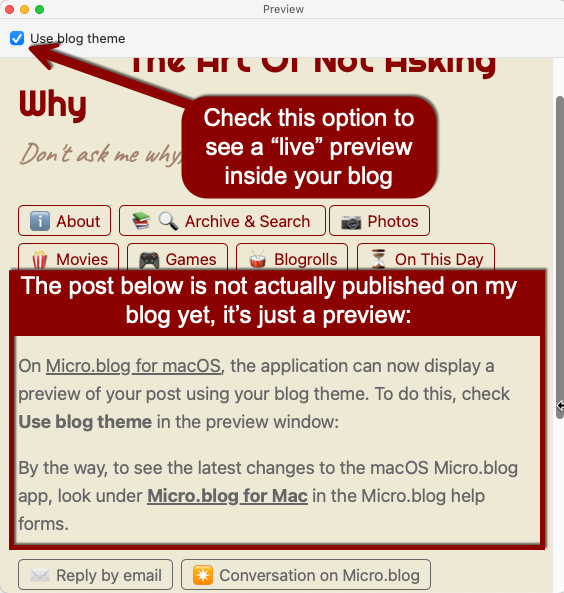
This is especially useful if you post code snippets in markdown and want to make sure you got the right syntax highlighted.

By the way, to see the latest changes to the macOS Micro.blog app, look under Micro.blog for Mac in the Micro.blog help forms.
More on the macOS application:
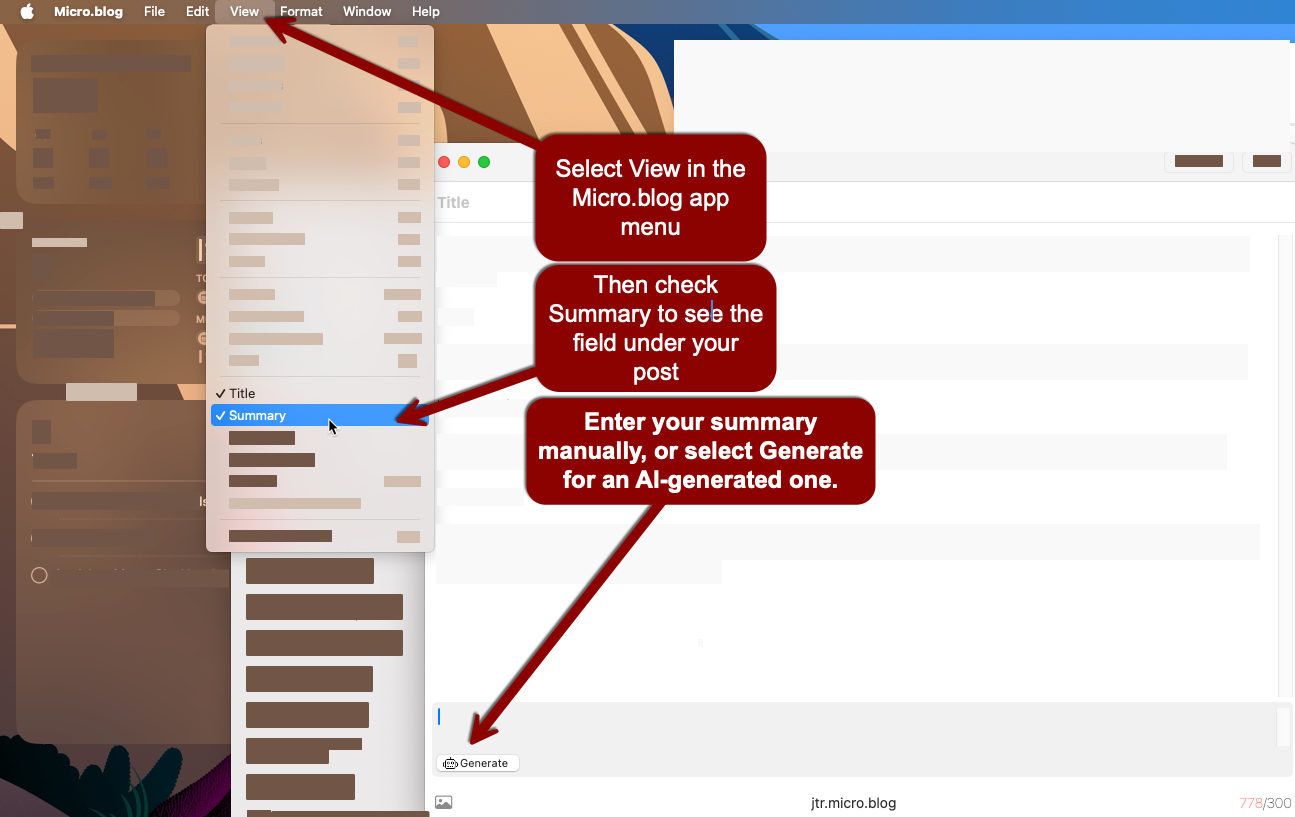
Under View, you also have the option to turn on Summary. The Summary can be written manually or generated by AI, if you have turned on AI assistance for your blog.
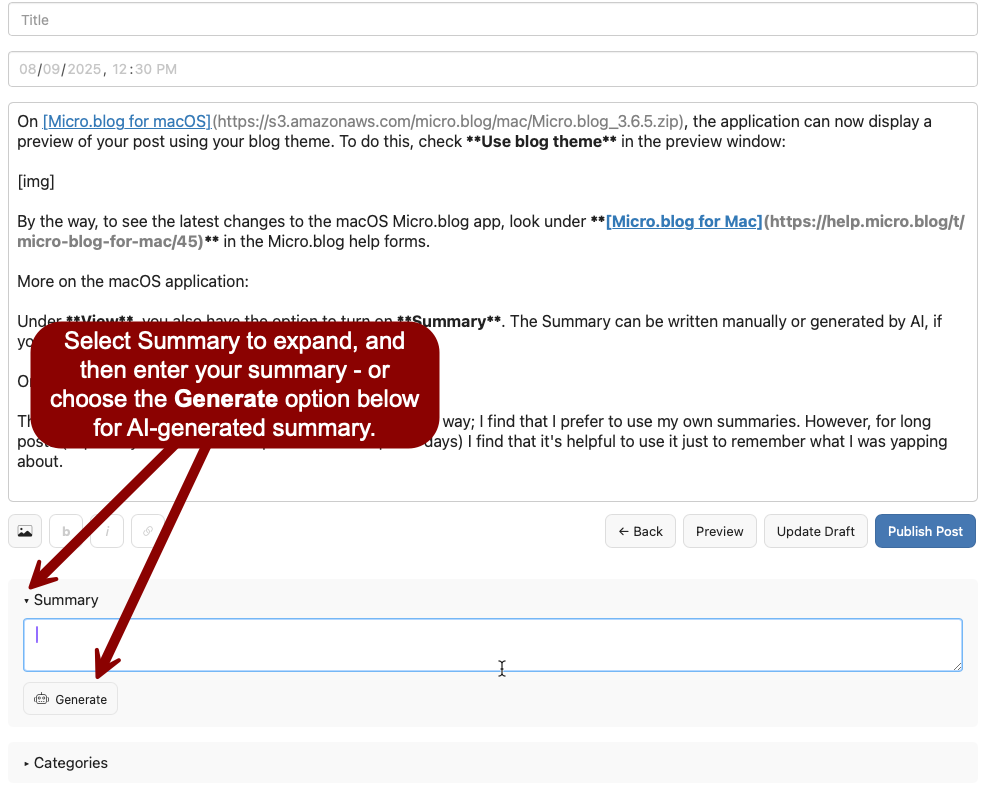
On the web, the Summary is under your post text. You need to select it to expand it and view the text field, with the Generate option for AI underneath:
The AI writes summaries in a factual third-person kind of way; I find that I prefer to use my own summaries. However, for long posts (especially if I write them in parts over a couple of days) I find that it’s helpful to use it just to remember what I was yapping about, and then rewrite it as a human.
Summaries are important when you cross-post to Mastodon or Bluesky: these become the posts that will show there with a link to your full posts. No more posts that cut mid-sentence once you reach the character limit on these social networks.
Speaking of AI assistance, selecting Copy HTML on images, both on the web and the macOS versions, will now copy the HTML for the image with the AI-generated alt description for the image directly. You don’t need to go into the uploads section of your blog and find the image again with the embedded code. The AI-generated alt descriptions will start with “Auto-generated description” to ensure your readers know AI generated them.
I find that the AI-generated descriptions are especially good for photos, and often don’t need retouching. This is great if you take quick posts and attach a single image with the image button, especially on your mobile device, as the description will be included in your post.