
DMing for the first time in 25 years
Last weekend, I ran a DnD session. Three curious players stepped into a fantasy world I created for the first time in over 20 years, took whatever plans I had for them, shredded them to bits, and apparently left satisfied and wanting more. So if you’re curious, this is a chance to understand what’s the fuss about from a perspective of a guy who’s starting it all over again.
DnD (easier to type than D&D) is a phenomenon that has seen a renaissance in the last decade or so. I believe that’s because most of the folks who played the game as teens (myself included) are now old enough to pass the hobby down to the kids: either their own or those who matured after the 90s.
Because DnD is essentially an act of communal storytelling, you can make it whatever you want. This means you don’t have to be a kid to participate; the story can be adult-oriented with everything you’d expect from a good book. While DnD is usually set in a medieval fantasy world, it doesn’t have to be this way (one such example is the unsleeping city, a DnD setting in modern-day New York City).
To me, the story aspect of DnD is primary to everything else, which means the people who create it are of utmost importance. I was on the lookout for a while. I couldn’t just pick a random group online and join a game: sharing the world inside my head is an invitation to a private, intimate domain. I had to pick and choose people that I felt I could open up to and be comfortable with.
The requirements from these people were not easy, especially during these times of COVID. They needed to be geeky, even dorky. They needed to be open-minded and comfortable exploring darker themes, sexual elements, and questionable philosophies. I needed people who are familiar with the game and understand that I haven’t led an adventure in over two decades and that I don’t have the vocabulary they do for medieval terms or the knowledge of the rules. It was also important to me to meet these people face to face and talk to them over a drink or two, pick their brains, and see if they have what it takes1 (more accurately, if I have what it takes). In short, I had to make new friends.
I said led the game, and this is somewhat misleading. A better description of a DM (dungeon master) might be a host. Just like a host, the DM invites the players to play (in my case, the invitation extended to my physical home and the one in my mind). Once the players come, the DM serves as a foundation of a story for the players to take and do what they wish. A good host tries to make their guests feel comfortable and open up, be themselves, and have a good time; a DM’s role should be the same.
Usually, a good game session is full of good laughs, excitement, and a table with snacks and drinks. When a successful meeting ends, the players may ask when is the next session, and the gang you’ve brought together keeps exploring the world you’ve all just built together in chats until the next meeting. These were the moments that gave me satisfaction beyond just the joy of the game. It was the kind of happiness you feel after you feed a group of hungry people with homemade food.
There is more to being a DM than just being a good host. In fact, there is so much more I’d like to talk about just from this one gaming session, I don’t even know how to start (that’s right, I didn’t even start yet). DnD is a game spread over hundreds of pages of content and rules; yet, when it came to just sitting down and creating an adventure, I found that I was drawing from my intuition and past experiences and not so much from the official content. It felt as if there was very little there for me, and the little that I found was not what was needed2.
How does one create a good story? How do you even know you want to? And when you have an idea, how do you bring it to life? Do you just write down a list of bullet points? Start typing until smoke comes out of your fingertips? Do you draw the map first, or do you create NPCs (Non-Player Characters)? Do you know why there are monsters there, and are they automatically the “bad guys”? How do you tell a good story, and how do you roleplay?
I haven’t a clue. Seriously, I don’t. However, asking these questions is rewarding. It’s the stuff that would get your juices flowing and your imagination working as it hasn’t in years.
What I hope to do is to explore what I’ve done so far (which is both barely anything and way too much to write about at the same time) and recapture my passion for this game.
Footnotes
-
These are my requirements, which may be a bit much. Those who just want to pick up the game and play can find it in many places online, from Twitch to roll20 to meetup groups. You can always try to play first and learn what you feel comfortable with later.
-
The DMG (Dungeon Master’s Guide) is filled with good advice and rules, not to mention other additions like Xanathar’s Guide to Everything or Tasha’s Cauldron of Everything. This is not what I’m talking about here, as it will hopefully become clear. There’s an excellent discussion on Reddit about this, as well.
Org ID, Org Attach & Better Folder Names
You might have heard of org-mode header IDs. By default, these are Universally Unique Identifiers (UUIDs). In this post, I want to talk about what they are, why I use them (and you should, too), and how to make them into slugs: human-readable IDs that make more sense. This will be a long explanation of what I discovered in org-mode, so buckle up!
What are UUIDs and why should I care?
The org-mode manual doesn’t exactly point at header IDs unless you know where to look. Because of this, a casual user of org-mode might overlook these powerful organizational tools.
In org-mode, we can link to a file and a head directly: <path to file>/parent header/header, but this is risky because we refile (move) headers between files; old projects get archived, meeting notes get moved under other relevant projects, etc. This means that any links using a path like the one above will break1.
For this reason, we have header IDs: Org-IDs. They require that we include org-id in our init file (as part of org-mode’s modules), and then we can generate them for any header by calling org-id-get-create:2 “create an ID for the current entry and return it. If the entry already has an ID, just return it.”
By default, org-id-get-create creates a string of random numbers and letters: a UUID. Now, every time we want to reference the header, we link to the UUID instead of the header’s path, like so: [[id:our UUID here][description here]].
This is great, but these UUIDs are a string of random characters that make no sense to us. A header with an ID like 05576976-a33c-11ec-9da6-020017000b7b doesn’t tell us anything. We will return to this problem in a bit, because first I want to discuss another great (and perhaps overlooked) org-mode feature that makes this even more problematic.
Referencing to files with Org-Attach
Org-mode comes with a built-in attachment mechanism called org-attach. You can summon it with C-c C-a when inside org-mode under a header. Org-attach was one of the features I always knew existed but never used.
We already have a system to navigate and organize our files ingrained deep into our mind, be it Finder, Windows Explorer, or whatever GUI file manager we have in front of us. For us dedicated Emacs users, there’s of course the excellent Dired.
What’s more though, org-attach is using some seemingly weird system to store our files deep in folders that don’t make sense to us, and the only way to find them later is to use org-attach again to go to these attachments (by calling org-attach with C-c a, then choosing f or F, depending on the case). At least, that’s what I thought.
Assuming you haven’t tweaked your org IDs, org-attach will nest an attachment under three folders. First, the default data folder, which is where all the attachments are stored. Second, under it, a folder with the first two characters of the header’s UUID. Then, third, a folder with the rest of that UUID as its name.
This is a bit confusing, so let’s break it down a bit. Again, the following workflow assumes you don’t have any settings affecting org-attach. Launch Emacs with -q if you have any doubts:
- Go visit an org file, and navigate to one of its headers.
- Summon org-attach with
C-c C-a. This will bring up a menu. For now, just use the first option,a. - Next, org-attach will ask you which file you want to attach. Navigate to one and select it. Don’t worry, this will create a copy. The original will stay where it is.
- With the point on the header you just worked with, which should now have an :ATTACH: tag, summon org-attach again, but this time call option
F, which will open the directory the file is in with Dired.
What you’re going to see is that you’re inside your org file’s folder, inside a data folder, and then inside a weird two-letter folder, and then inside a long string representing the rest of the UUID. Something like this: /home/user/orgfiles/data/ab/f4b2cf-4b38-45ec-9333-346b42861d24.
I’d argue that this way of creating attachments would cause newcomers to Emacs to prefer other methods for storing their files. It looks odd, and it doesn’t make sense when you need to find something later. That’s too bad because you’re missing out on org-mode’s excellent ability to organize your projects with their files attached right to them, of course, but this habit also comes after years of using org-mode (at least that’s how it was in my case).
If only you could make these folders make sense. Well, this is Eamcs. Of course you can.
From Org-IDs to Timestamp Slugs
The idea is simple: change how these IDs are created in org-mode by modifying org-id-method. By default, its value is a UUID. But we can change it to ts3: (setq org-id-method 'ts). That’s it. The next time we create an ID using org-id-get-create, it will produce something like 20220315T083403.413614. Still a bit confusing to read, but much better than UUIDs! The format is: year, month, date, followed by T for time, and then the current time down to the fraction of a second. Why do we need it broken down to these tiny time fractions? To guarantee we get different org-ids if we create several of those sequentially.
This will set up our unique IDs as timestamps4, but we still need to configure org-attach to use them. Because org-mode is set up to use UUIDs by default, org-attach is set to create directories that are meant to work with UUIDs. The directory structure is determined by org-attach-id-to-path-function-list. Specifically, it points to two functions: org-attach-id-uuid-folder-format and org-attach-id-ts-folder-format. You can go into org-attach.el and see that they break down the folder structure in a pretty straightforward way: the UUID function (which is the one used by default) takes the first two characters of the UUID and makes a parent folder out of those (as seen above), while the ts function takes the first six. The first six characters make sense because they include the year and the month.
By default, if we use the above example of 20220315T083403.413614 as a timestamp, we will get the following directory structure: /home/user/orgfiles/data/20/220315T083403.413614: the first two digits are for first two digit of the year: 2022. This is not very useful, as you will need to use org-mode until the year 2100 for a new sub-folder to be created!
This is what happened to me, and it required some head-scratching and diving into org-attach to figure out. I tried to mess around with the functions in org-attach directly, but that didn’t go well. Eventually someone on IRC pointed me to what I missed: what needs to be changed is org-attach-id-to-path-function-list. It is as simple as changing the order of the functions on this list, so org-attach will know to use the ts function first.
Together with org-id-method, which we defined above, we can write the whole thing like so:
    (setq org-id-method 'ts)
    (setq org-attach-id-to-path-function-list
    '(org-attach-id-ts-folder-format
    org-attach-id-uuid-folder-format))
Now when you use org-attach, it will use the ts function and create the following directory (to use the example above): /home/user/orgfiles/data/202203/15T083403.413614. This makes much more sense. You could also build your own function that would look like org-attach-id-ts-folder-format, perhaps for using the first 4 characters to create a parent directory for the year only. You will just need to make sure your custom function shows up first in org-attach-id-to-path-function-list.
A few Extra Things
I mentioned I used an excellent package called org-super-links. In a nutshell, this package automates creating org-IDs, linking them to an org-header, and creating a backlink from that header to the one linking from it. You should read Karl’s post about it and how he uses it to get a better idea than what I’m letting on here if you’re interested. As a matter of fact, if you want to get some more background, read the previous post mentioned above and you’ll see I’ve been trying to change org-IDs into timestamp slugs for a while. So much so, in fact, that I wrote my own function to do that for me until I discovered org has a system built-in already. As it goes with Emacs though, there’s no wrong answer. The previous attempt took me deeper into Elisp, which was a fun learning experience in itself.
With org-super-links, the process above is quicker because I don’t need to deal with org-id-get-create. I just search for the header I want to link to, and everything’s created automatically: an ID for the header I’m on, an ID for the header I’m linking to, a link linking to that ID at my marker, and a backlink at the header I am linking to pointing back to the header I’m on. You’d probably need to read that last one again. The bottom line is that if you’re serious about organizing your org headers, you should probably check out this package.
Another post that’s been floating around since 2017 by Matthew Lee Hinman approaches org-mode IDs from a different angle: exporting to HTML. In the post, Hinman explains that if you use IDs in your org file, you will also benefit when you export it to an HTML file: the header links you will use will link where you need them to go, and that’s even after you move headers around.
I’m actually using HTML more and more at work when I want to export my org-mode files into KB articles that go into wikis. This is especially helpful when you include a table of contents: the headers in the TOC will not break if you use IDs. This is maybe a bit more of a niche use, but having a TOC in a how-to article makes a lot of sense, and org-mode creates one for you by default when you export to HTML.
Footnotes
1 As a matter of fact, I think breaking links to headers and losing information is one of the reasons for org-roam’s popularity. Of course, the new versions come up with a lot more than just linking notes across a database, but at its core, I think this is why people started adopting it.
2 In newer versions of Emacs, using org-id-get-create (C-c l) can automatically generate an org-id for a header, if one doesn’t exist, provided that org-id-link-to-org-use-id is set to t. This can be done in the init file in Emacs.
3 Emacs documentation specifies a third method, org: “Org’s own internal method, using an encoding of the current time to microsecond accuracy, and optionally the current domain of the computer. See the variable ‘org-id-include-domain’.” This generates what seems to be a random string of text that is also not human-friendly. I’m not sure about the computer’s domain part, but this might be interesting for folks who have several computers on a domain using Emacs.
4 Giving headers unique IDs as timestamps is also useful because it leaves “clues” to help locate lost information later. For example, when you create a project with this unique ID, and later on you forget what it was, you can use the date to clue you in. It gives you another layer of search on your agenda (“202203” for example) to show all the projects created in March, provided you create an ID for each project, which you totally should. Because this is a simple text string, you can also use this outside of Emacs with other scripts to automate tasks that will look for this ID. It opens a world of options now that you have a range of unique IDs that you understand in your head, AKA, slugs. Also, it just looks better.
Feb 22 Updates
With changes at work and less energy to write here, I wanted to at least write a general update. This usually helps me to “get back in the groove” blogging-wise.
At work, we’re going through a merger of sorts. It’s been in the works for quite some time, but it finally took effect at the start of this month. Because our workflows and scheduling system have changed, I find myself a bit out of sync with my routines. One of the things that came about is our technical documentation: our work wiki and knowledge base, specifically.
As an Emacs org-mode user, I’ve been working on my knowledge base for years. Some of our current workflows started with this personal knowledge base on my office computer’s Emacs, or at least passed through it in some form.
Perhaps I have some talent for writing workflows (I would assume so, since I keep being tagged to do them), but it’s Emacs (and org-mode) that brings it to light. It’s not just about writing information down. Understanding Emacs and building my own wiki in org-mode gave me the confidence to tackle bigger projects on my own, from writing simple bash scripts to troubleshooting my network connectivity last weekend1 (it’s working now, thanks to speskk).
The interest in writing technical documentation brought to mind mind my college days, when I was taking technical writing classes. Funny how sometimes the past catches up with you, especially when you think you’re done with it.
Meanwhile, I feel my writing energy for the blog has diminished a little. Not because I don’t want to write: the impulse to do so persists as it has been for the last 20 years. There’s just a lot going on, and I feel like I can’t break it down into chunks I can express in writing, at least not yet.
Almost at the same time, another part of my past seems to be making a comeback. This one is personal and uncertain, hopefully positive. The collision of the two - professional and personal - made last weekend quite thought-intensive.
Footnotes
1: The mastodon.technology instance was a tech-focused Mastodon server that shut down in 2023. This URL is broken now, but I’m leaving it in case it lives on in some archive.
Capturing doctor visits & Sickdays in org-mode
Using org-catpure in tables in org-mode, I simplified tracking sick days and vacations for timesheets, improving organization and ease of access.
Harmony of Tea and Coffee
I’ve been dividing my day into two parts recently: coffee AM and tea PM. Both have been giving me happiness recently, especially as the days get shorter and gray.

The coffee ritual takes place around 06:00. I have three options to choose from: the regular “American style” drip coffee (Mr. Coffee), pour-over (Chemex), or espresso. I usually have two kinds of coffee beans: espresso roast and specialty coffee that I try out, usually with the Chemex.
Depending on how much time I have and what I had the previous day, I make a jug big enough for me and my two partners, so each one of us has at least one mug of bean juice. I usually don’t add milk to pour-over coffee, as I like to taste it clean and appreciate the flavor. Later, I will use the same coffee in the Mr. Coffee and add just a bit of milk (usually almond milk, rarely oat milk, never cow milk) to top it off and chill it a bit.
I used to drink more coffee at work, but after a co-worker decided to stop drinking coffee, I got us “hooked” on tea. I also “blame” Alex Schroeder for my renewed love of green tea. I know a good store in Manhattan that sells high-quality loose-leaf tea, so I’ll get us a bag that would last for about six weeks. I make the trip downtown myself whenever I’m out of supply of Lung Ching, my favorite tea, to replenish my own stash.
Around 19:00 (that’s 7 PM), my desire for a hot (never boiling) cup of green tea kicks in. I then sit in my armchair in my room, relax and concentrate on my breathing, halfway meditating, and go through most of the mug. This usually helps me re-focus my thoughts on writing in my journal, wiki, or for my blog.
My coffee and tea routines act as an anchor for my day. As time passes and I keep at it, these are two “seeds” in my day from which I can grow whatever branches of tasks and projects I want to do. It’s a good way to evaluate time and do something nice for myself. Of course, I can’t always have my coffee and tea. I tried to “make up” for those before by getting tea or coffee outside, but usually I end up disappointed. Besides, there’s nothing quite like making a good cup of tea or coffee for yourself.
The colors of New Mexico
I returned from a trip to Albuquerque, New Mexico, and I miss it already. My mind is still running a mental rsync against the usual daily grind, and as rsync goes with large portions of data, this can take a while. One of the things I can bring up already though is the color theme in New Mexico, which was everywhere we went. It seems to convey the colors of the desert: sand to clay browns and yellows, green-gray for the cactus, the turquoise for the sky and water.

I grew up in a place where the desert was always nearby, and forests were small, usually limited to modest nature reserves of pine trees. Perhaps it was somewhat of this home-like feeling, perhaps it was the peaceful surroundings, or the way human-made structures blended into nature effortlessly. Whatever it was, I felt the colors resonate with who I am as a person and how I operate.
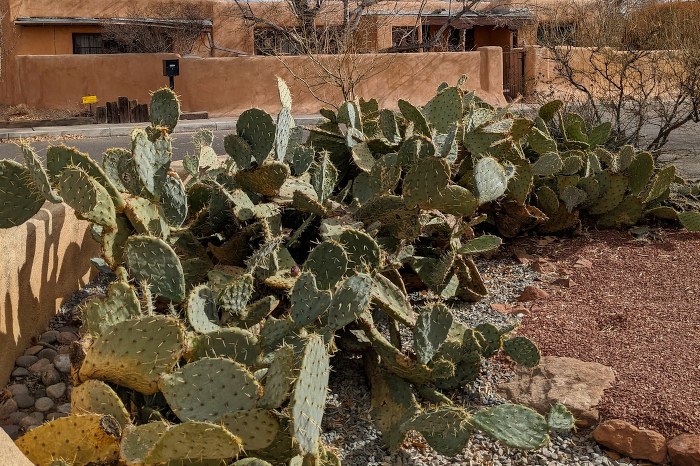
Naturally, Emacs came to mind. Coincidentally, I just discussed low contrast themes on Reddit before the trip, and received some interesting feedback. The discussion started after I realized I enjoy low-contrast themes over high-contrast ones. Indeed, the colors I now use in Emacs, inspired by nature where I went, give me more of that soothing feeling from New Mexico.
At this point, my “slightly modified” Gotham theme, which I discussed in the Reddit post, is heavily modified. The color descriptions inside the theme’s .el file don’t make much sense anymore. I’ve also noticed that org-mode is somewhat of an afterthought in the theme, with some of its key elements not defined at all. I’m wondering how hard it would be to create my own theme based on the colors I’ve already added.
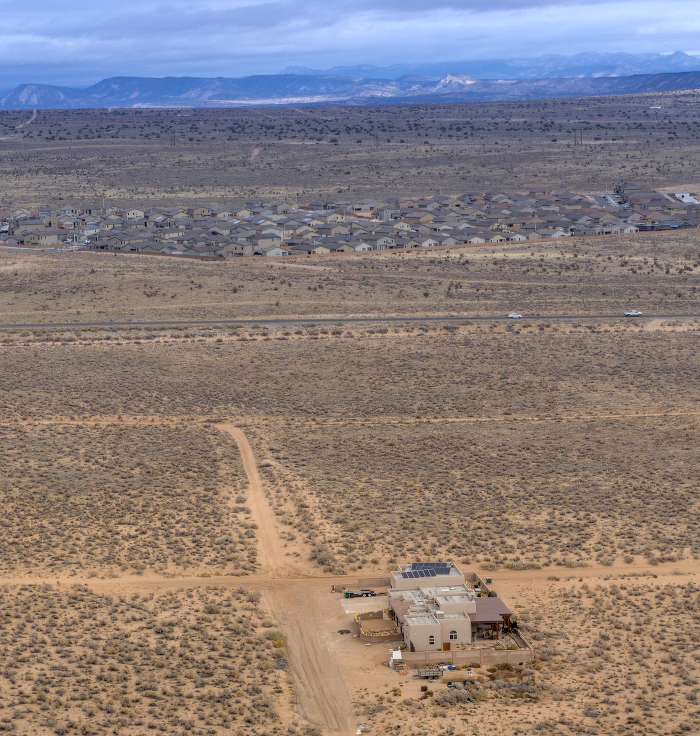
Interestingly, for such uniformity of colors, I couldn’t find any official guide or even an explanation from an official source (if you happen to be from New Mexico or know of such a place, please let me know!) The only thing that came close was the New Mexico University branding guide.
The price of Privacy
When I started researching privacy more seriously, I didn’t know what I was looking at was the face of a forlorn path that seems to go nowhere. I picked it up as a challenge, and within a few days it became clear that privacy is a journey of hard sacrifices.
When I asked for help on Reddit’s privacy community I was blocked from posting because my freshly-created account specifically for this purpose was too new and thus, too suspicious. It was just one stop of many I’ve made in the last two months. Article after article from Medium to Lifehacker was filled with beginner tips like “use VPN” or “search with Duck Duck Go.” As I kept digging deeper, looking for more specifics and advanced techniques, the more it seemed that the internet I use every day suddenly had an end. A wall.

Everything on the screen had a sense of purpose. I was supposed to follow the answers in front of me. Buy a Visa gift card with your credit card; submit your phone number to get a discount; surrender your verified email address to chat with an agent. Not a single website gave additional options. Everywhere I looked, I had to give up a piece of my privacy or lie and hope for the best. I chose the latter option whenever I could. The feeling that I was doing something wrong intensified.
Then there was the loneliness. I haven’t logged into Facebook for years. I stopped using Twitter last year, and with it, I stopped following trends and celebrities in my industry. Most recently, I stopped using Instagram and lost touch with those who like my photos, a window to the outside world, especially during the pandemic. On the other hand, getting in touch with me became more difficult since I insist on less popular apps that no one wants to download. When I try to explain why, it often feels like I’m speaking a different language even with those close to me the most.
This is the price of privacy. I am almost at a breaking point, and I’ve only started. I understand now why there is so little real information about true privacy. Those who stay out of the familiar platforms live in the shadows. It’s not that they hide, but by resisting selling their lives away they can’t reach us or we them. You can’t Google them, friend them on Facebook, or follow them on Twitter. They don’t exist to us, criminal by association with the cryptic “dark web.”
So much of what we do, what we are, is not even ours to share but instead borrowed, hosted somewhere unknown to us, supplied only if we sign an agreement to give ourselves up. And we can’t be bothered to know. After all, when was the last time you read Facebook’s terms of service? Twitter’s? Google’s? Apple’s?
I wish I could tell you this is all a cheap Matrix ripoff. The problem is that I can’t unlearn what I’ve learned or unread what I’ve read. Instead, I’m figuring out how to bend the rules just enough to be more than a sheepish user. I’m starting to see the invisible walls of the digital cell.
My Impressions of The Pixel 4a
I received my new Pixel 4a on Friday before last, and after a week, I can say this with confidence: this is the best smartphone Google has ever made. I also hope it will be the last phone I buy from Google.
If you want to read more about the Pixel4a, There are plenty of reviews on the web, both written and videos (here’s a recent in-depth one from arstechnica, and a quicker video from the Verge). Here I’m going to focus on why I like this phone.
Let’s start with the obvious: the price. At $350, Google is back where it has always been best: supplying top tech at a price that doesn’t twists people’s arms. At hard times like this, with folks losing their jobs, this is a welcome change from the $800-plus flagships.
The Pixel 4a is not a statement of class like the iPhone, and it’s far from delivering the latest and greatest. That’s fine because I don’t need the latest and greatest, I need a damn phone. The iPhone 8 Plus, which I have for work, still sells for about $500 today(1)
The iPhone 8 Plus is too heavy and too big, yet somehow the screen on it is smaller than the one on the Pixel 4a. This makes a big difference. The Pixel doesn’t fall out of my hand when I pick it up like the iPhone 8 Plus does. I can reach the corners of the screen without doing crazy hands acrobatics. It doesn’t stick out of my pocket for everyone on the street to see. It fits into my pouch when I go for a run. These may look like insignificant details, but the overall experience is liberating.
As a bonus, the pixel comes with an earphone jack. I can carry my FLAC files with me on the phone and listen to my higher-end earphones at the office now. The Bluetooth headphones are good for meetings and streaming music, but if I want to get lost in some good stuff, I need an audio cable(2). It’s also nice to plug in my good set and charge my phone at the same time when I’m at my computer.
I know the argument for/against Pixel phones is all about the camera, the better battery life, lack of better water resistance, Android sucks/rules, blah blah blah. I don’t care about those. While I don’t particularly care about looks, the Pixel does look nice. The edge-to-edge screen without bezels, the crisp image, and thefabric cases to match, it puts the iPhone in perspective.
I used to marvel at Google’s utilitarian vanilla Android and scoff at anything that isn’t a pure Android experience. Now, after a couple of years in IT working with Android, iOS, macOS, Windows, and of course Linux, I’m moving forward.
It’s called GrapheneOS. A mobile OS that strips the Pixel from what makes it Google. It’s a mobile OS built for privacy geeks who want a smartphone that doesn’t call back to the mothership. I want to wipe this phone clean and see if I can live without Google on me all the time.
But I’m cheating. I still have my iPhone. I’ve decided that all the apps that need to “spy” on me can be on my work phone. Bank app? I don’t mind if my job, which pays my salary, sees my bank statements. Google Maps? If I travel, I can’t leave work completely behind anyway. Phone calls? I barely call people anymore and most of my contacts are on iPhone, so I don’t mind using Facetime. Everything private however will live on the Pixel. My org notes in Orgzly, my contacts on Signal(3), my media, passwords, etc.
Right now, this is a challenge I want to take. I still have my old Pixel 2, and I’m planning to use it first as a “demo” version to see how this works out - or fails. By the time I’m done, I believe GrapheneOS will already have a working Pixel 4a version.
Why? Well, why not? This blog is called the art of not asking why, after all.
(1) This price came up for a refurbished iPhone 8+ on Apple’s website.
(2) I find that I don’t need my amplifier when I connect directly to the jack. With the USB-C dangle, which looks terrible and prevents charging at the same time (so the phone slowly runs out of juice), I need to use an AMP as well. Visualize this: an audio cable from the headset goes into an adapter, which goes into the AMP, which goes into the phone. I want to say there’s a slight difference in sound quality without the amp, but I don’t have a professional-grade headset to detect that sort of thing.
(3) This will be tricky since Signal is not exactly open source, but I’m aware there’s a way to install the APK anyway. Actually, Signal puts out its APK on its website.
Standing Desk
At first, I only noticed an increase in back pains. Then, there was general restlessness that didn’t allow me to concentrate on long-term projects at work. There was a nagging feeling of “I miss something” coming from my body, not so much my brain. Then, one day at the office during my on-site duty, I pulled up my screen and keyboard to its standing position, and it hit me: I need to stand.
In the past, a standing desk was a gimmick I contributed to yoga-types and others who had back or posture issues1. When a co-worker left us for another place, I adopted his Ergotron Workfit because it had two keyboard trays which I needed (I work with a Mac and a Windows workstation at the same time). I thought standing up would be a nice “perk” since I often just enjoy walking around or talk to people while standing.
What I didn’t know is that shifting my weight helped me concentrate and became a big part of my morning ritual. The habit of standing up in the morning when I get to the office was so hard-wired that even my manager said at one point he couldn’t talk to me before I pulled up my desk to a standing position and prepared my oatmeal cup, another ritual of mine.
The Research
The research was fun. A full-standing desk at home was out of the question because of its price and the fact that I already had a nice IKEA desk that fit my NYC-size room nicely. I knew I was looking for a standing desk converter, a fancy term for a keyboard-mouse-screen elevator. Indeed, I first aimed for cheap options from Amazon because I didn’t think a converter would be more than that.
My go-to website for information about quality products when several options are offered is the New York Times’s Wirecutter. While it tends to lean more toward expensive things in general (it feels like sometimes they do it just so they have a “budget option” to add to the review), it is a good place to get a general idea. Their best standing desk converters review was helpful.
At the time, the investment seemed like a lot of money for something I could just use a bunch of boxes for, so after reading the full article (you need to keep scrolling past the “The Research” part), I carefully did some Goolging Duck-duck-going and stumble unto Work While Standing. This website seemed like a shallow review site full of ads at start, but as I read more into their reviews, I saw that wasn’t the case. Their “What is a Standing Desk Converter?” introduction was very informative and showed me what each type of converter does, what it’s good for, and why sit-stand desks tend to be more expensive…2.
The information on both sites helped me realize a sit-stand converter is a three-in-one solution for me:
-
My ultra-wide monitor’s3 stand that came with it was a piece of junk. It barely supported the monitor’s weight, and I was already searching for a better stand that wouldn’t let it wiggle and wobble at every slight movement (including typing just typing on my keyboard!)
-
I realized that, as Wirecutter noted, the screen does need to be higher up when you stand than when you sit down (try it - you’ll see that when you stand, there’s more space between your eyes and your typing hands). This has been an issue that has been bothering me for some time in the office.
-
My narrow IKEA desk and room setup meant I didn’t want a desk that would push forward as I raised it. I also didn’t like how the Z-shape legs of the other converters looked on the desk, blocking off the area under the desk in its upper position like a cage. I wanted something cleaner looking.
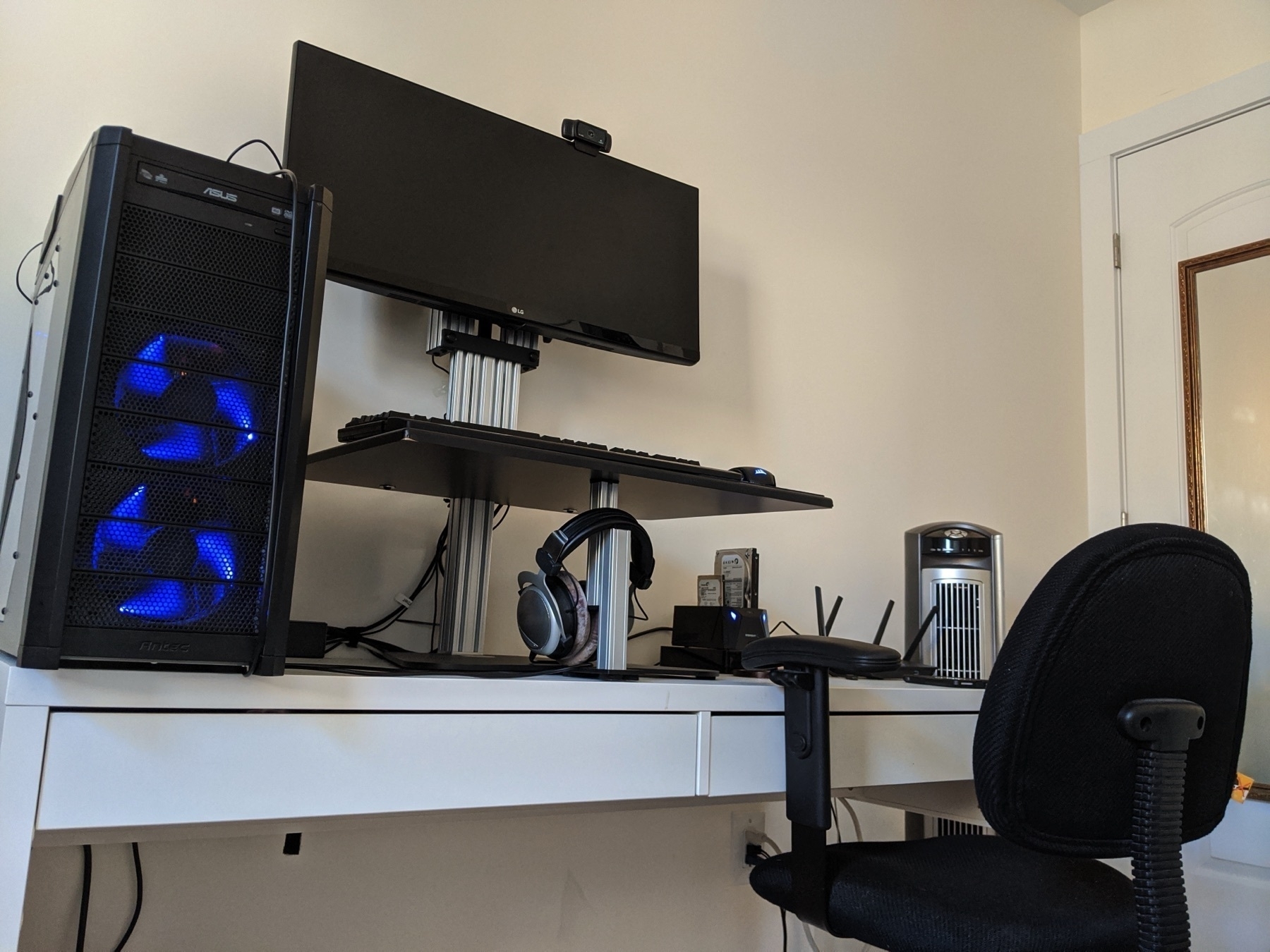
from there, it was easy to conclude that the Kangaroo pro model from Ergo Desktop was right for me: it included the extra feature that allowed the screen to move independently from the tray, but at the same time, I didn’t need the Elite series which included an electric motor for it.
The final tune-in was the measurements: it turns out that the Kangaroo Pro Junior’s depth was the perfect fit for my desk; the bigger Pro would be too wide, with its tray pushing out toward my chest and covering the drawers of my desk. The desk had a clean, industrial look to it that I liked. I also found a coupon online just before I placed my purchase, reducing the cost of the desk by $20. Shipping was free of charge. Nice.
Set Up and Some Hacking
The Junior Pro came in a large, flat, heavy box, kind of like a flat TV screen. Because I don’t trust USPS to ship anything to my home address (that’s a long story), I shipped it to my office instead and took it home from there. I’d say I’m in a rather OK shape, and I handled the box OK, but I wouldn’t recommend carrying the box a long distance or up the stairs without help. It was just heavy enough to be a bit much.
Assembly was easy enough. There weren’t many parts, and the instructions were clearly printed in full colors (you can also view the PDF on their website). The only tough part was the monitor: because of its size, it was difficult to hold it with one hand while adjusting the stand so the screw holes fit just right. This is also when I ran into more problems with my screen.
As it turns out, my ultra-wide monitor has its VERSA screw holes a bit lower than they should be. The Kangaroo’s screen-tilt lock doesn’t provide much friction as is, and it wasn’t possible to lock the screen at a straight angle. It kept tilting downwards, hanging on the adjustable tilt screw. Another issue was the screen’s HDMI socket location, straight in the back, where it hit the metal shaft of the stand. This is a known issue with the monitor, judging from the complaints on the Amazon page, where people ran into this issue while trying to mount the monitor against a wall. In short, this is a problem with the monitor, not the desk.
I fixed the problem temporally by placing Styrofoam between the screen’s mounting stem, which was sticking out a bit, and the metal shaft of the screen raiser. I contacted Ergo directly about my issue and got a reply the next day: they were shipping me another screw which was supposed to replace the tilt break. After playing around with it, I found that it was better to use the screw they sent as a stopper, which fit in one of the grooves of the metal shaft than a replacement for the break, as they suggested. This locks the screen tilt in one position, but I’m fairly comfortable with how it stands now, and I don’t need it to move. The result is a wobbly-less typing environment both for standing and sitting.
A few More Words
Getting a standing desk converter is easily the biggest upgrade for my work environment in recent years. At start I didn’t want to spend so much money on something that seemed to be a “perk,” but the quality of the product, the way it makes the whole room look, and the inviting feeling I get every morning when I stand at it with my fresh cup of coffee are priceless. Still, this is a highly personal choice. I can’t recommend this standing desk solution for everyone: too much depends on individual quirks, measurements, budget, etc.
Of course, This post wouldn’t be complete without praising org-mode again. A picture is worth a thousand words, so here, have a look:
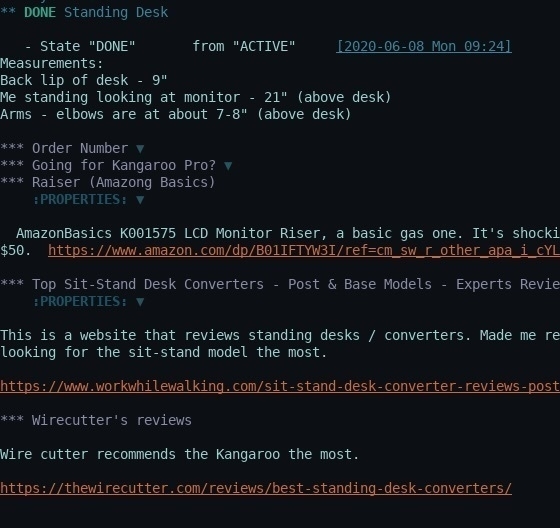
You’re only seeing half of it since my thoughts (under the closed headers) are too long to fit here. Org-mode made it easy to write down details while browsing and reading, kept me organized with my thoughts, and prevented me from remaking conclusions.
Footnotes
1: An interesting irony, I realize: I am one of these folks myself. 2: That’s because sit-stand converters effectively include a stand for the screen. Other converters are essentially just a raised tray on which you also put the screen with the keyboard and mouse; with sit-stands, the screen mounts to the back. Better models include independent raising mechanism. 1: Probably another post in itself, an ultra-wide monitor is another must-have in my setup today. It is not as heavy and messy as having two monitors while providing much-needed work space, not to mention good gaming experience (which is horrible on a dual screens in my opinion).
A New Camera Instead Of Pixel4
When Google announced the new Pixel4, I was excited to get a new phone with an improved camera and enhanced night vision. However, not even a week later, I ended up with a new digital camera instead. I am very happy with my purchase and the new things it brought into my life.
One of the important lessons you learn working in IT is not to jump the gun. You always want to stay a generation behind with maturity and support. When it was time to trade my current Pixel2 for the new Pixel4, my urge had already taken a hit from the cost. The more I waited, the more problems surfaced with the Pixel4, like the face unlock issue or the not-exactly 90ghz display. The list of “mehs” with the Pixel4 doesn’t show signs of slowing down. After a couple of weeks like this, my excitement transformed to “So, why do I want to give Google a grand for, exactly?"
I realized I was pushing myself toward the Pixel4 because of the camera. I’ve been enjoying my growing photographic collection and the artistic escape I get in my otherwise fully tech-related life.
So if all I want is a better camera and better photos, why not just get a good camera without a $800 phone attached?
Within minutes, I was already watching a YouTube Video about the four different types of digital cameras (by the way, Dave McKeegan has a bunch of very well-made explanatory videos about photography). Hours turned to days as I swallowed everything I could from YouTube and photography websites. When I felt I got an idea of what would work best for me, which was a generic-purpose mirrorless camera, I settled on the Sony a6000.
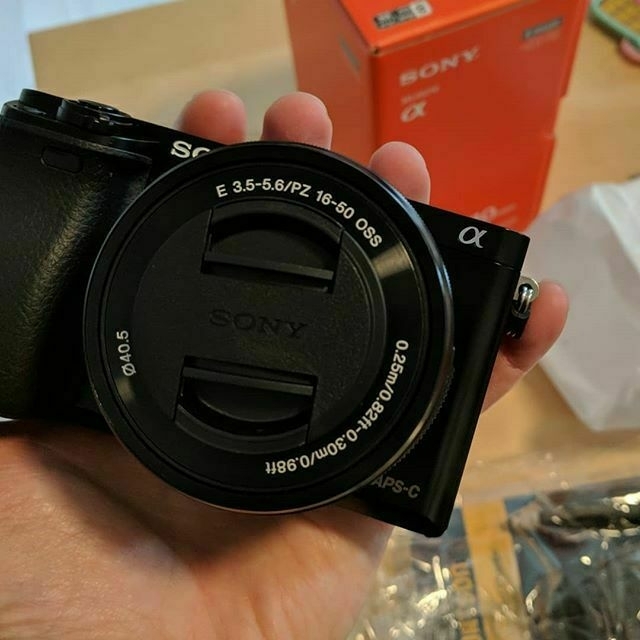
My decision was based on a couple of factors:
- I wanted a cheap camera that was still capable of taking good photos and would allow me to continue to learn. Likewise, I wanted a popular camera with a lot of support and tutorials available.
- I wanted a light, compact camera that would be easy to carry around and fit in my backpack so I could take it anywhere. I didn’t want to worry about carrying a heavy bag, which would demotivate me from carrying my camera and taking photos.
- I was also interested in capturing videos, mostly for my video journals and possibly videos for YouTube later.
The a6000 answered all of the above. Five years on the market, it is still widely sold, but old enough to be cheaper than its newer replacements (the a6300 and the a6500). It’s small and light, easy to carry, and, most of all, it teaches me a lot about photography.
Three weeks later, I’m happy to report I managed to carry the camera with me to work every day. I take photo-walk lunches whenever possible and take pictures s of different things I find while walking: dogs, birdhouses, trees, and color-changing leaves, co-workers, myself talking excitedly about photography (an interesting side-effect: I got myself familiar with OpenShot again as an interesting side-quest). I used to take walks on weekends, but now I do so with the camera and it makes me examine each object from different angles and situations that I didn’t do before. It’s a lot of fun, and I’m excited to do something more artistic with my time.
One difference between cameras and smartphones I learned: there’s no huge difference between two, five, and even ten-year-old cameras. I’m sure that there are some important factors for professional photographers to consider, but at the same time, I have a feeling that folks who have been taking photos for years know how to get great photos from old and new cameras. With a phone, you’re expected to buy a new one every 2 or 3 years; with cameras, it’s more about investing in what you already have.