
Rambo: Last Blood, 2019 - ★★½

A missed opportunity. Starting as a movie about a deranged veteran and his crumbling mind, the movie quickly shakes off any emotional backdrop and drives full speed into the action.
I didn't expect much else from a Stalone movie (his company, his writing—and I'm treating him here as the director, too, even though he isn't), sure. But the elements are there: the medications, the adopted family he built around him, the tunnels he built in his backyard, where he gets lost in PTSD-induced flashbacks. The movie has a good start, showing us an unstable man trying to build a stable world.
The first Rambo, based on a book of the same name, is a tragic story about a Vietnam veteran returning to a home that doesn't want him back or knows what to do with him. In this movie, Rambo explains that he didn't change; he's the same person and just learned to "put a lid on it, every day." Excellent. There's so much stuff to pick on and go on from there. Instead, I can imagine Stalone yelling, "Cut! Enough with the emotional bullshit, let's blow some shit up!"
As for the action, it's over the top (fine, it's a Rambo movie) but also not entertaining enough. That's mostly because we've seen everything in the other movies. Stalone didn't just borrow a few signature moments from his older films, it feels like he copied all of them. The bow is there, and so are the spike traps (same kinds), the same explosives, the same old trick of different weapons at different spots, the same "final boss" fights... only in this movie, there are two, and it seems like Stalone doesn't know what to do with him, so he just dies a very gruesome death, and way too quickly.
They also seemed to have confused bad guy number 2 with bad guy number 1: the primary villain at the end of the movie is not the one who should really have the spot.
It doesn't help that the bad guys are Mexicans at the center of a sex trafficking cartel, apparently 5 minutes away from the border, which is as easy to pass as to drive a pickup truck through. It feels too much like a political narrative I heard too many times.
I'm not a director or a movie writer, but I still have advice for Stalone: Slow down.
This movie would have been so much better if Rambo was fighting his own demons, perhaps getting into trouble with the law and his own family because of his mental state. The tragedy of Rambo is that he's a warrior without an enemy, and that tragedy should have remained all the way to the end instead of forcing it unto target-practice baddies.
Two things I absolutely hate about automated phone bots: the recorded keyboard sound in the background while they “search for your information,” as if it’s a human, and that they mention you can access them online to save time. You 🤬🤬🤬, I’m obviously calling because I cant access you online.
My partner works at a small independent audiophile store, and sales are not doing good.
🎧 🎧 🎧
Anyone is looking for a good professional grade headphones or headset by any chance? They will match prices with Amazon and other sellers.
More Emacs would be nice, but...
Earlier this morning, when I was up between my sleep phases, I was looking for some Emacs content through irreal, one of the most prolific Emacs blogs out there. Irreal publishes a post every day, and these posts usually summarize and link other Emacs-related posts to other blogs. It’s easy to find blogs with good Emacs stuff and check their archives for even more Emacs. That’s the life of an Emacs user - learn it, tweak it, find another cool thing you haven’t thought about, learn it, tweak it…
I would like to have more Emacs in my life, but unfortunately, it’s not easy.
My blog archives are full of complaints about Microsoft products and web tools that I have to use because of work. I can’t use email in Emacs because logging into Office 365 for work is restricted, and no other apps but Outlook can access it (not even Apple Mail). ServiceNow, the platform we use for IT tickets, has an API, but it’s also heavily restricted, forcing us to use the browser. Communications and phone calls happen on Teams, another closed Office 365 application. It’s not even just Microsoft specifically, even though I like to blame them: it’s the cloud.
I work with different IT departments, engineers, and managers. Usually, when app X doesn’t answer certain needs, the solution is to find a new app, which in turn is also integrated in the cloud with its own restrictions. This happens so many times that we don’t get the chance to explore the depth of one app before there’s another one. Each person brings his own new favorite app to add to the party.
I’m guilty of this too, on a personal level. I love writing in Emacs, but my favorite writing companion, Grammarly, doesn’t work with Emacs (yes, I know there were some packages for it in the past; they were abandoned, and as far as I know, Grammarly doesn’t have a working API anymore). Micro.blog uses its own macOS app for writing content, which brings convenient integration to my other content (like my photos and saved bookmarks) that I don’t currently have in Emacs, so I just copy-paste my posts into it these days. Even good tools like being on my iPhone are not as fluid as Apple Reminders or Notes, and it’s just easier to start something there and have the discipline (this is the weak link) to bring it all back into Emacs later.
Still, despite all of that, I love working in Emacs. It brings me peace that no other app does at this point because it’s entirely mine. I know where everything is, I know how to tweak it (or I can learn how to), and I can access its org files everywhere, even if I don’t have Emacs installed. No other application organizes my life and projects so well and for so long, and I don’t see anything replacing it in the near future.
Snow march
I woke up after a solid 6.5 hours of sleep, the first time since last Wednesday, and felt energized. It was a crisp day outside, cold but not bitterly so, with fresh snow on the ground.
Running was a bit too much, as I haven’t run in months. I also didn’t want to fall on ice and hurt myself, especially now when we’re packing and moving. So I went for a “snow march” instead - the idea was to push harder than my usual walking speed.
It was around 35 degrees this morning (almost 0 degrees celsius), so I dressed up as if it was 45, to account for warming up: a light coat, hoodie, cozy home pants (it’s not like anyone was up at that time on a snowy Saturday morning), and my Timberlands boots that I usually wear at this time of the year.
The goal was just to get out there. To move, walk, and stay out for a while, with the idea of completing four laps around the local park (the size of one block).
The snow was shallow and melted a bit, making that “crunch crunch” sound when I walked. I stomped my fit a bit, forcing more of my boot into the snow with each step, partly to increase my heart rate a bit but also for stability and to avoid ice.
It worked out nicely. I started warming up toward the end of the first lap and needed to take my beanie off. When I was hot enough to walk with my hands out of my pockets (I forgot my gloves…), the additional momentum from my arms’ movement added to the exercise and warmth. It felt good. On my march, I spotted three miniature snowmen:

With Trainwell, the workout app I stopped using, I would have probably skipped this fun morning exercise. If I already pay a hefty sum for a workout app and a coach that comes with it, I should improvise and come up with my own ideas. Meanwhile, the app doesn’t count as an exercise, and I would need to send screenshots from my Apple Fitness to my coach to review. Because the app wouldn’t count the walk, it would still push me to do the routine for the day, making me do the usual leg exercises even though those’s the muscles I already worked on in the morning.
This flexibility is important. If I want to work out later, I’d probably concentrate on my upper body, doing isolated exercises of pushups, crunches or pull-ups without starting a whole new workout.
What’s more important now is that I did /something/. I got out there. What I did and how I did it doesn’t even come second - that sport is reserved for consistency. Picking up the habit. What I do and how I do it comes next down the line; I know that if I keep this up, I will push myself further and harder by instinct and the motivation I’ve developed, and things will fall into place. I know this because that’s been my experience since I started exercising.
I just can’t enjoy a regular cup of drip coffee, it seems. too water and bland. I need my espresso in the morning, or a good pour over from freshly ground beans. I think this qualifies me as an official coffee snob, yes?
A needed comic relief
One of the things that started to fit into my weird sleep schedule is watching stand-ups on Netflix. It takes me some time to find someone who fits my criteria, which is based on two things. First, I usually get bored with comedians who talk too much about marriage and/or kids, since these don’t relate to me and I only find them mildly funny; the second, they need to walk a thin line where they are provocative, but not downright assholes.
One of the folks whose shows I enjoyed recently is Gabriel Iglesias, who goes by Fluffy. I watched his most recent show, Legend of Fluffy, and found that while I didn’t laugh as much as I usually do, I did nod in agreement when he was talking about skittering around politically correct phrases and the importance of owning a gun. He explained it from a Republican angle; his show took place in Florida.
Something about the stand-up made it more down-to-earth, a level I can relate to and understand, not something that I usually read with a politically aware eye through a left-leaning newspaper website. It made me think, not just smile. Iglesias is, among other things, a Mexican immigrant, so listening to him describing serious issues like immigration to a crowd that mainly supports Trump (or so I assume anyway) at this time had a sense of authenticity. At one point, for example, he reflected on a show in Mexico where he performed in front of Americans who were there on behalf of their company, boasting that he caused a bunch of Americans to cross over the border to watch a Mexican. Hearing this from him made me smile about this topic for the first time.
I can’t help but think that someone like Iglesias is the kind of person we need right now. Someone who’s on both camps at the same time, who can tell a story with a sense of humor. Fluffy is a celebrity now, but he hasn’t forgotten his roots and the people that helped him reach fame, and his show is, eventually, about gratitude. This gratitude to his mentors and fans who made him what he is today touched me in a way I didn’t expect.
Moving
Yesterday, I finally managed to get through to our management company here at the apartment to let them know we’re moving out. I’ve been trying to reach them for the last two weeks unsuccessfully.
I’m worried because, on the other hand, we still don’t have the key to the new place that we found. It’s a co-op building in Manhattan, which I think is fair to say is one of the hardest places to move into. We’re throwing a lot of money into it that goes beyond just the security deposit and the first month’s rent. We are required to have insurance, we must pay for credit checks (plural, yes), we need to pay to move in, we need to pay for an inspection, we need to buy carpets because apparently, that’s one of the rules…
Financials aside, we’re also required to fill out tons of paperwork. After the lease that came first (this part is behind us; everyone signed), the documents from the board are a package of roughly 50 pages. This includes standard NYC stuff (bed bugs, guard rails, lead paint…) but also “house rules,” real estate documents, financial status statements, bank account information, and letters of recommendation - yes, we need to be recommended to live there - both personal and from the previous landlord, and on it goes. Our real estate agent is working with us on those, but it’s a nerve-racking race full of phone calls, emails, and visits to the bank.
Meanwhile, work projects do not let go. The amount of events chained together in a symphony of urgency has been almost comical. Just yesterday, for example, a new Dean joined the ranks after the previous one stepped down rather suddenly. “Why doesn’t this work?” is not a good way to start your relationship with the top VIP, but if you work in IT, you know that 80% of the time, you’re notified about a change only after something breaks. We managed to turn it around and demonstrate our skills and support. I am grateful for my unphased team, which followed through without ifs and buts.
Another major work project I’m engaged in involves overhauling network authentication throughout the entire medical center I work for. This requires new written instructions and a video clip demonstrating the changes. In the meantime, the old instructions need to be scrapped or updated from various places on the public web and the private intranet. This is where I step in, as the person who took over my role when I left for my current one was let go.
Other projects on my to-do list block my calendar and prevent me from attending my regular meetings, not to mention the aforementioned bank visits/phone calls/emails about the new place, which must happen during business hours.
So far, I’ve managed to keep my head up. I’m adjusting to sleeping in part and exercising in small intervals when I get the chance. I’m exhausted, but my mood, while serious, is not melancholic. I’m doing OK.
But I wouldn’t be without the tremendous support I get from everyone. Partners, friends, family, the people I work with. They all understand and support me. I’ve never seen so many people who know me step up in turn and say, “Yes, I can help.” I’m writing this with tears of gratefulness rolling down my cheeks, thinking of my support net. Whenever I feel too tired or overwhelmed, there’s a smile, a pat on the back, or an encouraging nod.
I hope that in a month, I will write a post from my new room in the new apartment. It would be a big upgrade for my two partners, not just me, and I’m happy for that.

Trying out Leviathan Wakes (The Expanse Book 1) by James S. A. Corey 📚. I wanted to give it a try for a while, but I’m not sure I’m up to the task at this point. We shall see.
The woes of flexibility vs. structure
I paused my Trainwell subscription, my exercise app. I didn’t give up my exercise routine if that’s what you’re wondering, though it has suffered in the last couple of weeks. As I explained to my excellent coach on the app, there were two reasons for that.
The more immediate and simple one is everything going around me: I’m moving out, and I am now tasked with working both in my new position and my old position, which I left a few months back since there’s no one else who can do it at this point. These two things with an additional few recent stressful events cause my insomnia to spike, and I often wake up after 4-5 hours of sleep, which messes up my ability to work even further, putting me in a vicious cycle of trying to make up lost for time and energy.
The longer, more complicated reason is the lack of flexibility. Trainwell is an exercise app with a limited number of exercises and a busy coach who can’t remember and adjust everything about you. Things like meditation and even running are not handled well by the app, at least not yet, and I have to look elsewhere for those. Since Trailwell costs $100 a month, I expect more from it, and it can’t deliver.
I have very limited space in the apartment to exercise, so some exercises and stretches don’t work for me. On top of that, the app works by introducing new cycles each couple of weeks, and these come filled with mostly new exercises that I haven’t done in the previous cycle. I tried to navigate away from exercises I didn’t want and keep the ones I did with limited success. New cycles usually mean a period of adjustment and learning, and I realized that this is starting to damage my routine. Instead of improving what I do slowly, I’m starting something new.
Speaking of routine, I’m now at a point where I want to exercise without being forced into it. It’s a good part of my day, with the key (that I keep forgetting) of doing just a little at a time and doing more after I start if I can and have the time. Doing a short 10-minute daily exercise is always better than not doing anything because I’m intimidated by an intense 30 minutes of weight lifting. Yes, I can adjust my exercises on the run and work with my coach, but that in itself is cumbersome, and I don’t always want to explain why I did one thing instead of the other every time. I asked myself: if I’m already adjusting and switching exercises to fit my needs, then what use is the app in guiding me anymore? And the last couple of weeks were based on adjustments to my crazy schedule.
So, I decided to return to my old workout sheet with the addition of a few exercises I’ve learned in the last months. Here’s a portion of it:
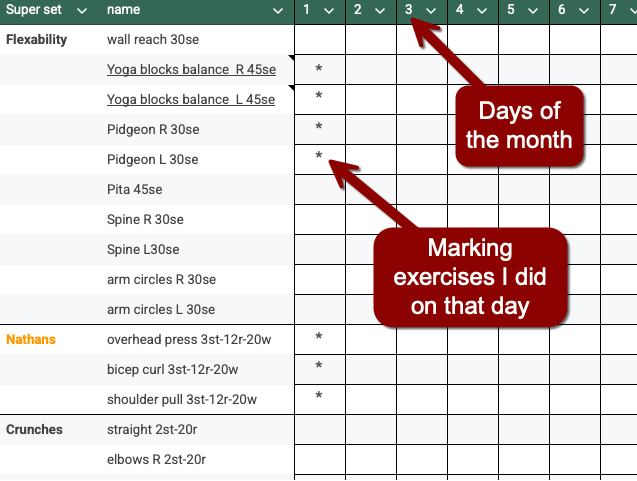
However, I quickly learned that a simple spreadsheet is problematic. I want to measure daily exercises (in the image, you see the page for February. I have a sheet for January and will keep going for a year), so I’m using the Y axis for the exercise names. I wrote the specifications for reps/sets/weights next to the exercise’s name (it will take too much room to specify for each day), but it is an issue if I want to change the number of sets/reps I’m doing on the fly. For example, if I join pull-ups and chair dips, I probably want to lower the number of push-ups I do that day since they overlap the same muscle groups. Another issue is that different exercises may have different data altogether - for example, running records speed and distance, not weight and sets. Yet another problem is that the list of exercises becomes longer, and finding the exercise I want to do on a certain day and joining it with others becomes confusing, so I need to start color-code those, which means I need to be more picky about which colors I use when I go up in sets/reps during the week…
you get the idea. It just doesn’t cut it, and I have issues already.
Meanwhile, I have my Apple Watch, which I’m trying to utilize for all of this. It comes with Workouts, but those are basic pre-determined activities that don’t allow me to add weight or follow sets conveniently if I break for rest in between. There are other apps out there I could use, but then I run into the same problem I have with Trainwell and flexibility: if the app doesn’t have a certain workout, it’s annoying to use it just for some things and not everything.
I don’t like the lack of structure in my exercises, which is why I need the table on one hand, but on the other hand, it’s not flexible enough to do what I need. It’s starting to sound like “I’m holding it wrong”, not an app or a sheet problem, if you get my meaning.
Still, the exercises I end up doing are good and fit my routine better than the ones I followed on the app, as in. At least I’m doing something. I need to figure this out.