
Emacs org-mode
Welcome to the Emacs org-mode category.
You can subscribe to this category only via RSS!
I am working on restoring some of my related posts from my old blog, so keep checking here for new content.

- Go visit an org file, and navigate to one of its headers.
- Summon org-attach with
C-c C-a. This will bring up a menu. For now, just use the first option,a. - Next, org-attach will ask you which file you want to attach. Navigate to one and select it. Don’t worry, this will create a copy. The original will stay where it is.
- With the point on the header you just worked with, which should now have an :ATTACH: tag, summon org-attach again, but this time call option
F, which will open the directory the file is in with Dired. - BYOD devices, which need to be evaluated and prepared for our environment.
- MacBooks, which we can’t automate yet.
- Replacements of existing computers, which should also come with a snort checklist, reminding me to change the inventory, and re-add the hostname to AD down the line, because it is taken (by the existing computer) when I start the process.
-
Download and install Libre Office. It comes built-in with many personal desktop-geared Ubuntu distros, but in my version (Mint), I chose to opt out at the start. OK, no biggie, the full Libre Office suite is only 100MB, and I can do that. I see myself editing the occasional Word file or producing a PDF.
-
Add the following to .emacs to turn on .odt option in the export dispatcher:
`(eval-after-load "org" '(require 'ox-odt nil t))`
Of TiddlyWiki, Emacs, And Digital Gardens
For the last couple of weeks, I’ve been brainstorming the idea of converting this website into a fork of a wiki, particularly, TiddlyWiki. I went full circle from using the tool to builing a static website, back to the original, single-file java script supported version. Here are some of my thoughts.
I brought up digital gardens before, and again when I was re-tagging my posts recently. In short, case in point: instead of having the above links leading readers to find these static discussions which are concealed with dates in the past, the discussion would be dynamic, something I keep adding to as I keep developing the idea.
To continue with this example: on this blog, I would keep discussing digital gardens until it becomes a tag and group all my posts about “digital gardens” together. You’d see a list of posts, organized by date, and you could go in and choose to read pieces based on my progress in time. This is one way to do things and it works quite well if to judge from blogs around the web.
The “digital garden” idea is to have one place, one “post” that is ever-developing, broken down into sub-topics. Certain ideas will get developed, and other abandoned in favor of others. Instead of seeing progress divided into chunks of dates, we see the progress of the idea in chunks of subtopics.
OK. Time to get this off my chest. I don’t like the name “digital garden.”
On the web, folks consider digital gardens anything from a dateless blog to documentations to roam and zettelkasten. I understand the metaphor of being a digital “gardener” as someone who grows ideas and articles, but I prefer to think of it as a form of emphasizing topic organization over date organization. To me, since before I created this blog, this is called a wiki.
The problem with wikis is that they’re technical documents. Or so I thought. Wikis are named after encyclopedias, which are all about facts. But wikis are just a form of content presentation. They can be as personal as any other personal website can be, just as blogs, which are web logs, can be as technical as a changlog or as personal as an online diary.
Before I disappeared into org-mode and Emacs and left all other text editors in the dust, I enjoyed using one such wiki: TiddlyWiki. What sets Tiddlywiki’s apart besides the funny name is that it’s fully self-contained: a single HTML file (at the humble size of about 3 MB when you download it first) which contains everything, text and media, by design. It is a polished tool, a more utilitarian one than eye candy, with all of its settings built into its nested articles, which are called tiddlers. You can go into its style sheets and color pallets, which are tiddlers as well, and change whatever you’d like to make it looks and behave however you’d like.
After moving to write in org-mode however, I didn’t need TiddlyWiki anymore. Emacs offers a much superior writing experience, combined with org-mode, an excellent organizational system. To look into TiddlyWiki again I first had to find a way to work from within org-mode, and I couldn’t find a way to do so. Without much motivation, I gave up quickly and went back to org-mode. It took the spark of going “digital garden” again to explore this a bit more in depth.
One of the first things I learned, on mastodon of course, was that TiddlyWiki now comes on Node.js. Node.js allows you to run JavaScript applications (which TiddlyWiki is based on) outside of the browser using a local server. This also means the individual tiddlers do not have to be nested inside the original HTML file; instead, every tiddler is stored as a file.
OK fine, so I have my tiddlers in tid files, what’s the big deal? Well, now we have individual files with essentially text (in TiddlyWiki markup, called wikitext.) See where this is going?
we can now use Emacs to write and edit tiddlers using wikitext. But it gets better. As it goes with everything you learn, now I was able to ask the right questions. Looking for a way to export from org-mode to wikitext within Emacs, I found ox-tiddly on melpa, which converts org syntax to wikitext. I can now write my TiddlyWiki articles from org-mode. But it gets better even better.
through node.js functions, I also learned that you can convert TiddlyWiki into a static website. A few simple commands which can be made to a single script will convert all those tid files, the tiddlers which are the articles, to HTML files. TiddlyWiki can become a static website, which can be run off GitHub or Gitlab. I can even push changes through Netify, it seems. Essentially the same workflow I’m using for my current static site.
But… as I continued learning about these options, I also realized the one downside of publishing content this way, and it’s a big one: no JavaScript. This means the core TiddlyWiki functions, the same ones that make it so good, won’t work. There isn’t even an option to navigate through the different tiddlers since the navbar is completely built on JavaScript.
There is a way to export JavaScript along with the style sheets and the tiddelrs, but then I’d still need a way to activate it. With all of this it occurred to me that it doesn’t make sense to break down TiddlyWiki if I want to use it for a website; it’s easier and more functional to keep it as is, a single snappy HTML file that contains everything. This is also how other TiddlyWiki websites are built, including the official tiddlywiki.com. So, while there is a slight benefit to working on individual tiddlers locally, I will need to bring everything back together before I build and push the site.
At this point, it’s simpler to just copy-paste the wikitext from the temporary buffer ox-tiddly gives me and paste it into the editor. Another benefit of this method is seeing the content as I paste it live, with TiddlyWiki’s built-in editor preview mode. Images and different styles that are invisible through org-mode are easier to fix this way.
I’m not happy to write outside of Emacs org-mode1, but I do want to at least give TiddlyWiki a try. I believe the way it will present information, along with its customization, will be the next big step for this site.
Footnotes
1: I discussed similar issues with writing content out of Emacs not too long ago, and the workarounds I’ve come up with. While I managed to stop using Word for the most part for now (and thankfully so), the big issue is that using Emacs is a one-way street: I can use it to publish content to other platforms (in the case TiddlyWiki), but once there, it’s hard to get whatever edits I make there back in Emacs. I wish I could keep all my work in Emacs, but that’s not realistic.
Org ID, Org Attach & Better Folder Names
You might have heard of org-mode header IDs. By default, these are Universally Unique Identifiers (UUIDs). In this post, I want to talk about what they are, why I use them (and you should, too), and how to make them into slugs: human-readable IDs that make more sense. This will be a long explanation of what I discovered in org-mode, so buckle up!
What are UUIDs and why should I care?
The org-mode manual doesn’t exactly point at header IDs unless you know where to look. Because of this, a casual user of org-mode might overlook these powerful organizational tools.
In org-mode, we can link to a file and a head directly: <path to file>/parent header/header, but this is risky because we refile (move) headers between files; old projects get archived, meeting notes get moved under other relevant projects, etc. This means that any links using a path like the one above will break1.
For this reason, we have header IDs: Org-IDs. They require that we include org-id in our init file (as part of org-mode’s modules), and then we can generate them for any header by calling org-id-get-create:2 “create an ID for the current entry and return it. If the entry already has an ID, just return it.”
By default, org-id-get-create creates a string of random numbers and letters: a UUID. Now, every time we want to reference the header, we link to the UUID instead of the header’s path, like so: [[id:our UUID here][description here]].
This is great, but these UUIDs are a string of random characters that make no sense to us. A header with an ID like 05576976-a33c-11ec-9da6-020017000b7b doesn’t tell us anything. We will return to this problem in a bit, because first I want to discuss another great (and perhaps overlooked) org-mode feature that makes this even more problematic.
Referencing to files with Org-Attach
Org-mode comes with a built-in attachment mechanism called org-attach. You can summon it with C-c C-a when inside org-mode under a header. Org-attach was one of the features I always knew existed but never used.
We already have a system to navigate and organize our files ingrained deep into our mind, be it Finder, Windows Explorer, or whatever GUI file manager we have in front of us. For us dedicated Emacs users, there’s of course the excellent Dired.
What’s more though, org-attach is using some seemingly weird system to store our files deep in folders that don’t make sense to us, and the only way to find them later is to use org-attach again to go to these attachments (by calling org-attach with C-c a, then choosing f or F, depending on the case). At least, that’s what I thought.
Assuming you haven’t tweaked your org IDs, org-attach will nest an attachment under three folders. First, the default data folder, which is where all the attachments are stored. Second, under it, a folder with the first two characters of the header’s UUID. Then, third, a folder with the rest of that UUID as its name.
This is a bit confusing, so let’s break it down a bit. Again, the following workflow assumes you don’t have any settings affecting org-attach. Launch Emacs with -q if you have any doubts:
What you’re going to see is that you’re inside your org file’s folder, inside a data folder, and then inside a weird two-letter folder, and then inside a long string representing the rest of the UUID. Something like this: /home/user/orgfiles/data/ab/f4b2cf-4b38-45ec-9333-346b42861d24.
I’d argue that this way of creating attachments would cause newcomers to Emacs to prefer other methods for storing their files. It looks odd, and it doesn’t make sense when you need to find something later. That’s too bad because you’re missing out on org-mode’s excellent ability to organize your projects with their files attached right to them, of course, but this habit also comes after years of using org-mode (at least that’s how it was in my case).
If only you could make these folders make sense. Well, this is Eamcs. Of course you can.
From Org-IDs to Timestamp Slugs
The idea is simple: change how these IDs are created in org-mode by modifying org-id-method. By default, its value is a UUID. But we can change it to ts3: (setq org-id-method 'ts). That’s it. The next time we create an ID using org-id-get-create, it will produce something like 20220315T083403.413614. Still a bit confusing to read, but much better than UUIDs! The format is: year, month, date, followed by T for time, and then the current time down to the fraction of a second. Why do we need it broken down to these tiny time fractions? To guarantee we get different org-ids if we create several of those sequentially.
This will set up our unique IDs as timestamps4, but we still need to configure org-attach to use them. Because org-mode is set up to use UUIDs by default, org-attach is set to create directories that are meant to work with UUIDs. The directory structure is determined by org-attach-id-to-path-function-list. Specifically, it points to two functions: org-attach-id-uuid-folder-format and org-attach-id-ts-folder-format. You can go into org-attach.el and see that they break down the folder structure in a pretty straightforward way: the UUID function (which is the one used by default) takes the first two characters of the UUID and makes a parent folder out of those (as seen above), while the ts function takes the first six. The first six characters make sense because they include the year and the month.
By default, if we use the above example of 20220315T083403.413614 as a timestamp, we will get the following directory structure: /home/user/orgfiles/data/20/220315T083403.413614: the first two digits are for first two digit of the year: 2022. This is not very useful, as you will need to use org-mode until the year 2100 for a new sub-folder to be created!
This is what happened to me, and it required some head-scratching and diving into org-attach to figure out. I tried to mess around with the functions in org-attach directly, but that didn’t go well. Eventually someone on IRC pointed me to what I missed: what needs to be changed is org-attach-id-to-path-function-list. It is as simple as changing the order of the functions on this list, so org-attach will know to use the ts function first.
Together with org-id-method, which we defined above, we can write the whole thing like so:
    (setq org-id-method 'ts)
    (setq org-attach-id-to-path-function-list
    '(org-attach-id-ts-folder-format
    org-attach-id-uuid-folder-format))
Now when you use org-attach, it will use the ts function and create the following directory (to use the example above): /home/user/orgfiles/data/202203/15T083403.413614. This makes much more sense. You could also build your own function that would look like org-attach-id-ts-folder-format, perhaps for using the first 4 characters to create a parent directory for the year only. You will just need to make sure your custom function shows up first in org-attach-id-to-path-function-list.
A few Extra Things
I mentioned I used an excellent package called org-super-links. In a nutshell, this package automates creating org-IDs, linking them to an org-header, and creating a backlink from that header to the one linking from it. You should read Karl’s post about it and how he uses it to get a better idea than what I’m letting on here if you’re interested. As a matter of fact, if you want to get some more background, read the previous post mentioned above and you’ll see I’ve been trying to change org-IDs into timestamp slugs for a while. So much so, in fact, that I wrote my own function to do that for me until I discovered org has a system built-in already. As it goes with Emacs though, there’s no wrong answer. The previous attempt took me deeper into Elisp, which was a fun learning experience in itself.
With org-super-links, the process above is quicker because I don’t need to deal with org-id-get-create. I just search for the header I want to link to, and everything’s created automatically: an ID for the header I’m on, an ID for the header I’m linking to, a link linking to that ID at my marker, and a backlink at the header I am linking to pointing back to the header I’m on. You’d probably need to read that last one again. The bottom line is that if you’re serious about organizing your org headers, you should probably check out this package.
Another post that’s been floating around since 2017 by Matthew Lee Hinman approaches org-mode IDs from a different angle: exporting to HTML. In the post, Hinman explains that if you use IDs in your org file, you will also benefit when you export it to an HTML file: the header links you will use will link where you need them to go, and that’s even after you move headers around.
I’m actually using HTML more and more at work when I want to export my org-mode files into KB articles that go into wikis. This is especially helpful when you include a table of contents: the headers in the TOC will not break if you use IDs. This is maybe a bit more of a niche use, but having a TOC in a how-to article makes a lot of sense, and org-mode creates one for you by default when you export to HTML.
Footnotes
1 As a matter of fact, I think breaking links to headers and losing information is one of the reasons for org-roam’s popularity. Of course, the new versions come up with a lot more than just linking notes across a database, but at its core, I think this is why people started adopting it.
2 In newer versions of Emacs, using org-id-get-create (C-c l) can automatically generate an org-id for a header, if one doesn’t exist, provided that org-id-link-to-org-use-id is set to t. This can be done in the init file in Emacs.
3 Emacs documentation specifies a third method, org: “Org’s own internal method, using an encoding of the current time to microsecond accuracy, and optionally the current domain of the computer. See the variable ‘org-id-include-domain’.” This generates what seems to be a random string of text that is also not human-friendly. I’m not sure about the computer’s domain part, but this might be interesting for folks who have several computers on a domain using Emacs.
4 Giving headers unique IDs as timestamps is also useful because it leaves “clues” to help locate lost information later. For example, when you create a project with this unique ID, and later on you forget what it was, you can use the date to clue you in. It gives you another layer of search on your agenda (“202203” for example) to show all the projects created in March, provided you create an ID for each project, which you totally should. Because this is a simple text string, you can also use this outside of Emacs with other scripts to automate tasks that will look for this ID. It opens a world of options now that you have a range of unique IDs that you understand in your head, AKA, slugs. Also, it just looks better.
Capturing doctor visits & Sickdays in org-mode
At work, we need to fill out a timesheet every month. For those of you who are not familiar with the concept, this is usually a spreadsheet with one column for each month and cells for each day. You fill in the code (V for vacation, S for a sick day, etc.) for the spots you took off from work. There might be a few more variations of these, but this is the general idea.
To me, timesheets are a pain in the rear. I need to check your calendar (or agenda in my case) to see when I took the off days, then I need to mark them down on the spreadsheet, and then I need to export them to a PDF to sign the thing and send it to my supervisor. I’m horrible at keeping track of these things because they don’t fit my workflow: a vacation or a doctor visit gets marked down on the agenda as an event with a location, unique to its settings. This makes it difficult to go back and catch those when it’s time to do the above routine.
I had been considering using tags for a while, but I usually only use them for people on the agenda when a task or event involves them. I could have used a category, but it seems silly to have a whole category for one thing just because it’s hard to find on the agenda. Then an idea hit me when I was watching the Emacs Conference, when I noticed a few of the presenters using tables: a table!
Of course! Not only can I mark down the exact day for a sick day I took, but I can also fill in if it was half a day or a full day, which is another thing I need to mark on the sheet. It took some time to figure out how to use org-capture for a line in a table, but the results were well worth it. Here, take a look:

Looks great, doesn’t it? Not only do I have a nice, organized place to mark down these days, but I can also link to the event itself on the agenda (right now it says journal, I should change that). I can even go into the table and add separators for months and make it clearer. If only Emacs could also fill the Excel sheet I need to fill and sign for me…
Here’s the code that makes this work:
("js" "Sickdays" table-line (file+olp "~/Archive/routines.org" "Personal" "Sickdays") "| %u | %^{(H)alf/(F)ull} | %? |")
table-line is the magic word that tells org-mode to populate the next available line in the table, so it doesn’t matter what’s before it. I can add and remove things as I please. And then the lines just work as is, using org-mode’s powerful table format.
Submenus in org-mode capture
In my last post, I discussed how I (finally) found out that I can use entire org files as capture templates. This is a basic feature that works out of the box, but the org-mode manual doesn’t give it enough exposure in my opinion. Turns out it wasn’t just me either.
As I expanded my checklists and learned more “trivial” org-capture features, I discovered additional useful things but ran out of time to write about them. It’s now time to get back to the basics of org-capture again for some helpful tips.
When you build your org-mode templates, it’s possible to create sub-menus for better organization. Another way to explain it is to think of “categories” in your capture.
Says the manual:
Keys
The keys that selects the template, as a string, characters only, for example ‘“a”’, for a template to be selected with a single key, or ‘“bt”’ for selection with two keys. When using several keys, keys using the same prefix key must be sequential in the list and preceded by a 2-element entry explaining the prefix key, for example.
The bold part was another part that I had to read several times to understand. I knew there’s something different because two letters are used, but my capture template failed to work the first couple of times. I figured it out, and here it is:
     (setq org-capture-templates
      (quote (
              ("s" "Manual Laptop Setups")
              ("sd" "Staff Dell Laptops" entry
              (file+headline "/mnt/veracrypt1/Archive/OhSnap!.org" "Staff Dells")
              (file "/mnt/veracrypt1/Work/setup-dells.org"))
              ("sa" "Staff Apple Laptops" entry
              (file+headline "/mnt/veracrypt1/Archive/OhSnap!.org" "Staff MacBooks")
              (file "/mnt/veracrypt1/Work/setup-macs.org"))
              ("sm" "SLS-Mac" entry
              (file+headline "/mnt/veracrypt1/Archive/OhSnap!.org" "SLS-Mac")
              (file "/mnt/veracrypt1/Work/setup-SLS-Mac.org"))
              ("sw" "SLS-Windows" entry
              (file+headline "/mnt/veracrypt1/Archive/OhSnap!.org" "SLS-Windows")
              (file "/mnt/veracrypt1/Work/setup-SLS-Mac.org"))
;; more code below - the above is incomplete
Let’s take it piece by piece from the top. Keep in mind, this is not the entire capture section, just the relevant part. If you copy-paste it into your Emacs init, it will fail with an error.
First, as soon as I start the capture templates, it seems as if I am starting to create another one inside the first one. That’s what the manual means. In my opinion, it stumbles on its own words. I feel like an example would go a long way. What I did was basically create a sub-menu for “Manual Laptop Setups.”
The result is that when I call org-capture, I get the following:
    Select a capture template
    ===========================

    [s]... Manual Laptop Setups...
    [i] INC (my incident template)
    [e] Event (my event and journal template)
I have more templates going down, but I want you to look at the very first one. That [s] with the three dots after it indicates pressing s will take me to a sub-menu of the capture template, which looks like this:
    Select a capture template
    ===========================

    s [d] Staff Dell Laptops
    s [a] Staff Apple Laptops
    s [m] SLS-Mac
    s [w] SLS-Windows
You can see from how the menu looks that all of these items start with an s, but this time without the brackets. The brackets indicate what you can press now after you’ve already pressed s to get into the sub-menu you’re currently in. That is, d for Dell checklist, a for Apple checklist, and so on.
Each one of these sub-templates is a checklist based on an org file, as I explained in the previous post. The templates are all org files (like setup-SLS-Mac.org, for example, the third template), which are nothing but checklists like I pointed out in the previous post.
This way, I can have an entire “category” of capture templates, with S for setup, without having a long list with letters that won’t seem related.
Org-mode in files
Note: Before I dive into the how, I want to tell you a story about why I needed checklists, and how, for a long time, I wasn’t aware that org-mode capture templates can be called from individual files, complete with their headers, tags, checklists… everything. You might find this useful if you’re starting out with Emacs, or if you are a veteran Emacs user who wants to understand some of the hurdles non-programmer Emacs “newbs” might go through.
If you want to jump ahead to the good stuff, it’s under the “How this works” header below.
First, I want to answer why use a whole file as an org-mode capture template. To understand that, I need to explain some of the work I do as a help desk person in a large organization.
Among other things, my work includes prepping desktop and laptop computers. For the most part, this is done from an image, and all software not included is installed remotely via our SMA. However, there are still many cases where the automation fails or does not apply and hands-on deployment is needed. Some scenarios include:
These scenarios are complex but similar in one area: they beg me to use checklists. We’re a big company, and often I find that a good checklist is half the job.
Communication with clients, managers, purchasing staff, as well as documenting everything, is also a part of the checklist. The difference between a job that was done with a checklist and one that was done without is so obvious that my checklists have been adopted throughout the team, and I was asked several times to guide others (especially newcomers) because of my “methods”. I find this humorous because if you know me, you’d know I’ve always been far from organized. It’s all org-mode, to which I’m very thankful (note from future me, about six years later: I owe this organization my promotions at work. Little did I know back then that these checklists would go so far!).
As you can imagine, these checklists get quite long and complex, containing parent items and their children.
In the past, I’ve had a long checklist “template” in a header in the setups.org file, which I used to copy-paste into new projects. The idea of using a file as a template for org-mode capture occurred to me in the past, but because I’ve never seen an example in the wild and didn’t find a clear reference to it in the manual, I dismissed it as wishful thinking.
When I asked about using org files as templates on Reddit I didn’t get answers. I believe that’s because I didn’t understand exactly what to ask, since I didn’t know what I was looking for. After all, if I had a more concrete idea, I’d probably read this in the Org manual for what it was:
template
The template for creating the capture item. If you leave this empty, an appropriate default template will be used. Otherwise this is a string with escape codes, which will be replaced depending on time and context of the capture call. The string with escapes may be loaded from a template file, using the special syntax ‘(file “template filename”)’. See below for more details.
This little paragraph of text can be found about half a page down in the manual. I read the capture part of the manual probably 20 times or more at this point, and I still feel I wouldn’t know I can use a file as a template just from reading it. But why?
There’s no clear statement that says you can load a capture from a file; rather, it says “the string with escapes may be loaded from a file…”. To me, this meant I could include my template’s syntax in a separate file instead of specifying it in my init file. I had the following template:
      ("j" "Journal" entry (file+datetree "~/Documents/Work/Setups.org")
    "**** %<%H:%M> about %a \n%?" :tree-type week)
** And I thought this bit of lisp could go into a file. OK, but what’s the point of that?
So, if for some reason I wouldn’t want the above code in my init file, I could copy-paste it into a dedicated file. This didn’t seem useful for me, after all, I wanted all my code in one place where I can break it down with explanations in org-mode, so I didn’t bother with it.
Further, the manual says “see below for more details,” and there aren’t any. There are only details about what is referred to as “string with escapes.” Nothing really tells me I can have my whole template, a huge checklist with headers and tags, in another file.
So I just struggled for a while, trying to figure out how to fit my a checklist in a single string, as shown above, such as [ ] checklist item one /n [ ] checklist item two /n and so forth, which of course didn’t work well (how would I tell org-capture to indent items so create children items under a parent item this way?)
At some point, I saw an example of someone using a checklist that was inside a different file. stumbled me: for the first time, I realized what I should look for. I managed to find a couple of questions related to org-mode in emacs.stackexchange.com that were not directly related to my issue, but had the following lines in the code (I cut out the paths as they do not matter here)
("j" "Journal" entry (file+datetree "...")
(file "..."))
And then, I found a presentation by Jonathan E. Magen. Of particular interest was slide 6. Right there, in front of me, the title was “Template stored in file,” and below it, a very simple example of org-capture lips that tells org-mode to read the template’s content from a file. It was as it is in the manual, but this time, the slide was very specific, telling me “this is how you tell org mode to go to a file and grab the capture template from there.” Someone finally pointed a finger at it for me. So, this was true. Org-mode can read templates from other org files.
I wrote the code as I understood it from the examples I found and added (file "~/Documents/Personal/journal-tmpl.org") to the code above instead of that “string with escapes”, and got an error: org-capture: Capture template ‘j’: Template is not a valid Org entry or tree.
I saw this error in the past. I got this far before. Now, through the eyes of someone who knows this should work, this error looked different. Org-mode, I knew, (or Emacs for that matter) should open any file if I tell it to, even if an MP4 or a JPEG file. I would see gibberish on my screen, yes, but it would open. That made me realize that if I see this error, it means the capture template should work, and what I wrote does indeed tell it to open the template from a file, but something in the template file was specifically wrong.
Suddenly, this error became an encouragement that I am headed in the right direction. The error was now telling me, “Hey, I want to do this for you, but your file is messed up, sorry.” Knowing this, I turned back to the community, this time asking the right question: What is wrong with my org file?
How this works
As it turns out, my regular org file started with certain options like #+TITLE: and #+TODO: with several headers already nested inside of it: org-mode capture was looking for the capture syntax, and instead found options it didn’t know what to do with. If I simplified the file and removed all the additional options, it worked.
Here’s a complete example of one of my org-mode capture template files (for example, mac-checklist.org). Notice how the very first thing is the header itself. It must be the first thing in org-capture syntax. Then the second line specifies what the template does, just like it did in my init. Finally, the checklist itself:
    * Setup Proccess [0%]
    %^{Ticket}p %^{ID}p %^{Computer}p
    - [ ] Rename (SLS-ID-MAC)
    - [ ] Check OS Updates
    - [ ] Encryption
    - [ ] A/V
      - [ ] Install
      - [ ] Manage (overwrite XML file)
    - [ ] SMA
    - [ ] Restart
    - [ ] WiFi
    - [ ] VPN
    - [ ] Another App
      - [ ] Install
      - [ ] Test
      - [ ] Test w/ VPN
    - [ ] Asset Registration
The header has a percentage that changes as I fill in the checklist items. This allows me to see how close I am to being done straight from the agenda view. The second line tells org-capture to prompt me for properties for the ticket number, ID number of the person, and the computer name. Then I have a blank list ahead of me, which I can fill up according to whatever is already done.
This particular list is summoned by a very similar line to the one I have above regarding my journal. I just have a different file specified (say mac-checklist.org instead of journal-tmpl.org).
I am now working with four checklists, which I’m tweaking to perfection, summoned directly from org-capture.
Because I was encouraged to work with different checklists from one menu (org-capture), it meant I needed to look for a way to have “submenus” inside org-capture. In other words, if I want to capture a checklist, I should choose something like c in org-mode capture, and it would then take me to another menu asking me which of the four checklists I have to use.
Once again, I learned this is possible, and I went down a different rabit whole understanding org-mode capture menus to the point of re-inventing my workflow. This is too much to include in one post, so I hope to specify on that soon (note from the future: I did). For now, the big lesson I learned is this:
If you think something is possible, it probably is. One way or another, it is. And for those of you who used org-mode for years, especially from a programming background, I hope this post serves to show that some of us struggle not with the code, but with a lack of good, clear examples. We need a story, a scenario, a reason to explore. (another note from the future, after using Emacs for almost 8 years: this is probably our job - the bloggers. To tell a story and not just explain how we do something, but why.)
Orgzly: An Interview
I’ve talked about Orgzly several times on this blog, but I haven’t dedicated a full post to it until now. Instead of describing my workflow again or just praising Orgzly’s usefulness in a repeated manner, I thought it would be interesting to reach out to its creator and ask a couple of questions instead. To my delight, he was happy to reply! I’m happy to present my first interview on this blog.
First, for those of you who are not familiar with Orgzly, a quick intro. Those of you who are, just skip the next paragraph.
Org-mode, as awesome as it is, has one glaring problem that keeps many users from using it all day: its inability to be mobile. Org-mode is built into Emacs, which in turn is built into Linux (or, with some alterations, into macOS). This means you can’t take Org-mode with you on the go. For Android, Org-mode’s official tool was MobileOrg, which is no longer active. While workarounds exist, it’s probably safe to say the only Android tool worth your time out there is Orgzly. As I mentioned several times before, it was actually Orgzly that got me into Org-mode and then into Emacs. I use Orgzly every day, all day. It is easily the main reason why Org-mode is even an option for me at work: it is what allows me to access my agenda and todos with all their details on my running-around routine.
With this out of the way, let’s turn to the creator of Orgzly: Neven.
Neven prefers not to talk too much about himself but agreed to tell us he’s a software engineer working for a company in the US. His experience comes mostly from working with Java. Below, my questions in italic, his answers in the texts under.
Orgzly seems to answer a very specific niche: Android Org-mode users on the go. Are these the people you’re trying to reach?
The project was born from the need to have org files on my Android phone. MobileOrg was the only app available I could find, but I had a hard time setting it up and getting used to it. Initially, I started writing a web app, in Rails. But too many little things bothered me, it felt hackish and clunky. So eventually, I started playing with Android. I never wrote anything for it before, but since I use it, it seemed like the best alternative. Orgzly literally grew from the “hello, world” app, while I was learning to program for Android. So my first goal was to have an easy-to-use Android app for org files, yet powerful enough to be able to do the majority of work in it.
Having Org-mode users as the app’s early adopters was very useful, as they know what they want and how they want it. It was also a motivator for me. But I had non-Org-mode users in mind right from the start. Even with huge competition in the field of task apps, I thought it would be useful for the quality of Orgzly to make it tempting for those users as well and see what suggestions they’d have on improving it. It’s easy to get stuck writing for the very specific type of mostly tech-savvy users and end up with a hard-to-use app. Orgzly was made to support more formats to store the notebooks in - not just org files - from day one.
As an Org-mode user, how does Orgzly help you with your personal workflow?
When I got a job years ago, I needed a way to track all the projects and the little tasks I was working on. I never had a real need for that before, so I started using a simple spreadsheet (I used OpenOffice, which was popular at the time). Occasionally I gave random software or productivity apps a go, looking to improve my system. Eventually I tried Org-mode (after about a year or so) and never looked back. At the time I was a Vim user, but because Org-mode became such an important part of my workflow, I eventually switched to Emacs. It was way more convenient for me, as I became a heavy Org-mode user.
Nowadays I use Org-mode for pretty much everything: Orgzly-related work, day job-related projects, and personal tasks. Anything from new Orgzly repository type support to buying fruits at the store, really.
Can we expand on that? We Org-mode folk love hearing about other people’s methods and hacks…
I don’t do anything too crazy. I used to store the majority of my tasks in three big org files (Orgzly.org, work.org, and personal.org) with different states, tags and properties. Search speed became an issue for me in Org-mode, mainly when filtering by planning times and properties, so now I have two files per area: one for active tasks and one for some day/maybe (a la GTD) stuff. I also have a separate Inbox.org file (again taken from GTD, the method I’m trying to follow as much as I can in Org-mode). This seems to be working particularly well with a mobile app such as Orgzly, since you don’t want to spend too much time thinking where and how to store some idea or a task when you’re on the go.
What do you hope Org-mode users get out of Orgzly? What about the non-Org users you mentioned?
For Org-mode users, my goal is that they feel as comfortable and efficient in Orgzly as much as they do in Org-mode. This is obviously a huge goal and the app has still a long way to go for that to happen, but I think it’s a useful goal to have since it helps to improve the quality of the app.
As for non-Org-mode users, they should be able to use the app easily, without the underlying format of notebooks or any Org-mode-specific features getting in their way. They shouldn’t need to know what Org-mode even is, but if they learn about it through Orgzly, great.
What makes Orgzly different than the other task and productivity apps out there then?
Considering the number of apps out there, it’s pretty hard to stand out. Having notebooks in plain text and being able to sync them anywhere would be the main advantage I guess. Syncing is currently done through Orgzly’s Directory repository, and Dropbox is still the only way to do that directly.
Do you get any help developing the app? How much work and time do you put into it? Orgzly doesn’t have any ads or any other form of contribution, is that something you are looking into?
I try to work on Orgzly as much as I can, but I don’t do it nearly as much as I’d like to. It’s not always easy to find the time between my day job and personal projects. There are periods when I have a lot of free time to work on Orgzly, and there are times when I can barely get on top of my emails. Contribution on GitHub is great, especially small and tested pull requests which I can just merge immediately. There have been some larger projects done too. For example, there is a Git repository support currently in progress which I’m barely involved in, which is great. As for Orgzly monetization, my plan is to implement in-app purchases for the version in Google Play. (note: Orgzly is available in Google Play store and in the free F-Droid store - J.R.) I never considered adding ads (I do not like seeing them in apps). I considered accepting donations, but I prefer trying to have a long-term steady income instead, eventually.
Neven, thank you so much for agreeing to do this FAQ. Please keep up the excellent work!!
Thank you! -Neven
A Couple of Concluding Remarks
I have a few additional thoughts to share after hearing from Neven:
First, It was intriguing to hear Neven’s opinion about non-tech and non-Org users. In a way, he looks up to them as inspiration: the more they can use the app, the better the app is. This makes me think about the Org-mode and Emacs manual. It is very detailed, very informative, yet in the beginning it served me as a last resort only. That’s because it feels like Emacs was written from the “inside” by people who understand programming and Linux. Because of that I often couldn’t find what I was looking for and ended up Googling basic questions. I didn’t know what to ask. Today, when I have a better understanding of what I need, I can use the manual more often. But Orgzly was not created this way. I started using Orgzly before I started using Emacs, and one of the reasons for that was because it made sense from the start. The manual was intuitive, made sense, and small. I think Neven is on to something very important here.
Second, I find that a couple of hacks really help me work around Orgzly’s limitations. It is, after all, just an “Org-mode light”. It might be useful to highlight some of these here again:
Neven said that in a mobile app, you don’t want to think much about what information you capture and where to put it. This is something I very much agree with. I have Orgzly’s agenda widget on my screen for my tasks for the day, which is a quick tap away from projects I’m working on at any given moment (since I go back to my office to refile and organize between tasks). The widget has a plus sign at the corner which quickly launches a new note in my default “inbox” org file. When I create a note, I often don’t type. Instead, I tap the microphone on my Android’s keyboard and dictate what I need. Even if the translation isn’t 100%, it’s close enough that I know what I wanted to say when I’m in front of a computer. This is so quick it’s often better than using org-capture. When the note saves, it is automatically scheduled as a todo item on my agenda for the same day (an option in Orgzly) so that it’s in front of my face on the agenda and I can refile and schedule it as needed and don’t forget about it.
The second thing is Syncthing. Neven mentioned Dropbox, which works fine, but for the more privacy and space-aware folks out there, Syncthing is a godsend. I wrote about it in length before so I won’t get into my system here. If Orgzly is what allows me to work with Org-mode everywhere, Syncthing is the glue that makes it possible. An update on my phone from the field will show up in a second on my VM at work and my Linux box at home, and vice versa.
Evolvement Of Video Journal & Org
Over time, my journal videos (I call these j-vids, or jvids for short) got smaller. This is because I got used to use org-mode to record my thoughts. I discussed these a couple of times before.
My tasks rarely contain sub-tasks anymore. This is odd because sub-tasking was one of the reasons that initially got me into org-mode. Over time, I found that I rather leave notes where I left off and what needs to be done instead of using Keywords (TODO) for tasks in org-mode1.
The notes I take are usually brief (one paragraph with 3 to 5 lines) and are time-stamped with the most recent note at the top. This lets me know where I stopped a task and why with a quick glance. I also use such notes to indicate general mundane errands, like buying groceries. In such cases, I can also include a checklist.
The org-mode journal is a different story. This is where I let myself “spill the beans”. I’ve been on a long break from using a journal because typing it felt slow and I wanted a quicker way to record my thoughts - so I started recording myself in jvids.
But recording myself was inconvenient. I had to take a break from my workflow, record a video, name it, compress it, and save it. It required that I’ll find a quiet corner - nearly impossible to do during my day - to record for a few minutes. So out of necessity, I started to include more notes. Eventually, I felt they become too long and too personal. I needed a separation. Going back to my journal felt natural.
Now I find that typing is just slow enough to make me process what I’m thinking. I can edit what I’m trying to say, which means I can rethink of a better way to describe it. To stop myself from going on and on, I journal on specific events, not an entire day. My capture template copies the link of the event from the agenda and makes it the title, then takes me to the under it to start typing about it.
Yesterday, I noticed something interesting: with time, my rambling on videos was reduced from going on an on for an hour plus or so (and multiple videos) to shorter segments. Here’s a visual:
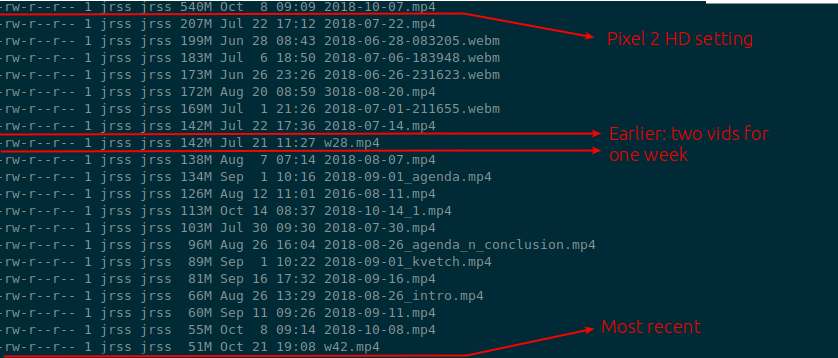
I reached the conclusion that my written journal is just better at keeping track of my experiences. Since I re-created the way I save my achieve files now, it also means the links from the journal to the events is never broken: I just have to make sure to refile an event from my “oh snap” thought-dump folder into the current week’s org file, and I’m good2.
I still record a short “weekly summary” on weekends, and now I find that I’m actually looking forward to it. These are now 10-20 minutes long videos in which I briefly go through my agenda and logged events and explain what happened while my memories of this week are still fresh. I then give the week a “theme,” like “agenda and conclusion” if I can.
This work sas a way for me to remember what happened far in the future if I want to reflect on my experiences but not look for something specific, or if I’m not sure what it is. It’s also a good way to reflect on the major events of the week after I had a weekend to slow down and process.
1 Note from 2024-09-26: today I live by subtasks and such Keywords in org-mode; they are a critical part of my organization
2 Note from 2024-09-26: today, I’m back to using a hand-written journal for summaries of personal reflections and emotions, while the more technical notes about the task are included there. Instructions for the future are kept in a separate notes folder, where I use Prot’s Denote to write them in a step-by-step format with visual aids as needed in org-mode.
Libre and clothes
When I write, I live in Emacs (with the awesome Solorized theme) inside org-mode.
With time, I found that org-mode has already made me a more efficient writer and note-taker. I write notes in every meeting now, whether it’s my"turn" or not. I write notes as I work on every solution and every problem I’m facing. I write first thing in the morning, usually about my org-related thoughts as I wake up, over a cup of Sumatra coffee (a little almond milk, one pack of sugar). Quite honestly, Org makes me feel good because it’s transparent. It’s an extension of my thoughts, continuing on one long line, uninterrupted before I stop to think a second and reflect on what I was thinking (X-q).
There’s no pretending in Org. No fancy text, fonts, or even images. Style is only applied to function. It’s a delicate balance which, with the Solirized theme, works extremely well (by the way, the story of the man who created Solorized is quite interesting and worth reading).
Alright, but every now and then, you need to present stuff, and this means you need to “dress up” so other people can talk to you and relate. The “Normals,” so to speak, do not understand my org-mode dedication and often give me concerned looks when I type away a single long line into a blank screen. The purity is empty, and the lack of buttons and distracting elements feels threatening without GUI guidance. Fine then, I can do fancy schmancy.
Most org-mode folk I’ve read and listened to talk about LaTex. In my case, that meant a full installation, which is huge—over 2GB. It’s not worth it for occasional usage, especially since I work in a Microsoft environment, and most people I’ll share with will need .docx or .ppt format anyway. So, for me, .odt seems like a better answer.
Two things are needed on my Emacs (version 25.2.1) for that:
Now I can create the .dot file, which I can open in Libre Writer. Ooof. Hello word GUI, with weird paper-screen restrictions look. And the white, the white! It burns us! Overall, things look excellent, but if I want to change fonts, move around images, eye-candy, etc, now I can do it without leaving Linux. Then again, if I really need to produce a document, I might as well save my .odt in Writer to a .docx and remote into my work computer, where Microsoft reigns supreme. Options. We like having them, yes?
Another option I was considering is to use Typora, a pretty markdown writer. It comes with Pandoc and can handle Word and PDF files. Typora does not feel “Linux-free” to me and seems heavily inspired by different “minimalist” Mac world processing apps if that’s your thing. It probably won’t show up in your distros and requires installation from a PPA. I used Typora for a while for markdown, but we’ve parted ways.
I’m curious how this will stand out when I present my notes (since I’ve become the unofficial note-taker at work for the reasons mentioned above).