
YouTube removes a video explaining how to de-google
About two months ago, I criticized Life Hacker’s article about de-googling. In a nutshell, the article is oversimplified and doesn’t go further beyond the same recycled bullet points of “use DuckDuckGo” and the like.
LifeHacker is not alone in this. I once read a similar article from the NYT tech reporter (I believe it’s somewhere on my old blog; I need to find it), and there are others, too.
The problem with simplifying de-googling is that it’s not simple at all. Even some tech folks I respect, like Irreal (which is how I learned about the LifeHacker article), oversimplify it with a blanket solution like “just use Apple.”
Every now and then, someone has a few good tips. This morning, I saw a video from Louis Rossman, who recommended someone I haven’t followed in a while: Linus Tech Tips.
Linus’ video kickstarts a de-goolging series, because the ways Google is tracking our lives have enough material for a couple of 20-minute videos. Linus goes through all of the big things, including YouTube.
It’s no surprise that part 2, which discusses YouTube in depth, was removed from the platform because of “violating YouTube’s Community Guidelines.” If this is not proof of the quality of the content, I don’t know what is. Part 2 is still available on Linus’ Reddit at the time of this writing. I suggest you watch it while you still can. There are other platforms that can be used to advertise this content, and I think it’s worth it.
I watched part 1, and I can confidently say that it gives an excellent rundown of options that most folks would be comfortable enough to try. It does get a bit deeper into the woods with DNS and routers, but Linus makes an effort to explain these things without getting too deep into them. Still, I think this is where most people who need De-Googling will give up. After all, part of the problem with De-Googling is understanding what Google does so you can seek replacements.
I was just asked for an ID in the supermarket because I bought a six pack. I lifted my cap, showing my bald head: “is this good enough?”
We both had had a laugh and I have my beer. 🍻 Fun moments.
Back in time with MB hiccups
I’m enjoying my new “On This Day” page. As I mentioned before, I’m borrowing Jamie’s blog gardening idea and trying to enhance it. I want to import blog posts from my old blog into my new one.
This is not so simple. It requires I “schedule” posts from the past, which is a crude workaround, as it’s not meant to work this way.
I have to be careful and make sure I put in the date correctly, or the post will default to the present day. If I mess up, I need to change the date of the post to the past, which does not move the current post but duplicates it to the past date I specified instead. I am left with a copy of the post in the present day, which I cannot edit or delete unless I rebuild the blog.
For example, a few days ago, I brought back a post about scripting in Bash. It needs work. The markdown contains a few formatting errors, not to mention a healthy dose of typos and poor choice of words I wouldn’t use today.
I wasn’t careful enough and published it immaturely. Instead of receiving the datestamp from 2019, it was posted on September 1, 2024. I tried to correct this and change the date back to 2019. This created a duplicate post on that date while leaving the original post in 2024. The 2024 post showed on my Mastodon feed, and people commented on it, thinking it was from a few days ago (as they should, since It had the date of September 1, 2024). Back on Micro.blog’s backend, I could only see the post from 2019, the same one in the link above. The duplicate post from 2024 was not there, so I couldn’t edit or delete it.
The solution to removing that “ghost” post was to rebuild the blog on the backend. I think of this option as pressing “reset” on my blog. This fixed the issue. The ghost post disappeared, but it took the comments with it.
Now, I only have the correct post, the one from 2019, and I have a draft with corrections (it’s a long one!). If you comment on this post, it should be fine once I update it. I would wait though; there are a few corrections I need to put into place, including broken links and weird formatting issues.
While it doesn’t come as a big surprise, this article supplies us with evidence and data that we’re not going crazy: our toilet paper is getting smaller:
Why toilet paper keeps getting smaller and smaller thehustle.co
Good riddance. They’ve lost their way and have been pushing their political agenda ahead of their objective news coverage for too long.
WSJ and AP News for me.
I enjoy these walks that end on a bench somewhere, looking at the leaves, feeling grateful for places such as these. 📷

I woke up a second time (this is what happened the first time) and cleaned out my projects in Emacs. I had 12 projects, a mix of finished, canceled, and active ones, but now it’s down to 4 💪.
Rabit Holes
Woke up a bit after five in the morning. Mind racing, thinking of unfinished tasks at work, trivial ones, but when you’re half asleep, you don’t have the sense to convince yourself of that until you’re more awake.
Installed Micro.blog for macOS again. Discovered Grammarly stopped working outside of Safari again. Reinstalled. Meanwhile, I saw my feed on Micro.blog, where @javbel said, “Two things about this”. It’s a nice cover for Mad World, so I felt like listening to Mad World. An hour later, my browser tabs look like this, by order:
- The Curious Meaning of ‘Mad World’ by Tears for Fears.
- Tears for Fears - Mad World | The Story Behind The Song.
- Wikipedia: Tears for Fears,
- Wikipedia: Mad World.
- Wikipedia: Bath, Somerset.
- Wikipedia: The Primal Scream.
- YouTube Music: Mad World (TFF version).
- YouTube Music: Mad World (Garry Jules version, AKA the Donnie Darko version).
- Reddit: Which Mad World do you prefer: Tears for Fears or Gary Jules?
Did you know Mad World was originally written by then-unemployed 19-year-old Roland Orzabal (Tears for Fears) while his girlfriend worked three jobs so he could stay home and look outside the window playing around with his guitar? He watched people going to work from above and came up with the lyrics (see link 2 above).
Such a dark powerful song, influenced by primal therapy (that link I opened just now) nevertheless, about lack of feelings on one hand and feelings about death on the other, and Orzabal had no idea. Listening to the TFF version, I believe it: it’s punchy, upbeat even.
Garry Jules, on the other hand, who did a more true-to-form (or true to lyrics?) version a couple of years later, performs the perfect version for Donnie Darko and what I believe is the song’s true meaning.
How can a 19-year-old teenager who doesn’t need to work for a living create something so different than what he is at that time? Can we experience feelings that are completely disconnected from our daily experiences (…." daily expiii-riences…." in a Mad World tune, as playing in my head right now)?
It’s possible that at the time, Orzabal had some suppressed feelings (if to go by the theme of the book), and those did come up in the song, but listening to the song he created with Curt Smith (who ended up singing it), I don’t believe it. He wrote about what he saw and read, letting his creativity take over. Then the song was out as its own entity, something separate from its creator, like a child born to parents, and they are alike but also different than the parent.
The feelings we express are entities in themselves, based on our experience, but do not reflect them completely. I find the whole thing funny but also kinda sad. Time to go to try to sleep again.
I’ve noticed several times now that certain apps I installed on the Mac “disappear” or lose the permissions I gave them before.
TechSmith’s Snaggit is one example, and Grammarly is another. I’m still on Sonoma. Is this a thing other experience?
Home gym: why non-adjustable single weight dumbbells are better for me
I cursed and paused the app mid-set. It wasn’t the first time, second, or third (I stopped counting after that) that the steel from my weights bolt splintered into my fingertips, left unprotected with my gym gloves.
It wasn’t the only thing I disliked about my traditional adjustable disk dumbbells. The other issue was changing weights between sets: when one exercise requires 20 lbs and another requires 15, you need to unscrew the bolt, take out the 2.5-lb disks at each end, replace them with 5 lbs instead, and tighten the bolt again. Imagine you have four alternating sets like this, and you have to repeat it each time. It’s a pain.
Then there’s bulkiness. The disks are pretty big and flat, and I’m a small-ish guy. The size of the disks makes it hard to do certain exercises that require me to hold the weights close together or when I need to lower them to the floor, and their size prevents me from lowering the weight fully.
At some point in June, I decided to try Amazon Basics rubber hex dumbbells to see if it improves my exercise, and that got me pissed off - because I hadn’t thought about it sooner. The difference is huge.
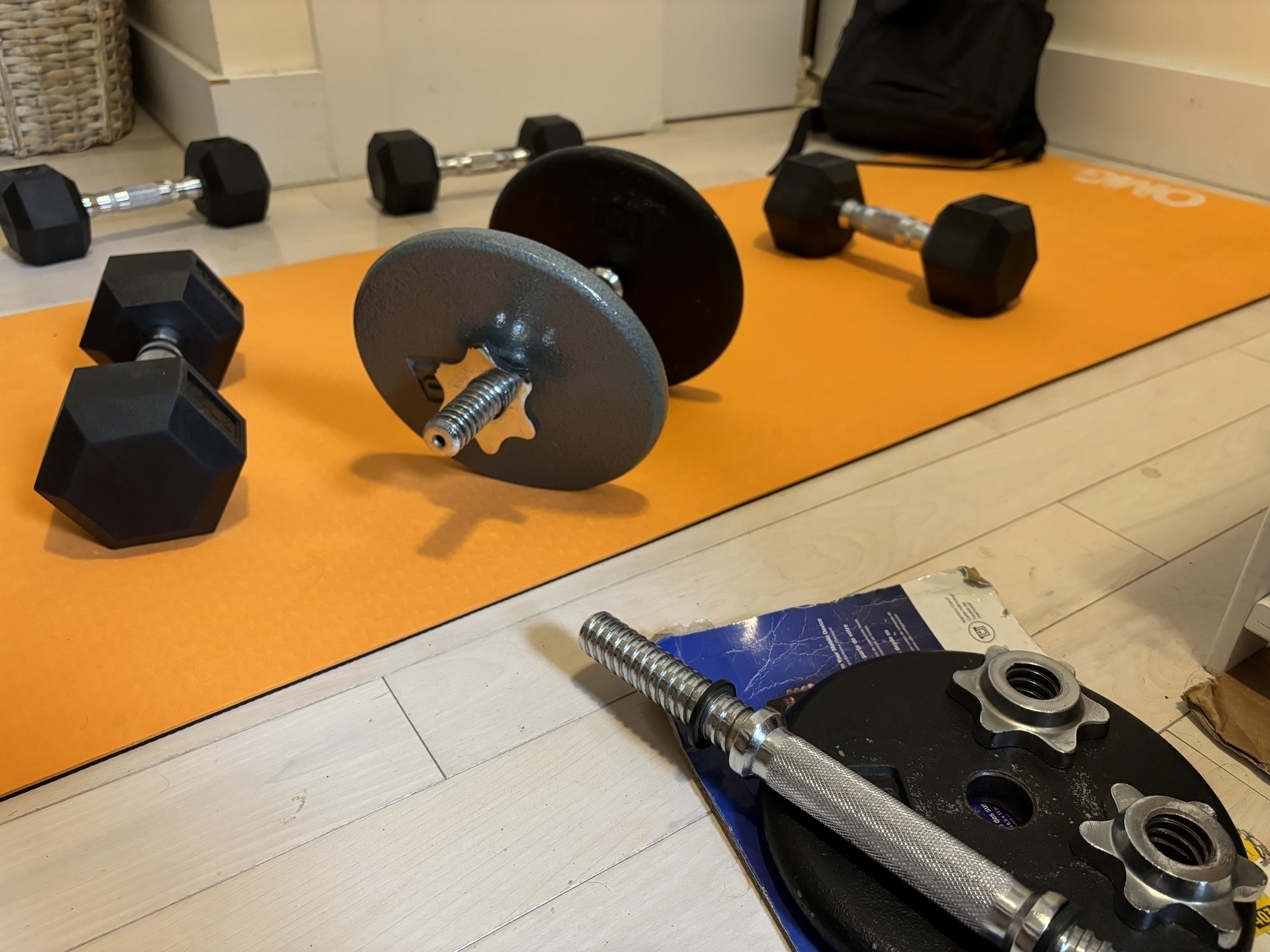
Above, you can see the difference in size between the disk weights next to a hex one I got more recently. To the lower right, one of the bolts I have to tighten on top of a disk. These suckers are the one that keeps splintering. I am placing them on cardboard so I don’t scratch the floor.
With the new weights, I don’t need to switch between weights quickly, so my exercise sessions are more fluid and more fun. I can do the exercises as intended, improving my form and isolating the muscles I need to work on. The hex-rubber weights mean I don’t need to worry about the floor (the apartment has a white wooden floor, a genius idea), and they don’t roll away from me when I place them down. I can even use them for support as push-up handles. And no more splinters.