
Emacs org-mode
Back to digital journaling once more...
For the last week or so I’ve been journaling on my computer again instead of in my notebook. This is a cycle for me I keep going through.
The urge to write in a handwritten journal is there, and I love the feeling of sitting down at a desk with a good pen and paper pages. The problem I’m having is the amount of details I need to put in—and with it, the time I need to spend on writing—and the references I need to make while writing.
Unsurprisingly, the culprit is my work. There are so many to-do items each day that, combined with my personal tasks, Start to cause me to lose track of the big picture. While I still have my projects organized in big bullet points with all the references I need in org-mode, I am missing the “so, what does this make me feel?” aspect of it all—the reflection of looking back on what I did last week or last month.
This is where my written journal would have fit in, but a written journal cannot link to my projects directly. Meanwhile, when I want to write about a fun hangout I’ve had, I want to include a list of places and map snippets, and while I can do that in my notebook, I just don’t have the time to find the locations, write down the addresses, and print out maps snippets - all are things I do within minutes in my digital journal.
Another issue is that my hand cramps if I keep writing for a long time, especially as I start writing faster or get excited. My handwriting becomes sloppier and I can’t fix my spelling mistakes without crossing out a word. Sure, I can use write out (or Tipp-Ex, depending on where you’re from), but that introduces even more time and more friction.
I started to realize that instead of just writing, the first thought I have is if I should write, where, and when. The option of taking out a personal notebook filled with intimate details is not realistic in most cases most of the time, so I can only reflect on my day at specific times that I don’t always have or want to spend on something else. I miss the availability of “just writing” what I need.
Ironically, I use a notebook, my pocket one, to write quick ideas or summaries. Again, it comes down to speed: taking my pocket notebook out of my pocket with my pen to write something down is faster than doing it on the phone.
So I guess I came a full circle. Journaling is digital, and quick ideas I want to capture are handwritten in a notebook. 📓 🤷🏼
Emacs-plus PATH in macOS Sequoia
Important: this is for emacs-plus for macOS via Homebrew.
After the upgrade to macOS Sequoia, Emacs' Dired didn’t find gls, which made it impossible to navigate to folders and open files this way. When a program can’t find another program, it’s usually a sign something is wrong with the path environment.
On Mastodon, Jumile directed me toward a discussion about a similar error on Github. Seems to be a path issue indeed, from what I can tell. Something with PATH injection in Emacs (I don’t know what this is yet, but from the name, I get a vague idea. This seems to be an interesting read)
Two solutions and a workaround.
The workaround is to launch Emacs from the terminal, which loads the environment correctly.
Something more permanent is manually doing what emacs-plus does automatically: copy and apply the PATH in the init file, as explained in the GitHub above. To do that, you want to go into Info.plist inside the Emacs package: /opt/homebrew/Cellar/emacs-plus@[your version number here]/[version number]/Emacs.app/Contents and locate the PATH string (search for “PATH”). On my system, it looks like this:
<string>/opt/homebrew/bin:/opt/homebrew/sbin:/usr/local/bin:/System/Cryptexes/App/usr/bin:/usr/bin:/bin:/usr/sbin:/sbin:/var/run/com.apple.security.cryptexd/codex.system/bootstrap/usr/local/bin:/var/run/com.apple.security.cryptexd/codex.system/bootstrap/usr/bin:/var/run/com.apple.security.cryptexd/codex.system/bootstrap/usr/appleinternal/bin</string>
And copy it into the init file, telling it to set the environment like so:
(setenv "PATH" "/opt/homebrew/bin:/opt/homebrew/sbin:/usr/local/bin:/System/Cryptexes/App/usr/bin:/usr/bin:/bin:/usr/sbin:/sbin:/var/run/com.apple.security.cryptexd/codex.system/bootstrap/usr/local/bin:/var/run/com.apple.security.cryptexd/codex.system/bootstrap/usr/bin:/var/run/com.apple.security.cryptexd/codex.system/bootstrap/usr/appleinternal/bin")
(setq exec-path (split-string (getenv "PATH") path-separator))
Something even better came from David Hagerty: exec-path-from-shell. This package is “copying important environment variables from the user’s shell: it works by asking your shell to print out the variables of interest, then copying them into the Emacs environment.”
I tested it out, and it works as advertised. This is a more reliable solution than copying the path manually each time, though it’s important to understand what’s going on and what it does.
On Reddit, slashkehrin added the actual path issue on Github.
What is or why Emacs?
My “Emacs day” is July 11, 2018. Or in org-mode, it looks like this: . As I noted last year at that time, it is the day I wrote my first official journal post in Emacs org-mode, and the rest is history. I’ve been a daily Emacs user since that day.
Both my partners joke about Emacs. NK calls it “Immaculate.” When I asked them this morning to guess what I was going to write about, they rolled their eyes and nailed it on the first try. At the same time, Nat and I have “venting sessions” where we sit down and talk about work and life. If there’s something that’s too complex and I need their patience as I unfold a story, I lead with “Well, this is kind of an Emacs vent, but…” and Nat knows to brace himself.
But what the hell is Emacs, anyway?
I’m not sure I explained it in a way that makes sense. The problem is not explaining what tool Emacs is or what kind of software; that’s pretty easy: It’s a text editor, like NotePad, TextEdit, or that horrible, well-known Microsoft Office one I dare not associate with Emacs in one sentence. Asking what is Emacs sells it short and doesn’t explain why so many people swear by Emacs every day. Perhaps a better question is why. So, as the blog’s title suggests, don’t ask why; I’ll explain anyway.
Some people compare Emacs to an operating system of its own, which makes sense: it comes with so many built-in tools you could fire it up and probably do all of your computing work without ever exiting it. Well, in a command-line computer-geek kind of way.
Some of the things I use Emacs for all the time, besides writing, of course (it’s a text editor, remember?), are to navigate and operate my Mac’s files, read other blogs I subscribe to, check my calendar for events, and manage my projects and todos. I do all of those inside Emacs. But even so, why not just use my Mac’s tools or Windows if I were to use a Windows computer for my productivity?
The answer, which may not make sense to you if you’re not an Emacs user, is that Emacs is quicker and simpler and thus better for me to use. The key thing is that if it’s not better to use for something, I can manipulate and customize it until it is. My Emacs is made for me, and if there’s something I need to change so it fits better, I can do just that. Emacs is completely customizable, which means you get to tinker and manipulate whatever you need until you get those tools to work exactly the way you want them to.
Imagine you get up and make drip coffee. You grind your beans, fill in water, carefully place the filter with the grinds, and turn it on. Now, imagine that turning on the coffee maker doesn’t only start brewing your coffee but also turns on the toaster with two slices of fresh bread and also displays a crossword puzzle automatically on your phone. Not only do these things happen automatically, but also the bread is always toasted the way you like it, the coffee is automatically dispatched from your favorite roaster, and the crossword puzzle is tailored specifically to a level of your liking. On top of that, to continue with the metaphor, you can always make changes (change the coffee type, for example, so you make yourself a cappuccino instead of drip) quickly and easily, and the knowledge and ability to do so is completely yours to do whatever you want with it, for free, forever.
If you could do all of that, would you still go to Starbucks to get your coffee?
Sounds almost like magic, but for a computer, that’s what Emacs is. You could use it to read and write emails, look at maps, browse the web, listen to music, and over other 5000 additional things that exist just in its main library (it’s not even the biggest one). All of those are available for free, code and all. When you’re an Emacs user, all of these functions are available to you with the same ease - and keybinding - that your fingers are already used to.
Perhaps now it’s a bit easier to understand why Emacs is difficult to explain. It’s not just another application. it’s a lifestyle. To me, it has been the ultimate productivity hack - and it keeps getting better.
Emacs configuration is personal, like... stickers?
Over at Irreal, JCS says “I don’t understand what those desiring a minimal confutation are seeking or why they’re seeking it,” speaking of Emacs configuration.
I agree. While I used to be intrigued by minimalism in the past, overall I’m over the idea. For one, while minimalism and productivity come close in our world of constant distractions, but they are not the same thing; for another, I came to appreciate some “tchotchkes” in my life that have no use besides reflecting style or personality. Take this sticker for example, on the shelves on my desk:

It’s an inside joke between me and NK while reminding me of the good-natured silliness we have in this apartment, and of course, it’s the Muppets. I don’t need this sticker; it has no function, but at the same time, it brings a smirk to my face when I get off my chair in my room to say good morning to my partners - so why not?
Emacs configurations is somewhat similar. Sure, it’s technical, and it’s a collection of computer instructions, but anyone who’s been messing with their Emacs configurations for more than a couple of months had comments all over their config file, not to mention (as JCS also explains in his post) the choice to include certain configuration to make Emacs fit their lifestyles. It’s one of the reasons reading through these configuration files is fun: each one is a bit different, with different ideas and perspectives. Emacs is a personal tool, and each person has their own Emacs “stickers” inside their config.
org-mode to Apple Calendar sync via beorg
beorg is a well-known org-mode productivity app among Emacs iPhone users that allows you to view and edit your tasks on the go.
I’ve known about it for a while, but I didn’t have a use case for it for two main reasons. First, I used my Android for my tasks until recently, and with it the excellent Orgzly app (now Orgzly revived). Second, iOS doesn’t work with Syncthing, which is what I’ve been using to sync my files for almost a decade.
Now that I have my now.org and events.org files, I want to view them on my iPhone so I can view my work-related tasks there. This means using iCloud sync. Personal events now also show on my work phone, but at this point, I don’t care if Apple knows I’m going to see my sister this weekend or if I’m meeting up with a friend after work. After all, Apple knows this anyway because I take my iPhone with me anywhere I go; the Android stays at home1.
I installed beorg again and discovered a nice surprise: beorg also syncs these events to my iPhone’s calendar. Events I create with a capture template in Emacs now find their way into my Apple Calendar through beorg, which sees these events in my events.org because it’s synced from my Mac to my iPhone with iCloud.
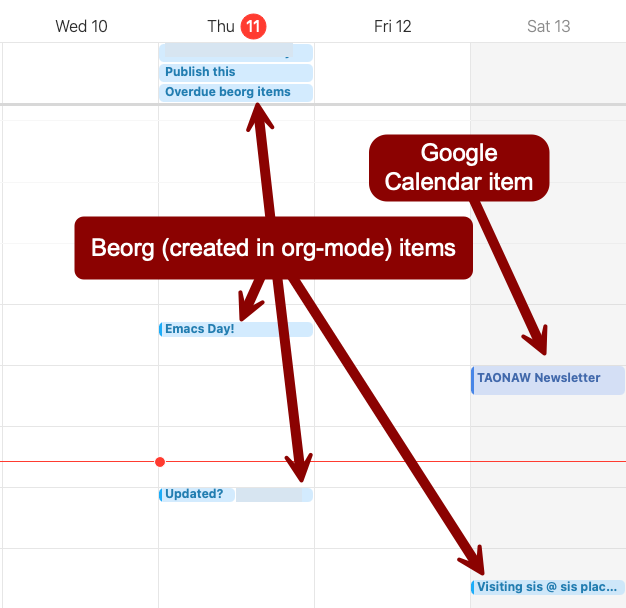
I don’t necessarily need to see my overdue tasks on the calendar, but they are there anyway. This can be useful especially when they’re out of the way like this:
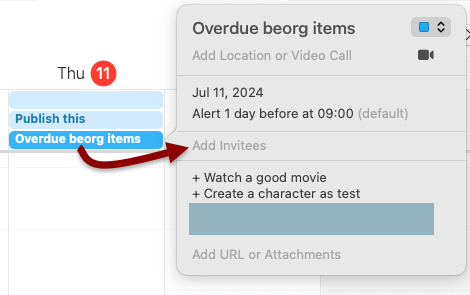
I know different packages can do the same thing directly from Emacs, but I gave up on those because they were too complicated and fragile. Another issue I had with these is that I can’t sync my work calendar, which is on MS365, with my Calendar on the Mac. This is a restriction from my employer, which wants us to use Outlook.
Since I now do whatever I can to keep as few Microsoft products on the Mac as possible (especially after I had to wipe it because of corrupted MS Teams configuration, which no one knew what to do about, especially Microsoft’s support), I’m going to keep using the browser version of Outlook for now, which I prefer anyway. so no syncing for now.
Actually, as I was writing this post and looking at beorg, I found I can sync my MS365 events with my Calendar on the Mac! My iPhone is connected to my MS365 account with Outlook, unlike my Mac, and shows events on my Apple Calendar there, where beorg can see it. Turns out beorg has a handy extension that saves calendar events into an org file from the iPhone to the same folder I have synced with iCloud. This means that I see my work calendar (and my Google calendar as well, since it also syncs to Calendar on the iPhone) on the Mac in read-only mode. I can refile events from that org file to my events.org and extend on those with notes if I need to (Emacs will copy the entry but will not delete it from the calendar org, which is fine with me).

I like what I see! I can finally have all my events, work or personal, in my events.org! it also sync quickly, so I can change things like the duration or location of events and the updates show almost instantly. Adding things from my MS365 and Google calendars to my Emacs agenda is an excellent find.
1 The reason for why the iPhone and why I gave up a big chunk of my privacy are stretched over many posts in my blogs; this one and the old one. It’s been a process (and “un” process) that spends across several years.
How my writing outlets balance out
I have several writing outlets, and each one has its own benefits and disadvantages.
There’s this blog, where I slowly become more comfortable writing about more personal things. It’s a good outlet because writing to someone else (you—and thank you, by the way) affects not just what I write but also how I write. Things tend to be clearer and to the point. Usually.
There’s my handwritten journal(s), where I write my feelings and conclusions about certain things as well as notes that I want to keep private. This is a good place to let out thoughts because it allows me the freedom to write whatever I want without explaining myself. At the same time, it limits how much I can write and for how long, as writing by hand is much slower and also starts hurting my hand after a while (I think it’s the pen). It’s also not a good place to find specific information, like names and addresses, which leads me to my new-old addition, the events.org file.
my events file is written in Emacs org-mode. Without getting technical as I usually do when I talk about org-mode, this file contains exactly what the handwritten journal does not: precise locations (with map snippets and links to coordinates), names of people, and exact times. For example, the events file would mention I was out with friends (their names would be captured as tags in the entry) last weekend at a certain pub (map snipper to show it) at a certain date and time. Then, in my handwritten journal, I would expand on our conversation and my opinions if I have more to add.
That last bit above, “if I have more to add,” is different from how I used to capture events in the past completely in Emacs org-mode. I would write down every day in my old journal.org file, making it a habit to try and write every morning or every night, sometimes more in between. I was writing a lot in my journal.org file, leaving little time and energy to write on my blog, let alone a handwritten journal. Too much was invested in one place.
I write on my blog much more often than I write in my written journal. Even if I don’t write a full-length post, I will comment about something I read or a quick photo with an explanation. The more I write these little “nuggets,” the easier and more streamlined writing those become. The “nuggets” workflow is completely mobile with the micro.blog app; most of my photos are taken on the iPhone anyway, and I can edit them with Lightroom or Snapspeed on my phone. I also have Grammarly turned on as a keyboard for proofreading. With these short posts, I skip writing in org-mode anyway.
As you can see, there’s a sort of a cycle going on here. My Events file would describe events along with meta information, while notes about these events would go to my blog and/or my written journal for private comments later when I mentally digest things. There’s another thing I started doing because of the influence of my events file: I started taking more pictures of every place I go to, even if it’s as boring as the sidewalk next to a place.
Photos on the iPhone (or an Android) contain important information I could use later. The time the photo was taken would tell me when the event started. The coordinates, which are captured automatically, will tell me where it was if I don’t remember the name (or if it’s just a spot somewhere without a name) later when I want to find it on a map1. A photo can also include other information, like a menu of a nice restaurant, or it can be aesthetically pleasing, like the view from a nice spot overlooking a river. Such photos can decorate the entry in the events file, be printed and included in the journal, or be posted here with an explanation. Photos are really great for all of the outlets I mentioned.
1 - I used to use Swarm for this, and I even have a feature on this blog which posts locations from it automatically, but I stopped. For one, Swarm is a private company and my location data belongs to them before it belongs to me. For another, getting this information out and use it is tricky.
Rethinking & Organizing my life with org-mode (part 4)
Welcome to part four of my rethinking and organizing with org-mode.
In the last part, I rediscovered org-achieve and the option to archive past events. Turns out this works well. Since the archive is an org-mode file, I can add options (like making it present pictures) and give it a user-friendly name. Here’s an example from an event I just blogged about. Looks pretty good, no?
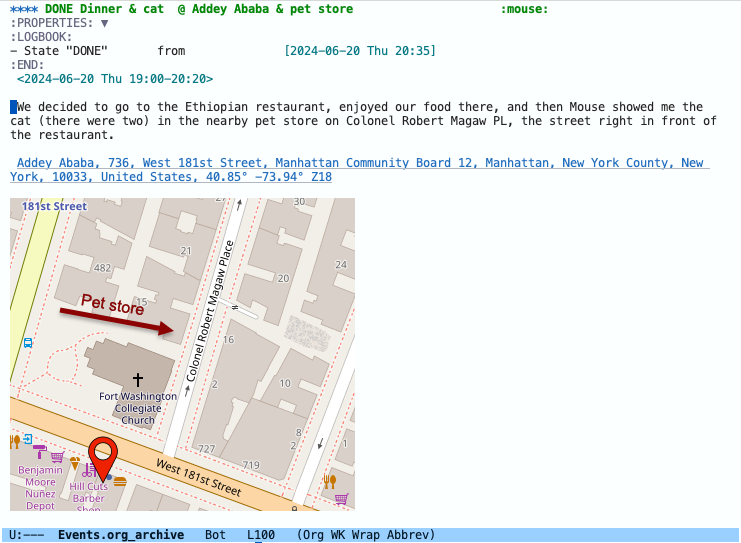
The map is by the OSM package, and the screen capture with annotation is with Snaggit, which I use for work. You see it because I included #+STARTUP: inlineimages at the top of the file. The date breakdown is an automatic org-mode archive option I discussed last time. I use the tags to include people in events and at this point, also to note that I took photos (I don’t want to attach those because this will quickly eat up space - though I could just link somewhere else where I store them… 🤔)
Not bad. I like.
Rethinking and organizing my life with org-mode (part 3?)
I spent some time reading through the manual for part 3 of organizing my life in org-mode. org-mode has an archiving function I haven’t bothered with in the past because dumping old files into a folder was easier to do.
There was this interesting example under org-archive-subtree help text:
“~/org/datetree.org::datetree/* Finished Tasks” The “datetree/” string is special, signifying to archive items to the datetree. Items are placed in either the CLOSED date of the item, or the current date if there is no CLOSED date. The heading will be a subentry to the current date. There doesn’t need to be a heading, but there always needs to be a slash after datetree. For example, to store archived items directly in the datetree, use “~/org/datetree.org::datetree/”.
Ah ha! So you refile a task and put it away in a different file (this is what archiving does by default in Emacs) and store it in its appropriate month. Not only that, the function will look for when you finished working on a project and automatically store it on that date in a header of your choosing. Good stuff.
For example, let’s say I started to write a technical document at work about pink rabbits (I’m in a good mood, OK? Bare with me, I’ll get grumpy soon enough) and this project includes a couple of subheaders: a meeting we had about the project, a task to backup the existing version of the document, and a couple of more TODOs regarding images and sending it for approval by subject matter experts. So far so good, this starts in Now.org where I keep working on the project and add to my notes.
Let’s continue with the example. Two months later, I’m done with the pink rabbits projects. I go to the parent header in my Now.org file, “update Pink Rabbits document,” and change its keyword from ACTIVE (my keyword for projects) to DONE. Since I have the keyword “ACTIVE” defined with ! in the file’s options (this is defined by the line #+TODO: TODO(t) ACTIVE(a!) MEETING(m!) | DONE(d!) CANCELED(c) at the top of the file - you can see ACTIVE is triggered by a! while its neighbor, TODO, is only t which means a timestamp will not be added), org-mode adds a timestamp for when I marked it DONE.
There are three basic scopes of defining where to put the archived headers. I can define one file in my init file for org-archive-subtree, which will create a global definition and thus a file for everything (not very useful), or I can define the destination for the archive at the top of the org file (so Now.org will have a line: #+ARCHIVE: my/path/is/here), or, I can go into the individual headers and define it there as a property with Archive: my/path/here. This last one is best for me, as I can quickly define headers for, say, article updates, announcements, and misc, each one of these parent headers pointing to a different file, if I want to do that. Nice indeed.
With the datetree option above, these archived tasks will be filed in these files and under the date and time I finished the project. The archive function will include properties in each telling me exactly where these projects came from.
I was about to start using this, but there’s only one problem… I haven’t found out how to restore something back from the archive.
Back to the example. Say I thought we were done with our pink rabbits document so I archived it away. Then, next month, someone says “Hey, JTR, we need to mention the catapults we’re implementing with the pink rabbits. Can you add it?” I say “Sure, no problem!” After all, I have the power of Emacs and it takes me less than a minute to find this project in my archive (consult-grep is amazing for this sort of thing).
So go to the archive file, I find it, and… I want to pull it out of the archive and put it back into my Now.org as one of my active projects… but… how do I do that?
I can be barbaric and go around killing and yanking, but there must be a better way, right? I think? Grrrr… (see, back to my grumpy self).
Rethinking and organizing my life with org-mode (part 2)
The other day, I mentioned how my projects file in org-mode is basically a huge mess that makes it difficult to be on top of things, and then an idea occurred to me during a shower, as all good ideas do: organizing is important when I save and store things, not when I’m working on them.
When I work on something, I deal with a dynamic environment with tasks, reminders, attachments, comments, and a bunch of other things. This is the information-gathering phase. The main point is to collect everything quickly so I have it available later. It’s when I’m done with a project that I need to clean it up and store it in its place so I can find it later.
I was considering (still in the shower) the “now page” phenomenon. What if I change my project.org file to now.org? Technically it will look the same but conceptually it will be different. A place for things I’m actively working on in the present moment.
The real change should take place in the org files I save my projects into. Work projects will go into dedicated files, depending on the kind of task. Personal things will fit into their own files. As a matter of fact, the work-personal separation is not as important as it used to be, as each activity (work or personal) gets a separate file anyway.
For example, if I’m working on a vacation in now.org, I have a project with the location, the hotel, a map of the area, a couple of places to see, and a packing list. When the vacation is over, it will go into an events.org file under a “vacations” header. When I place it there, I will also include a link to the photos I took, tag it with “journal” if I wrote about it in my journal, and add a couple of annotations to the map, depending on where I’ve been.
In the future, when I want to reflect on the vacation, I will know exactly where to look. Keeping these files small is important so they don’t become overwhelming. An indicator for that could be casual reading: Can I just open the file, read through it, and enjoy it? Maybe even make it into a PDF and print it? The answer to these questions should be yes.
The trick is to know when a certain “thing” happens often enough to have its own file. For example, would I need a vacations.org file, or is events.org (which also includes going out to restaurants and movies) good enough?
For this, I think the size of the file itself could be a good indicator. In org-mode, the files contain only text. So if a file contains more than, say, 50KB, it means it has 50,000 characters. This roughly translates to 7,000 - 10,000 words. Since the characters in org-mode are also symbols for syntax for meta information, I think this is a roughly good number for now; I can always adjust it later.
This concept also works when I’m happy with the category the file captures, but as it grows, I can split it by months or years. For example, if events.org is good enough to capture vacations, restaurants, movies, and other social gatherings, and I want to keep it this way, I should have event_2024.org, and then make events_2025.org, etc. It’s possible some things, like certain work activities, will need to be broken down every couple of months while other personal tasks only every year or even only a couple of years.
I started storing some of my completed tasks yesterday, and I slowly chipping away at my big projects.org mess. As I go through it, I will get a better idea of how it’s working and if I feel like I am back in control again. Since I need to wipe my Mac and start fresh (this is a story for a different time), I will have a nice clean start this weekend. That’s the goal, anyway.
Rethinking and reorganizing my life - with org-mode
I used to be more organized. At least, that’s what I think.
When I was working as a desktop technician, I added all my tasks into a file called “Oh Snap,” which I cleared every week. Every Monday morning, I would go over my Oh Snap file and archive done tasks, remind myself of and write notes of existing tasks, and make sure a weekly backup was created.
In my current role, my tasks mostly grow into projects. Besides some quick things, like creating an announcement or an alert for our website, these projects usually take weeks; some even take months. Going over my Oh Snap file every week stopped making sense.
But when I stopped my weekly routine, I also stopped organizing tasks. Now I have one big file mixed with personal and work tasks, some active and some complete. It’s an intimidating blob of “stuff,” and just looking at it makes me want to run away to a video game instead.
I also write less about what I do in my personal life unless it’s complicated enough with several todos and a packing list or if I have the itch to write, which is when I pull out my journal. This means that a lot of useful information never gets saved. Things like map snippets with locations (easy in Emacs), links to pictures I took with descriptions, and the people I got to know - all of that is not written and gets lost.
This made me realize that the weekly routine around my Oh Snap file was one thing; organizing different tasks and events into categories is also important. I don’t mean just “work” and “personal,” which are too vague and big to work with. Categories should be a rough outline of familiarity, a way to frame and save things for better retrieval later. For example, “vacations” might be a better category than “events” (too general), and both are better than just “personal” (way too general).
A good category is like an apartment building where I know certain past events happen. If I want to see pictures of my niece from last Thanksgiving, a “family” or “holidays” category would make sense; at work, if I want to recall when I created certain announcements for the website, then “website” or “announcements” is a good category for that.
So now I’m trying to figure out a couple of things. First, when should I visit my projects file, which is a dump of everything I do, and move things out into their categories. Second, what are these categories? We shall see what I come up with.
I’ve updated my Microsoft Edge notes, after working with it for a couple of weeks. If you use Office 365 for work like I do, here’s a tip: Maximize (but don’t go full screen!) when working with Edge. Read more in the full article linked above.
For Emacs org-mode users, two tips in two new notes: linking to other org-mode headers and plain lists to checklists in org-mode.
As always, you can access my welcome note and read all my notes there.
I'm retiring my Android from my org-mode workflow
I feel a bit weird disconnecting my Android from my work tasks and projects in Syncthing and thus cutting it off from my Emacs workflow, but it’s about time.
I haven’t used my Android for work notes in months - probably a year. I keep having syncing conflicts with Syncthing between the Android and my Raspberry Pie, which still serves as my file server after four years (I love this thing!), and there’s no reason for those anymore. I use my Mac for Emacs 80% of the time nowadays, and I want to include my iPhone in my workflow now so I can use it to record org-mode notes, and the iPhone doesn’t play with Syncthing.
Since my iPhone is my work phone, it makes sense to me that work-related notes are synced to my iCloud, as these are not personal or private, and I want to be able to create org-mode notes on the go again. Apple’s Notes is nice and all, but it’s no org-mode, and it’s not private.
The issue I had yesterday with Elfeed-org is fixed. As it turns out, the parent headers for the feed have to be tagged with “elfeed” for the feeds to load correctly. It looks like this:
    * Blogs                                                              :elfeed:
    ** Blog 1 feed here
    ** Blog 2 feed here
    ** Blog 3 feed here
    * News                                                               :elfeed:
    ** News site 1 feed here
    ** News site 2 feed here
    ** News site 3 feed here
That’s all that was needed! Thanks again, takeonrules!
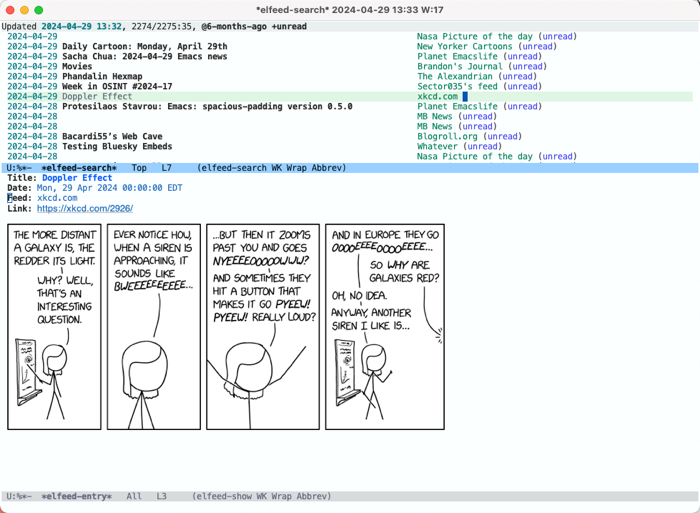
And here is what my RSS list looks like in action. It’s nice to sit back with a cup of tea (coffee is a morning thing!) during lunch break and see what’s up:
Scratching my head at an Emacs issue: Elfeed-org doesn’t seem to load my feeds. I’m not sure why, everything looks OK. I have my feeds.org and I have the path defined in rmh-elfeed-org-files and it does show the value it’s supposed to have.
Does anyone have a working config I can look at?
Another little gem I’ve been using for a while: org-toggle-narrow-to-subtree. I added an explanation to my emacs config:
Macro I created to focus on projects (headers in org-mode) that gets everything else out of the way. The idea is simple: when standing on a sub-header (in my case, this is usually level three. For example, I’m standing on “pay electric bill” in: * Personal > ** ACTIVE pay bills > ***TODO pay electric bill), jump to its parent (in this example, “pay bills”) and narrow. When running again, expand it back. This is working by using org-toggle-narrow-to-subtree. Very useful when working in a buffer with several projects.
(fset 'jr-project-focus
   (kmacro-lambda-form [?\C-c ?\C-u ?\C-c ?n] 0 "%d"))
I wanted to fix company-mode for Emacs, and on the way I remembered that was something Emacs already comes with. Yep, and it has a name you’d not guess in 100 years: hippie-expand. Added to my config. See Mickey’s post about it if you don’t believe me.
Emacs org-mode category
I’ve been following 404 media for a while, and after they recently offered a discount, I decided to become a paying subscriber for a year. This is a unique publication with a small, dedicated team of journalists behind it.
With the subscription, they also offered a private RSS feed for full articles. Since I can’t share that private feed with the world, I decided it’s time to migrate my feeds out of my main emacs settings and into its own dedicated org-mode file, using elfeed-org.
As this is yet another Emacs org-mode update, and several people comments on those, I created Emacs org-mode category on my blog with its own dedicated RSS feed: taonaw.com/categorie… This post should be on it as a test.
Updating my Emacs settings file. As this is now in an org file, it’s so easy to write comments there. It helps since comments on the blog get lost over time. If you’re an Emacs nutcase, let me know what you think 😬
Sharing my CSS Tweaks and Emacs Configurations
And now it’s my to complete a milestone:
Uploading my Emacs config! That’s right. And with it, side by side, the CSS customizations I’ve made to my blog (I’ve made a couple of changes since I last talked about it).
Find them in my public folder on GitLab or just read the new welcome note there.
He did it! Prot created a function that converts denote links back to “regular” org-mode links, using some regex magic.
This means I can now upload org-mode files directly into GitLab, which displays org files natively. Take a look