
Emacs org-mode
Welcome to the Emacs org-mode category.
You can subscribe to this category only via RSS!
I am working on restoring some of my related posts from my old blog, so keep checking here for new content.

More Emacs would be nice, but...
Earlier this morning, when I was up between my sleep phases, I was looking for some Emacs content through irreal, one of the most prolific Emacs blogs out there. Irreal publishes a post every day, and these posts usually summarize and link other Emacs-related posts to other blogs. It’s easy to find blogs with good Emacs stuff and check their archives for even more Emacs. That’s the life of an Emacs user - learn it, tweak it, find another cool thing you haven’t thought about, learn it, tweak it…
I would like to have more Emacs in my life, but unfortunately, it’s not easy.
My blog archives are full of complaints about Microsoft products and web tools that I have to use because of work. I can’t use email in Emacs because logging into Office 365 for work is restricted, and no other apps but Outlook can access it (not even Apple Mail). ServiceNow, the platform we use for IT tickets, has an API, but it’s also heavily restricted, forcing us to use the browser. Communications and phone calls happen on Teams, another closed Office 365 application. It’s not even just Microsoft specifically, even though I like to blame them: it’s the cloud.
I work with different IT departments, engineers, and managers. Usually, when app X doesn’t answer certain needs, the solution is to find a new app, which in turn is also integrated in the cloud with its own restrictions. This happens so many times that we don’t get the chance to explore the depth of one app before there’s another one. Each person brings his own new favorite app to add to the party.
I’m guilty of this too, on a personal level. I love writing in Emacs, but my favorite writing companion, Grammarly, doesn’t work with Emacs (yes, I know there were some packages for it in the past; they were abandoned, and as far as I know, Grammarly doesn’t have a working API anymore). Micro.blog uses its own macOS app for writing content, which brings convenient integration to my other content (like my photos and saved bookmarks) that I don’t currently have in Emacs, so I just copy-paste my posts into it these days. Even good tools like being on my iPhone are not as fluid as Apple Reminders or Notes, and it’s just easier to start something there and have the discipline (this is the weak link) to bring it all back into Emacs later.
Still, despite all of that, I love working in Emacs. It brings me peace that no other app does at this point because it’s entirely mine. I know where everything is, I know how to tweak it (or I can learn how to), and I can access its org files everywhere, even if I don’t have Emacs installed. No other application organizes my life and projects so well and for so long, and I don’t see anything replacing it in the near future.
After yesterday’s issues, today I split my now.org into four different files: personal projects, work projects, work meetings, and blog projects.
Thinking about how to organize the projects in those, I rediscovered org-sort. I think I’m on to something.
More problems with my projects and meetings in org-mode
In my capture templates, I now use prepend, which works well and puts my captured header at the top of now.org, which is what I want. The problem is that I barely use the meeting capture template I’ve made. I refile from my calendar file 95% of the time, and Refile places headers at the bottom of now.org bottom. The results: new projects are at the top, and new meetings are at the bottom. Chaos.
I know I can reverse how Refile works, but I’m not sure I want this to work globally. I can start hacking things and write functions to refile meetings the way I want, but I’m starting to think my problem is bigger than that.
See, the above is just the latest issue in the last week. When I was sorting through tasks on now.org I saw a bunch of TODOs that were tied to a project at one point on the project level; that is, TODOs are filed among the ACTIVE project level, floating out of their parent projects, and as some of those get old I have no idea what projects they were used to be a part of. Why did that happen and why, I don’t know.
On top of that, I just had the issue yesterday where some of the headers lost their “**” at the start of the header, non-headers.
I can’t trust my now.org like this. I’m frustrated, and I just want to throw every single project into its own file at this point, just because of this mess.
I need to calm down get back to the basics and define my main workflows (meetings vs projects vs quick tasks etc.)
How I handled projects in Emacs org-mode in 2024
I mentioned my projects file, now.org, is getting a little bit out of control. I’ve been playing around with a few ways to organize it since.
This is firstly a conceptional problem, one that has to do with how I organize things mentally before I can go into the technical level of how to tell Emacs to do it: a “what do I want to see?” question before a “how do I do it?” one.
Let me start by showing you what my project file looks like now:
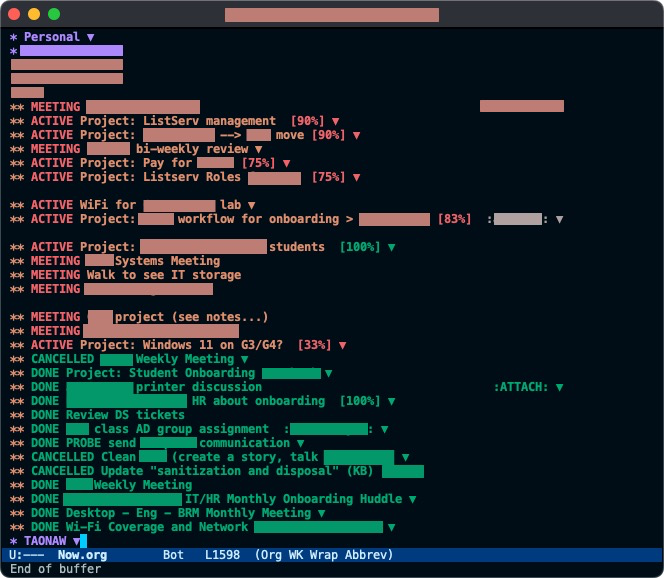
As you can see, a lot is going on.
One of the issues that are already fixed in this image is having the “DONE” or “CANCELLED” projects at the end of the file. This looks more organized than having them mixed with the “ACTIVE” projects all over, and it also allows me to focus on the things I’m currently working on as soon as I open the file.
By default, org-mode adds newly created headers at the bottom of the file. This means that every time I add another project or a meeting (an “ACTIVE” or “MEETING” in the image), it goes to the bottom of the list, right under the last header. I have to fix this manually by standing on the header I just created and moving it up with (M+↑) all the way to the top. However, I recently looked for a solution and found it: adding prepend: t to my capture templates. This reverses the order, so this problem will automatically sort itself out.
In my image, you can also see that some headers start as “Project:” and then the project’s name. This is redundant, and I hope to get rid of this soon because anything that is marked as “ACTIVE” is a project - which is defined by having sub-tasks (marked as “TODO”) under it; the idea is that a project is a large undertaking that has to be broken first to manageable parts:
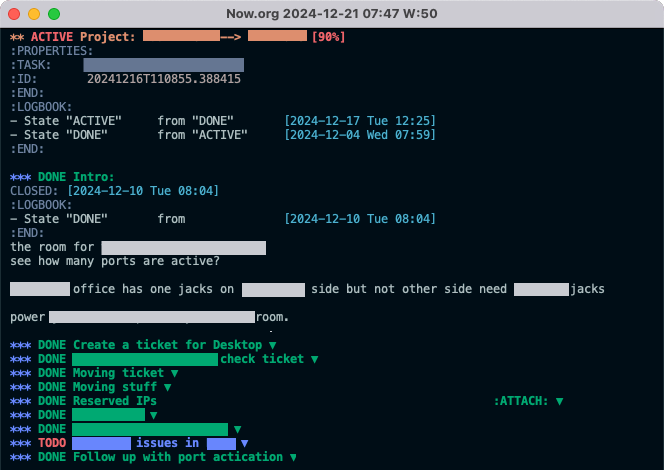
I write notes under each one of those sub-task headers (as you can see under the first one). I also find it helpful to attach relevant files (in this example, the Reserved IPs header has an Excel sheet containing details). I find that it’s easier to find files through Dired on Emacs than it is looking for them in my work’s OneDrive because they are tied to the project in the right place and arranged by date at the same time by my header’s ID (I changed that from random slugs to date-formatted IDs in the past). I can also jump directly to the directory with those files with C-c C-a F, and then use the open command on macOS (M-x !open) to open it with the default application.
Most of the projects in both images have a percent to completion next to them. Since I usually don’t know what a certain project requires to complete when I start it (what subtasks are required or how many), this is more of a general guide, if anything. Still, I like knowing how much of a project is already done. The percent cookie is an feature built into org-mode1.
Not in the images yet are emojis. I’m playing with the idea of including a small person emoji (🙋♂️) in “MEETING” headers to make them stand out a bit more. Meetings, as it turns out, are a special kind of project. It’s a place where a lot is going on at once, and I mark a “MEETING” as “DONE” only after all the actionable notes are distributed to tasks. Meetings can include tasks that start a whole new project or fit into existing ones. It’s also possible to meet about a certain project, so the “MEETING” header needs to be refiled under an existing project later as one of the subtasks. Meetings can take a long time to break down and follow up on, making them a project in themselves: this is why I found that giving them a dedicated keyword is a good way to handle them2.
Another thing I added to the projects’ capture template is clocking in as soon they’re created with :clock-in t. I often forget to clock out later, but I want to keep trying and build this as a habit. If I create a clock with a project, Emacs creates a :LOGBOOK: line for me with the time I started working, and I can correct the hours later. This is another area where it’s more of a guide than critical information: it’s often inaccurate (because I forget to clock out and then in again), and also, it doesn’t matter to me if I work half an hour more or half an hour less on something. It’s more of an indication of how much time a certain project took and how often I worked on it during the week.
Projects are also tagged with people I regularly work with. I know some folks (and I get to know many more) personally. When this happens, it’s helpful to see recognizable projects and tasks tagged with names I know. Since tags are hereditary in Emacs, an entire project can be tagged with a person if it’s required, but usually, I need different people for different subtasks of a certain project, depending on what I do. This is helpful to see how much I am working with a certain person, what on, and what that person does. I also have another file for people I work with, along with their names, their ID, their department, and what they do; it’s my useful “I know a guy” file I can tap into when I need someone to do something or when someone else asks me if I know how to handle a certain thing. I then can say, “I don’t, but I can find someone who can for you.” Helpful.
I can add a couple more things here, but this is probably a good place to stop. If you have any questions or suggestions, feel free to comment! I’d love to hear from you.
Footnotes
1: It’s also worth noting that half of the time, I need to “re-ACTIVE” a project marked as “DONE” because of a new development or because it would happen again and might become more of a routine. This means new “TODO” tasks are added below, and the percentage goes back down from 100%, so, yes, this is more a visual guide than anything concrete.
2: I use at least two (but sometimes more) datestamps in a “MEETING” project. The first time stamp is usually before the meeting takes place: this is where I write down a list of bullet points I want to bring up and discuss. The second timestamp takes place during the meeting (I type while people talk, and I ask them to slow down or wait if I need to (by the way, this is something that worked horribly for me with a notebook: my attempts and my attempts at something that looks like handwriting in meetings while rushing were laughable at best. I missed critical points that way). The second timestamp then becomes an indication to look for actionable items later. Since I write these notes in bullet points, it’s also easy to copy them back into Outlook with minor editing to leave a summary or meeting minutes later.
my Emacs projects file (which I call now.org) is becoming too big. The agenda is still snappy, and I can work with it, but it just looks like a pile of “stuff” that I need to do or did. I want to organize it better somehow…
#emacs #orgmode
I just typed away in my journal for an hour:
Region has 32 lines, 16 sentences, 1574 words, and 8124 characters
Man, I have to use more periods. Too many run-on sentences.
Not something I could do in my handwritten journal. It would take me a week, especially if I want to be able to actually read what I wrote, and not have crazy cramps in my right hand.
I still want this to be physical somehow… maybe I should just print it? I don’t know.
Filtering org-agenda to *exclude* a category
Back in July, I explained how I use Beorg to sync my calendars. To recap, Beorg continuously exports the iOS calendar into a read-only org file, which I then sync to my Mac’s desktop through iCloud.
The calendar.org file shows on my Emacs agenda, where I can see both my Outlook (work-related) meetings and my Gmail (personal) events. This is very nice, but because the calendar.org file is read-only (as it should be—it keeps being overwritten by the Beorg every time the iOS calendar syncs), I can’t use it for anything besides this visual information.
If I want to create a project from a meeting and add notes and sub-tasks, I have to copy the event from my calendar.org file to Now.org, where I keep my current projects and tasks. There, I can add notes and headers.
But then there’s another problem: when I copy my headers over to Now.org, my agenda shows duplicates - one event header comes from calendar.org, and the other comes from Now.org after I copied it there. Here’s what it looks like:

When I start my day, it’s important that I see calendar.org so I can copy over details to now.org. Once I’m done, however (clearing the Calendar tag, adding a keyword like MEETING, and cleaning the text under the header from details I don’t need), I no longer need to see calendar.org, and I want it to disappear.
I was looking around for a solution to this problem, and of course, it was right under my nose. Org-agenda comes with the option of narrowing down (filtering) the agenda to a category at the point with <. What I didn’t know is that C-u < does exactly what I want: the opposite of the above. It hides the category selected. Problem solved.
Irreal on my writing habits
Irreal commented on my recent posts about writing (analog vs digital). Irreal doesn’t understand why I’m hesitant:
To be honest, I don’t understand his ambivalence about the matter. He lays out the case for both and shows that, except for a vague feeling of attraction to writing with pen and paper, the digital method is more efficient and satisfying. The digital product is so much more useful and flexible that it seems there should be no question as to which to use.
Spoken like a true sysadmin. But he’s mostly right.
Pen and paper convey an intimate feeling and a connection to what I write that I can’t get out of typing on the keyboard. It’s not about how fast or clear it is. But that’s the thing, it’s a feeling. At the end of the day, if I need to capture information and have it available to me whenever I need it, digital wins by a large margin.
Over the last two weeks, I’ve started to reap the benefits of returning to digital and fully utilizing org-mode.
Meetings notes full of details, organized by date and time; Projects I’m working on are broken down to smaller manageable tasks; floating emails and quick reminders quickly tie into a workflow that I can find later and connect to a system and don’t get forgotten or lost. I can slowly breath again, and I’m starting to find the fun in work again.
Meanwhile, I’m also able to write more on personal events. I don’t have to fully reflect on every event, as I would do in the hand-written journal. Instead, I now have an option of including a list of places I visited with a friend last night or perhaps a picture showing a fun activity. Sure, I could do that in my written journal, but it feels too special: I don’t want to “waste” the page on a simple list of locations. Digital just makes more sense for that, since my agenda with its events listed with details is not the same as my journal.
I don’t know, I guess we’ll see. I do miss the idea of the written journal just enough to pick it up again sooner rather than later.
New emacs org-mode category in place…! Actually, it was there for a while, but now it’s in the navigation bar, complete with my own AI illustration of what the Emacs GNU looks like. Check it out: taonaw.com/categorie…
Digital Notes vs. Analog notebook
The other day, I needed to copy some notes from my pocket notebook to my project file in org-mode, which is synced to my iPhone with iCloud. I was on the subway on my way downtown with a friend.
I played around with Beorg, which allows me to work with org-mode files on the go. Not only did I manage to get all the items in, but I also figured out how to display my active projects on the app so they show neatly on my weekly agenda.
It was relatively painless to transfer my handwritten notes into the file. I was also able to add a few more to-do items with the app, something that would be nearly impossible to do with my notebook on a moving and shaking train. My handwriting is terrible enough as is.
When I got home, the updated file with the tasks was already waiting on my Mac, synced.
I spent my reading time in bed reading into Beorg’s documentation. I was excited but also conflicted. Should I even bother with my pocket notebook when capturing notes with my phone (and watch, with Reminders) is so easy? Is there any sense in transcribing and deciphering my handwritten notes into dates and checklist items when those can be created semi-automatically for me?
The speed alone, not to mention the clarity and search capability, would increase my productivity to a new level—one that I definitely need at work right now.