
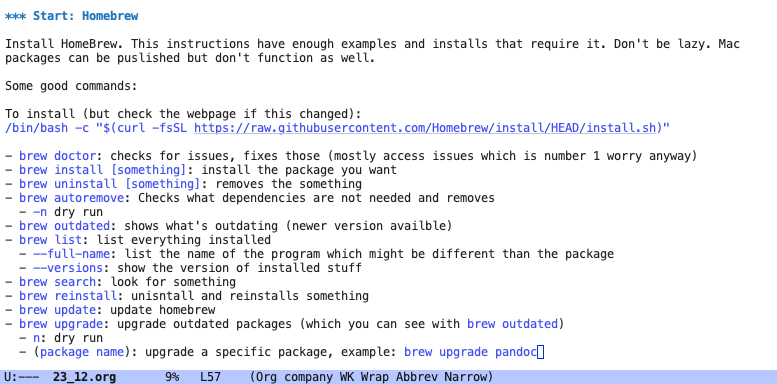
For the last couple of weeks, I have had the task “WIKI Mac wipe @ Home”. I wiped my Mac, and then I started documenting what sort of things I’m doing as I slowly re-build my environment. I say started because every time I want to put it up on the wiki there are more notes I keep adding to it.
Here are some added notes from this morning:
Note from 4/10/2025: I decided to take these videos down, so they’re not available anymore.
Another S3 video I recorded yesterday! In this one:
- I’m working with a Mac
- Getting back into photography and Lightroom Classic
- Some personal details and why now
- My gaming adventures in Dredge
If you watch and have opinions, I’d love to hear from you 🙂
Note to self:
If you’re using apps made by (and made for) Linux folks, use Homebrew. Sure there’s a pretty macOS package. It works nicely until it doesn’t. And you’ll only find out 2 weeks into using it and waste time digging into it. Use Homebrew. #macos
It’s important to be silly. With yourselves, with your close ones. Being silly is closer to the real us than when we have our mental clothes, for meetings or as we go about our errands.
So be silly. Be humorous. Have fun.
My Name
My name is Shay. Pronounced like Shy. And yes, I’ve been asked if I’m shy too many times. Maybe there’s some truth in this question.
I’ve been JTR for a while, and before that just JR or Josh Rollins. Why that name? I’ll leave it to your curiosity and your Googling abilities for now.
What I’m thinking this particular morning, after sleeping too little, is that it’s time to stop “branding” myself. I don’t like the word “brand.” It leaves a bad taste on a personal blog such as this one. I prefer authentic communication, with humans on each end, exchanging opinions and ideas.
Nothing too dramatic here, no big revelations after being online for 20 years (has it been this long? Yes, I guess so). It’s simply time.
I’m still an advocate of privacy. It’s an important topic that should be discussed more often. People know far too little about giving out far too much personal information. But privacy is not hiding for the sake of hiding; it’s about owning your information and having more control over who you share it with and when.
At this point, with my face on several videos I’m creating and intimate conversations in several locations online, I don’t want to be a brand - a thing. This will be a process. People know me as “JTR” in several places, not to mention that it’s my username on a couple of platforms. It’s a starting point then.
So allow me to reintroduce myself again as me, and now we can move on.
I’m going through my old posts (on my old blog) to choose what to put up again here, with the old posting date. I don’t like how I wrote these posts. Part of me wants to tear them down and rewrite them, but that’s cheating. I’ve made progress writing, and that’s proof. It puts things in perspective.
Lost Kings and hunches
As I watched The Lost King 🎬 yesterday, I was thinking it was a movie about a passion gone too far. The visions of Richard III, the R in the parking lot, the happy ending. Turns out though, it’s a true story.
That really got me thinking. If someone can have a “hunch” like this after doing some research, become a part of a society dedicated to uncovering the truth about a king long lost, and pinpoint the exact location of his royal skeleton… what else can we do? What else don’t we do that we otherwise could?
We can’t ignore science and facts, but on the other hand… can we? Isn’t much of what we know today to be science once considered magic? Who’s to say that we won’t discover a secret about our soul and its connection to the universe we now just consider to be superstitious?
Hmmm 🤨. Hmmm? 🤔
I'm up again. Thanks for reading.
This is the second time I woke up tonight, 10 minutes ago. I’m in the bathroom, on the shower carpet, slowly relaxing from a strong gag reflex. I woke up feeling bile coming up my throat.
The first time, about 3 hours ago, was a weird dream where I chopped people into food products. Mostly sausages, but also chicken, and potatoes. Possibly tomatoes. It wasn’t the horror factor that woke me up, it was because it was boring. At some point, when I started on yet another human, my brain just went “nope. This is too boring, I’m up.”
Now that I’m fully up I think I must have eaten something bad with my family last night, but I didn’t. The food (100% vegan, by the way) was excellent, the kind that makes me miss home cooked food. And the humans, they were excellent too, close family.
Maybe it’s all a subconscious message, or maybe this is what happens when I fall asleep on my stomach pressed against the matt, full of food.
Whatever it is, I need more sleep. Sitting and writing this provided enough time for my stomach to calm down. So, thanks for listening. I’m going to try and get back to bed now.
Another macOS “secret” I got to share with the micro.blog community: When blogging from your Mac, hold down CTRL + CMD + Space to bring up the emoticons complete with a search! Ha! Wish I knew this during the March MB photo challenge!
Smart Folders, where have you been my entire life?! I’m starting to really not hate #macOS over here.
Spring is here, and some of the flowers in the nearby garden are blooming

Why did I switch to Lightroom
I take photos on my phone and on my camera. The workflow on the phone is easy: snap a picture, edit in SnapSpeed, post online through ImagePipe, done. On the camera, things are more cumbersome: take a bunch of photos of the same thing, download everything from the SD card to the Synology, and… forget about it.
Photos from the camera need work. At the very least, I need to shrink them (my Sony’s ARW files are around 10MB and 6000 pixels wide) and export them to JPGs. These two things are both done in Darktable. While I’m there, I’m doing some editing.
That last part, working with Darktable, is easy as long as you know what you’re doing. Finding help, even in the official documentation, is time-consuming. You can’t compare the amount of work done by 1.5 volunteers to the work done by 100 professionals.
LinkedIn learning videos give you 60 hits as soon as you type in “lightroom.” Darktable? Zero. Other video tutorials are around 2 years old and geared toward specific techniques. Still, I managed to learn Darktable and use it for three years.
I have hard time seeing my toolbar icons, which are in dark gray over black background, because the program picks up my Linux’s dark theme. Changing the color scheme is not always as straightforward as you’d think. The icons themselves can change from one version of Darktable to the next. Keyboard shortcuts don’t show next to the menu items, so you have to figure them out as well.
I want to reach for my camera more often. I’m itching to take photos. I’m going to Italy soon, and I want to fill up my SD card. Sitting in front of Darktable and scratching my head trying to understand how to make certain parts of an image stand out could be fun, but not when you have 10 of those; each one requires different adjustments. This is usually why I leave my camera behind. My phone is capable of basic photo editing which allows me to do what I want much faster.
When I bought the camera in 2019, I was excited to learn about photography (Aperture, Shutter Speed, ISO = the holy trinity.) My photography skills have improved since then, but my software skills remain the same. Darktable started to slow me down instead of helping me to get the most out of my photos. It isn’t the lack of wanting to learn that did it: it’s the lack of finding information. Sure, you can search and find 10 good tutorials about Darktable, but they’re going to be outdated, too specific, or both.
And another thing. In GIMP, which I also use to edit photos, you need to search for “What is Free Transform in GIMP” to learn that you need “Unified Transform.” In other words, if you don’t know Photoshop, you’re going to have a hard time being proficient in its FOSS alternative. That’s what happens when professionals who use commercial products build a FOSS alternative. They use professional terms. Even the keyboard shortcut for Unified Transform in GIMP is Shift + T, imitating CTRL + T in Photoshop.
Can you explain how to use Mastodon without being able to compare it to Twitter? Sure. Will you write a manual from the ground up instead of explaining something like “On Mastodon, ‘retweeting’ is boosting”? Eh, not so much. We humans build on foundations we know.
It took me an hour to learn which version of Lightroom I need (Classic) if I want to work with photos on my hard drive, along with a complete set of features. Also learned in the same hour: how to open folders and collections from within the program, how to find the shortcut keys for zooming in/out and cropping, and how to do minor edits. The same things took me more than a day with Darktable.
If I want to take a photography course, I need to have Adobe programs. If I want to go on a photo walk with a local group and discuss photography, I better be talking Photoshop and Lightable. And if I want to spend less time learning software and more time walking around snapping pictures and not worrying about how to edit them later, Well…
As I write this, I’m copying over unsorted photos (ARW files) from my Synology to a local folder on my Mac with Emacs' Dired. I took the plunge and decided to try out Photography Plan from Adobe. I already sorted a couple of photos from inside Lightroom Classic, creating folders based on past events. This is addicting, in a good way.
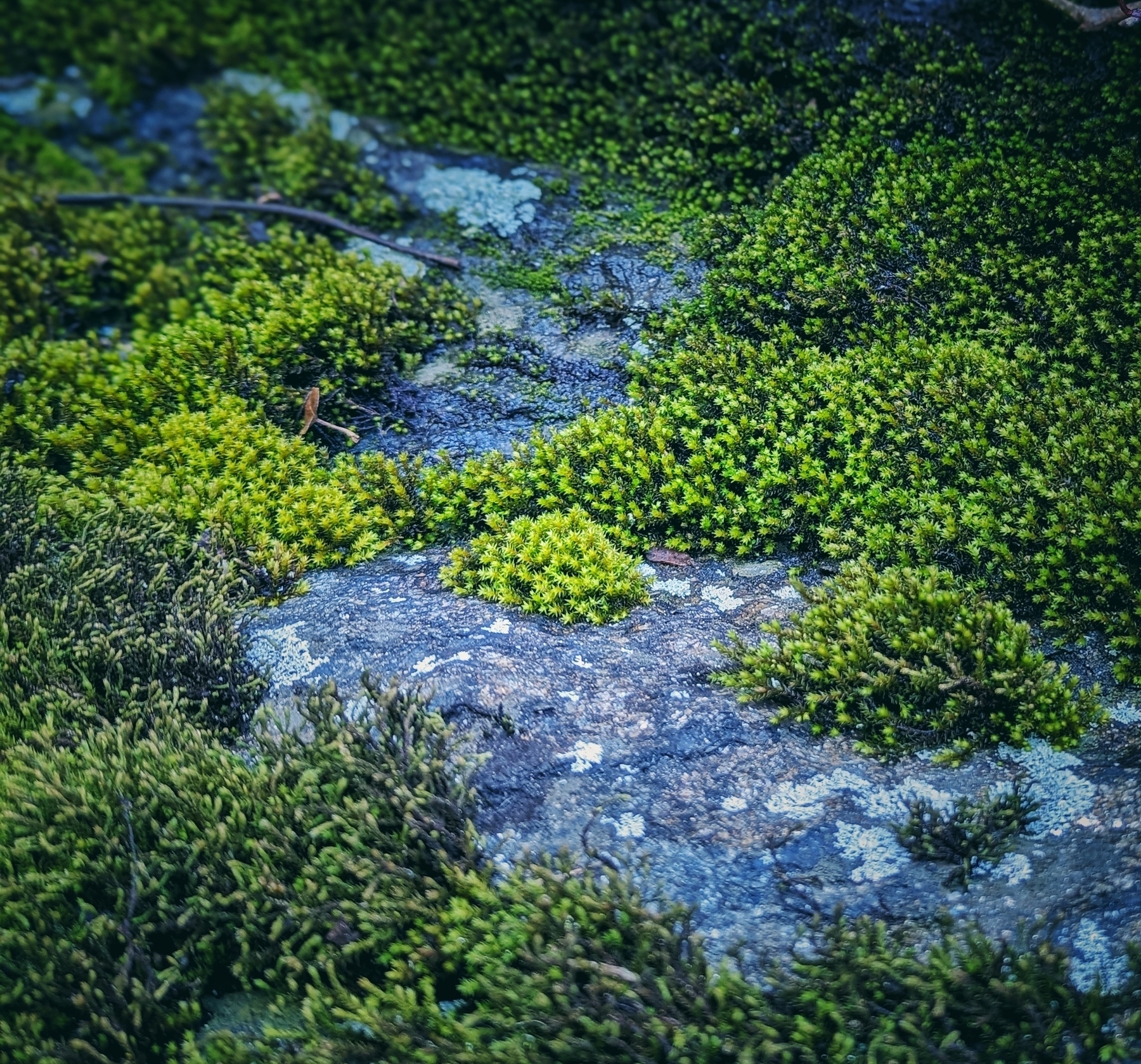
Some moss was covering a rock in patches, on a walk a couple of days ago
Working with a MacOS instead of Linux
As I keep working with the Mac for my wiki and blog, I experience more Apple features I’m starting to like. Here are some of them in no particular order.
Tweaking and productivity
One of my favorites is hot corners, and I’m glad to see it’s still around. I use the upper left corner to bring Mission Control, which places all the open apps side by side in thumbnails. This helps me find a buried terminal window or see which tab I have open in Safari with a quick glimpse.
Speaking of top-left, my dock now lives at the left side of the screen where it makes more sense to me. With a bit of a hack in Terminal:
defaults write com.apple.dock autohide-delay -float 0; defaults write com.apple.dock autohide-time-modifier -int 0;killall Dock
(I forget what YouTube video I got this from), the dock shows up instantly without delay as soon as I hover over with the mouse. Otherwise, it’s hidden from view and out of the way.
Shortcuts is something new I’m learning to appreciate. On Linux, I have a couple of helpful bash scripts to automate things. I’m used to going into the terminal there if I want to run a command (or run it from within Emacs). Shortcuts is an interesting hybrid of scripting and GUI. It’s not programming more than it’s a fancy way of creating macros on a Mac or an iPhone. I appreciate how well-integrated it is. For example, a shortcut I created becomes a part of a system menu that shows on right-click.
Everything in one place
When I’m working on my Linux desktop, I use Brave to open various work web apps like Outlook, Teams, and ServiceNow. This usually gets the job done.
With the Mac, these apps go to the next level. Opening Outlook in a dedicated app means it integrates with Grammarly (which I use to check for typos) and the shortcut I mentioned above. I like having the main apps in their own dedicated windows.
Additional perks
A couple of additional things I learned to applicate on the Mac:
- Music sounds better (I stream lossless classical music from IDAGIO) when I plug my headset directly. no need for a DAC.
- Seamless integration with the iPhone for scanned documents, freeform for sketches, notes, and mode
- Homebrew gives me tools I’m used to from Linux, like ffmpeg
What is not as good
I’m constantly aware that all nice Apple things go through Apple. Every sketch on Freeform, every scanned document, my txt files on the desktop, etc. Meanwhile, the Mac is not behind a VPN and Safari is logged into my old Google account. I don’t like this.
Of course, I could download and run Librewolf on the Mac, log out of Google, and turn off iCloud sync. Maybe I will. For now, it makes more sense to have these Mac features in place with the knowledge that when I want privacy and ownership of my stuff without a third party, I can go back to Linux.
One exception I’m making is my org files for Emacs. I sync them with my file server through Syncthing, so they are not stored in iCloud. Still, there’s a bit of an “off” feeling to it.
Speaking of Emacs, it’s definitely happier in Linux. I can get Emacs working nicely on the Mac, but it requires more tweaking and packages from Homebrew. Even Prot’s nice ef-themes don’t work quite as nicely on the Mac, and the colors are a bit off. Again, I know I can tweak and change that, but it goes to show that Emacs is meant to run on Linux, at least out of the box.
Overall
For now, I’m pretty happy - and surprised. As I explore more automatons and productivity hacks, I feel more at home. Still, Linux definitely has its place when it comes to my trust and privacy.
How many Brandons?
Sometimes you read something that resonates well with what you’re going through. Every now and then you come across someone who seems to be in a similar place in life as you are, and their reflections resonate with you more than once.
To me, this person right now is Brandon who talks about a couple of such things.
Makes me wonder, how many of us are out there? Seems like this is a good place to ask.
Sometimes I can’t sleep. Actually, it’s more than sometimes.
At this point, I’ve learned that certain nights are not meant to pass sleeping. Accepting that though, that’s a different story.
I know the morning ahead is going to be mentally foggy, a zombie state, where I can only handle basic slow function.
Sometimes I manage to fall asleep back in the early morning and wake up again; other times there’s too much going on and I remain in “zombie mode” for several hours, perhaps even the entire day if I can’t take a nap.
Perhaps writing this will help. Perhaps I’ll put the phone down again, take my glasses off again, turn to my side, and sleep. I tried several times tonight - I woke from a bad dream about 2 hours ago - so far without success.
Here goes. One more try.
I’m behind on the photos challenge, but I’ve been working on my wiki and other content… Maybe I’ll post some of the pics later, just for fun :)
Gave up on Horizon Zero Dawn 🎮
I want to like Horizon Zero Dawn (HZD), but I can’t. I tried. I’m wondering why it took me so long to give it up.
A greedy CEO of a mega-corporation builds powerful robots. The Robots become self-sustained and decide to do away with humanity. Humans realize their mistake too late and nuke the planet (I’m not sure about that last part yet, but I’m taking a wild guess). Apocalypse happens. A hero emerges some 100 years later. Bla bla, humans are now nature friendly, bla bla bad guys dig up an old technology and start all over again, bla bla, what’s the lesson to be learned, kids? It’s a formula that works, so why change anything?
Yet another case of a beautiful open world with very little to do in it. Walls you can climb are highlighted (what I’d like to know is who placed climbing cables in glowing yellow on the outside of a skyscraper after the apocalypse?) The space between metal beams can be big enough for a bus to get through, yet an invisible wall blocks your path. The navigation system keeps nagging you like an overbearing parent, so you can’t even entertain the thought of getting lost.
My favorite annoyance: there’s exactly one kind of bush across the different biomes of this vast open world you can hide in. You can find it in deserts, jungles, and frozen mountaintops. No other thing in this game will hide you, not even a thick bunker wall.
I stopped playing this game twice before: once after a boss I couldn’t beat (there were none of them bushes to hide in), the other due to poor framerate that made a fight with a translucent enemy impossible. I should learn to trust my instincts. No matter how many people admire a game, if it doesn’t work for me, it doesn’t work for me.
In my second official S3 video, I talk about the getting more comfortable recording and editing videos (ironically, adding text to a video in OpenShot is a pain in the behind), blog posts and continuing the Micro.blog March photoblogging Challenge, and recent updates to my wiki.
As usual, posting to PeerTube first, then YouTube and embedding the video here.