
A few quick updates:
-
Insomnia has been hitting hard for the second week in a row. My days have two parts: a small one from around 4 AM to 8 AM, and then after I get to sleep again, 9 AM to until 3 PM or so when I crash and take another 20-minute nap until later.
-
There’s a lot going on out there. Some good, some bad, and too much to express, especially in my state right now. I’m aware and am following with interest
-
Work’s been taking extra of my time with projects, and that was before the whole CrowdStrike thing. Yeesh. Between that, other hobbies, and trying to shove some exercise when I’m not a zombie, there’s little time left for other things
Hope everyone else’s doing alright, these days are a crazy ride.
Why CrowdStrike is still such a huge problem?
This, in a nutshell, was the problem Friday, and it still carries on to next week in some places:
Crowdstrike : its fine u just have to manually visit the PC boot it into safe mode and remove a sys file
— Hammancheez (@Hammancheez) July 19, 2024
US Organization with 50,000 pcs and a completely outsourced IT department in Bangalore : what
Not only hundreds of computers stopped working because of CrowdStrike, to fix those, you had to manually get to the computer.
Not only do you have to get to these hundred computers with an IT department that has 10 or so people on call, but many of these computers are locked away in offices you don’t have access to or belong to people who happen to be in a different state or a different country.
Not only many of these computers were impossible to reach, but there were computers IT didn’t even know they had in their inventory until they got BSOD, and users who work have been remote since 2020 or were forgotten in the basement next to their red staple called the helplines until those collapsed.
Not only IT have computers they didn’t know existed, but management was (and is) in full panic mode and wanted a full report of inventory (how many computers you have vs how many are fixed) ASAP. Because IT can’t give them such a report because they don’t even know how many computers they have or are affected, management demands that IT keeps reporting every few hours for a meeting that goes for an hour between all IT departments in an organization while they are running around fixing issues.
The technical issue is always just the tip of the iceberg.
At least at my organization, most managers are IT folks themselves and have known the people they work with for years, even decades. They trust each other to do their job, and it shows. And I have to say (I wish for the day I wouldn’t have to say this and it will just be normal) that the few women who lead IT groups through all this did an amazing job. They led by example and came up with ideas that helped everyone. Happy to be working in a place like this.
Had a couple of things to go over this morning, but the CrowdStrike ordeal kicked me to work in high gear. The memes on social media are awesome though! Should collect them in one post when I get the chance.
While I’m thinking about my blog: soon, a new category in the navigation bar - 🎮 games.
I’ve been using Backloggd for a while, and I understand how to use it better to record progress and mirror my posts here with images. #videogames #gaming #games #blogging #reviews
I love @jthingelstad’s blog gardening idea and I think I’m going to utilize it soon. I have posts going back about five years now (this and my older blog), and this will be a good way to get them all in here and clean them up. Good stuff.
Blog Gardening thingelstad.com
Reader: www.thingelstad.com
indie blogs are doing OK: here's how to find them
The other day I wrote that indie blogs are doing fine in response to what happened to blogs on Hacker News. Now that I let the grump out, let me share some of my methods for finding these blogs.
First thing first: don’t use Google. Indie blogs and personal websites are not usually optimized for SEO and Google’s shenanigans (and if they are, they can’t compete with big companies with a budget and marketing teams that do SEO all day). I use Kagi (work is Bing, which is not much better than Google, but that’s why it’s for work), and it’s excellent. Among other things, It has a “small web” toggle that allows you to reach places you won’t usually find with a regular search.
Indie blogs are like good spots in town. Sure, they’re on the map, but you need to ask the locals to point them out. In terms of indie blogs, this means other bloggers. The biggest contributions to my RSS feeds are from other blogs I follow, where one blogger mentioned another as a comment. I then do a quick test (more on that later) and if I find that the blog’s good, it gets added to my list.
Next, there are places on the net dedicated to indie blogs. I’m biased, and I love mine, so I’ll point to it first: Micro.blog. You can read more about Micro.blog in the About section of this blog, but the gist is that the guy who made it is all about the indie web and reviving the good old blog culture. The Discover part of Micro.blog is curated by a human, each post usually has a blog attached to it. Spend some time there, and you’ll probably find one or two places you’d like. Also, while I’m here, blogrolls. Micro.blog recently re-introduced those, and quite a few members of the Micro.blog community (this blog included) have some interesting links to suggest.
Speaking of blogrolls, some of those exist on the net. One of the famous ones is Ye Olde Blogroll. It is a bit too noisy for my taste and not organized as well as it could be, but put some time into it, and you’ll find something. There are a few more, but I can’t find them now, and I’m running low on coffee, so check @amerpie’s comment below. There’s also People and Blogs by Manu, which is quite nice, though it tends to be a bit too tech-leaning (more on this later) for my taste at times. Give it a try.
Indie social media is a thing, and you should use it. Mastodon is an excellent place to start because it’s pretty easy to build columns based on your interests. Then all you have to do is go fishing: once a week I find someone mentioning a post they write (or someone else’s post) in my topic-related columns.
The last tip I have is a bit of a catch. Write an indie blog yourself. If you’re reading this post and have read this far, you’re probably interested in indie blogs (I know my deductive reasoning is excellent, but thank you anyway), and the best way to find blogs is to become a blogger yourself. How is a different topic, but in a nutshell, start by writing something simple and mundane; never start with something big and “important” because you’ll get stuck in the not-good-enough cycle. Trust me, I got stuck in it many times.
This leads me to my two main guides for adding a blog to my RSS list. These might sound harsh, but hear me out. First, I try not to add web developers or other techies whose job is IT in general. This is because their blogs tend to be more about what they do for work and less about their lives (in general! This is not true for everyone, hence why this is a guide, not a rule), and their lives are actually what I’m after. I talk to enough IT folks every day the way it is. Second, I don’t generally read bloggers who write less than once a week unless they are very consistent and have been around for a long time; otherwise, chances are I won’t read more from them in a good while, if at all.
I hope this helps! Live well, and may your RSS list prosper.
It feels like everyone’s screaming constantly, and for a guy who lives in NYC of all places, I don’t like much noise.
I spent some time on my Mastodon filters (I don’t use other social media really so the rest is not a problem), uninstalled anything NYT-related from my iPhone and Mac, and sat down to listen to some Tchaikovsky for the fairy tales music.
People lost the ability to talk to each other. Everything is cranked up to max volume, everything is loud, everything is the end of the world, and there’s just so much mental bandwidth a guy can take before he becomes numb, you know? I don’t want to be numb. It’s not the time and the place to be numb. I have to be smart about what and where I spend the energy I have.
Personal blogs, as in actual personal blogs written by real individuals, exist. I find them all the time. I just don’t use Google to look for them, is all.
WTF happened to blogs | Michal's corner mpmisko.github.io
Reader: mpmisko.github.io
org-mode to Apple Calendar sync via beorg
beorg is a well-known org-mode productivity app among Emacs iPhone users that allows you to view and edit your tasks on the go.
I’ve known about it for a while, but I didn’t have a use case for it for two main reasons. First, I used my Android for my tasks until recently, and with it the excellent Orgzly app (now Orgzly revived). Second, iOS doesn’t work with Syncthing, which is what I’ve been using to sync my files for almost a decade.
Now that I have my now.org and events.org files, I want to view them on my iPhone so I can view my work-related tasks there. This means using iCloud sync. Personal events now also show on my work phone, but at this point, I don’t care if Apple knows I’m going to see my sister this weekend or if I’m meeting up with a friend after work. After all, Apple knows this anyway because I take my iPhone with me anywhere I go; the Android stays at home1.
I installed beorg again and discovered a nice surprise: beorg also syncs these events to my iPhone’s calendar. Events I create with a capture template in Emacs now find their way into my Apple Calendar through beorg, which sees these events in my events.org because it’s synced from my Mac to my iPhone with iCloud.
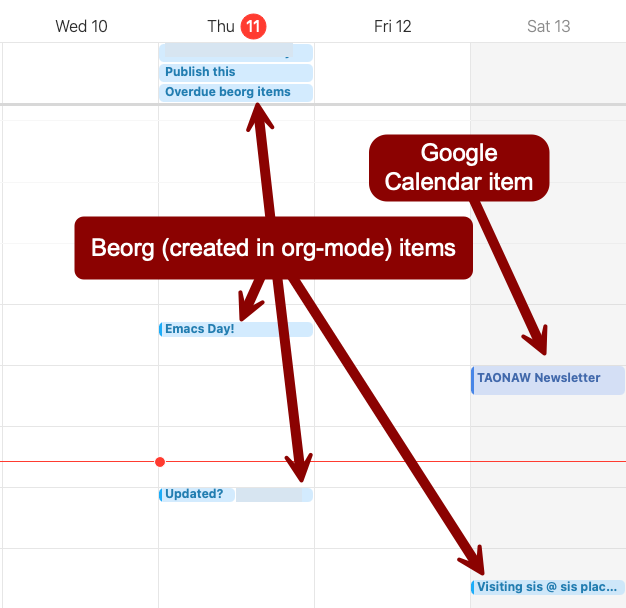
I don’t necessarily need to see my overdue tasks on the calendar, but they are there anyway. This can be useful especially when they’re out of the way like this:
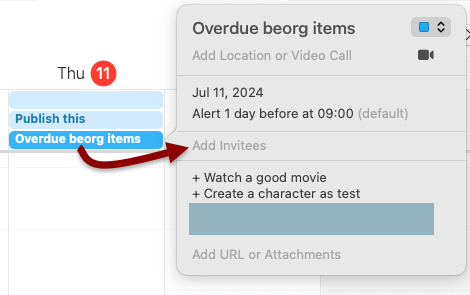
I know different packages can do the same thing directly from Emacs, but I gave up on those because they were too complicated and fragile. Another issue I had with these is that I can’t sync my work calendar, which is on MS365, with my Calendar on the Mac. This is a restriction from my employer, which wants us to use Outlook.
Since I now do whatever I can to keep as few Microsoft products on the Mac as possible (especially after I had to wipe it because of corrupted MS Teams configuration, which no one knew what to do about, especially Microsoft’s support), I’m going to keep using the browser version of Outlook for now, which I prefer anyway. so no syncing for now.
Actually, as I was writing this post and looking at beorg, I found I can sync my MS365 events with my Calendar on the Mac! My iPhone is connected to my MS365 account with Outlook, unlike my Mac, and shows events on my Apple Calendar there, where beorg can see it. Turns out beorg has a handy extension that saves calendar events into an org file from the iPhone to the same folder I have synced with iCloud. This means that I see my work calendar (and my Google calendar as well, since it also syncs to Calendar on the iPhone) on the Mac in read-only mode. I can refile events from that org file to my events.org and extend on those with notes if I need to (Emacs will copy the entry but will not delete it from the calendar org, which is fine with me).

I like what I see! I can finally have all my events, work or personal, in my events.org! it also sync quickly, so I can change things like the duration or location of events and the updates show almost instantly. Adding things from my MS365 and Google calendars to my Emacs agenda is an excellent find.
1 The reason for why the iPhone and why I gave up a big chunk of my privacy are stretched over many posts in my blogs; this one and the old one. It’s been a process (and “un” process) that spends across several years.
The starting pains of learning to draw
My attempts to learn how to draw turned into attempts to learn how to sketch, which turned into attempts to learn how to visually break things down into shapes, which turned into learning how to use the Wacom tablet Nat gave me, which turned into how-to Inkscape tutorials.
Let me give you an example. In Inkscape, you can turn on the pressure input for the Pencil tool. With this on, Inkscape detects how hard you press your stylus on the tablet, which translates to line thickness. This makes drawing feel more fluid. However, when you turn this option on, the Pencil tool does not let you choose a “stroke” anymore but just a “fill.” This makes sense: when you use pressure, the lines you draw are indicated by pressure, not by a shape (which consists of fills and strokes in Inkscape).
I was going nuts for two days because fills and strokes in Inkscape are everything I learned - when I was working with a mouse. In other words, drawing in Inkscape with a tablet is a different animal than creating shapes with Inkscape. It’s almost like using a different program.
It took me two paragraphs to explain this to you, and I’m sure some folks are still stretching their heads. Now imagine trying to convey this without having an idea of why Inkscape behaves the way it does. And I didn’t even tell you that the tablet’s range of motion is very different than that of a mouse, and learning how to scroll with it is also an entirely different skill to learn… but you get the point.
I’ve tried to sketch in a notebook too. “What’s the problem,” I thought, “just break it down into shapes.” Ha. Haha. You think you know how to draw a circle until you actually try to draw one by hand. Draw it fast, and it looks like a broken egg on a good day; draw it slow, and it picks up bumps along the way. I’m learning that I should probably learn how to draw circles and squares by hand all over again. Needless to say, breaking things down to shape, a whole ordeal by itself, will have to wait a bit.
I think this is the problem I always had with drawing. You see, I’m a visual person. I love visual aids. I love symbols. Our brain sees symbols and not what the objects are, which means when I want to draw something, what I’m visualizing is a concept that doesn’t exist. I don’t think it’s an exaggeration to say that learning to draw means learning to see all over again. It’s a long process, and it requires patience. Who has patience when all you need to do is to ask your AI program of choice to draw a house to get one? Not me. But I’m working on it.