
No, it’s not like Slack. Or Teams. And please don’t tell me it’s like IRC.
Discord makes me feel old in a way I don’t like. Most of the people I share common interests with use it all day every day, but to me, it’s just a lot of chaotic noise. I can’t make sense of it.
First Lechtturm-world problems
I started using my new Leuchtturm1917 last weekend, as predicted. There’s a difference in the paper texture, though I’m not sure it’s such a huge difference from the Moleskin, and the color of the pages seems to be just slightly more creamy, which is nice.
Initially, I thought having pre-purposed space for titles and index (contents) would be beneficial, but it’s actually in the way. Let me show you:
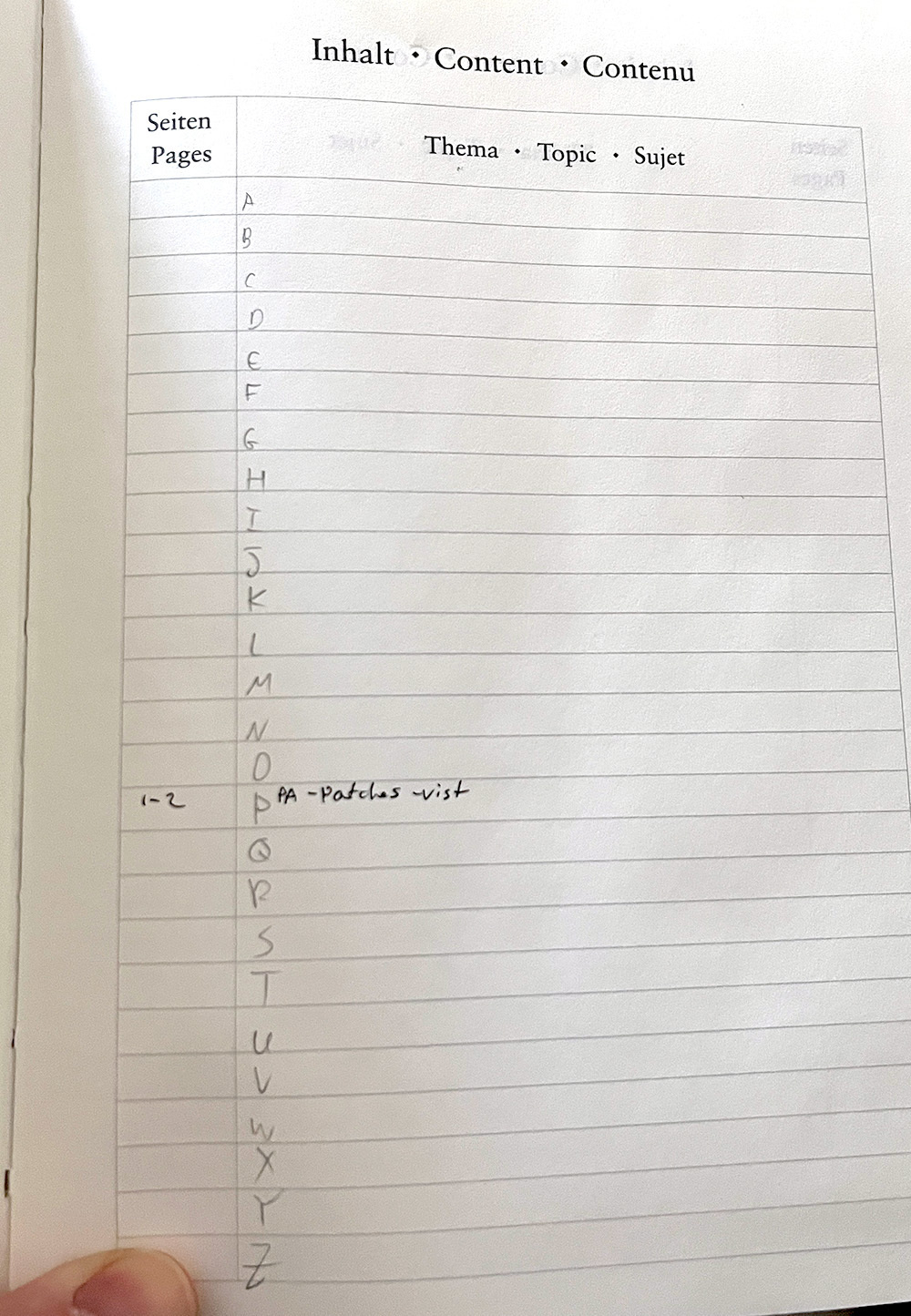
there are 26 lines in three dedicated pages in the content section at the start of the notebook. Naturally, each line can be dedicated to a letter to organized topics. Here is where I encountered a problem: I have three lines - three spots - for each letter across three pages. What if I have five topics under P and none under Z? For now, I think I can squeeze more than a couple in each section, but this is not what was intended. I also need to keep the pages with the topics, which means at some point, I will need to split the length of the “topic” line in the middle to fit more topics and page numbers.
Another issue that occurred to me quickly as I was writing my first three entries was the titles. I don’t start every day neatly with a fresh page; I often stop writing mid-page and start again a couple of days later in the middle. In that case, I write the date and topic manually. Now, the mid-page title doesn’t stand out as the title at the top, giving it a sort of secondary-header feeling.
I’m sure some dedicated Leuchtturm lover will quickly set me straight (Jack?). I’m surprised I didn’t think of this earlier.
Ok ok! Enough internet rabbit holes! I’m gonna start doing some work. I swear. Right after I grab something to eat. And check on my laundry. And make the bed. and….
Bluesky Out of Beta + Various Social Media Thoughts, February 2024
This will be the cue for some folks to have a handwringing moment about whether blocking is the right thing to do, discourse, echo chambers, blah blah blah, so I want to be very clear about this: I don’t give a shit. You can spend your time online with bots and/or shitty people if you think it’s important and you’re striking a blow for intellectual freedom by doing so. I wish you joy in that endeavor. I’ll be spending my time online with people I actually enjoy.
This comment was good enough to add this “guy” to my RSS feed, look into what he does, realize he’s kind of a big-time author who writes good books, and get one of his books. What would I do without internet rabbit holes?
And while I’m littering my techno thoughts over the internet for your eyeball pleasure: I’m considering testing out Tiny Theme from Matt. He just added what he calls “Micro Hooks,”. I’m wondering if this will simplify things like changing the background or displaying a different avatar for my blog
A couple of Emacs notes for options
In preparation for adjusting my Emacs’ settings, I added a couple of quick elisp functions I mashed together. The below is taking directly from my emacs-settings.org file, with these explanations. For now, they are all commented out. I’m saving them as notes and plan to use them soon:
First, a simple function that displays a message for Mac or Linux. The idea is to use it to do other things besides displaying messages. For example, I can have a certain frame size set on the Mac but a different one on Linux:
     (if (eq system-type 'darwin)
           (progn
     	(message "this is mac"))
        (if (eq system-type 'gnu/linux)
            (progn
           (message "this is linux"))
         )
        )
Another simple function that displays “booyah” if the display is bigger than 2000 pixels using the x-display-pixel-width function. This works, but backward: the MacBook Pro has a higher screen resolution than my ultra-wide, so I can still use it, keeping in mind that the higher resolution is when I’m not connected to the ultra-wide screen:
  (if ( > (x-display-pixel-width) 2000)
    (progn
      (message "booya")
      )
  )
As a reminder to myself, this function displays more information about the display, including aspect ratio (under geometry), which might be more “correct:”
(display-monitor-attributes-list)
I wanted to switch away from Arc to use Edge (work) and Safari (personal). I got hit by several workflow-related problems I didn’t anticipate right away, and today, I’m coming back to Arc bruised…
Feels like I was under a rock for the last two weeks… micro.blog has several new features, and I had no idea until today when I noticed (for the first time) the cross-posting button. I checked the News stream and it feels like I’m in a store jumping from one shiny thing to another 😁
So now, after I wrote about Arc browser and the middleman, and after watching a co-worker implementing a cool workflow in Edge (we’re a Microsoft 365 work environment), I’m considering switching to the old Safari/Edge combo again. @jack , are you still toying around with an Arc hiatus?
Browsing is broken: I have a challenge for you
I spewed my anger at how The internet is shit, and it’s getting worse the other day. Yesterday, I saw an update video from the Browser Company, the folks behind Arc browser, which is now the primary browser on my Mac. These guys keep teaching their browser new tricks using AI.
While I’m not sold on that idea (more on that soon), their heart is in the right place: keeping Google and its ads and annoying pop-ups out of the picture entirely. In this video showing off the new features, there’s an example of what’s broken with browsing today.
For a while now, I wondered why every page I open starts the same way: a lengthy introduction that looks like a boilerplate of the last one I read, telling me everything I already know. For example, if I search for “how to skip the introduction in web pages,” the first result is a page with a huge header image, and then (ironically) a couple of paragraphs introducing the problem. The actual content starts a third way in, after a couple of ads, because of course. We’re so used to this by now that we can’t imagine a different way. By the way, I used Duck Duck Go to search.
Back in my day… (but seriously, ask anyone over 25), we wouldn’t have so many crappy results flooded with ads. The sites that start with “15 reasons why…” would be labeled as “content farms,” and you’d know to stay away from them; I think some search engines even filtered those out.
The problem, of course, is Google and SEO. Websites make money from Google (usually), and to make the most profit, they need to be at the top of the search results. Once there, the practice is typically to splash you with a couple of ads before you get to the main content to ensure their highest-paying advertisers will be satisfied that their ads made it to your rolling eyeballs before you click away in dismay.
Arc browser wants to get around this with what they call (for now) Arc Explore: " ‘A tool for automating a browsing journey from end to end,’ with the promise that you can ask for information on any subject or question and Arc will scour the internet and use AI to generate a summary with links and information" (from The Verge). I don’t like the idea of using AI because AI can (and will) also be manipulated. We will just end up with “AIO” instead of SEO. It’s fixing a problem with another potential problem. The solution, rather, is humans.
But with humans, we have two problems. First, we’re lazy and don’t bother searching as much as we used to. When did you last search for something with your desktop computer and go beyond the second or third page of your search engine? Do you know - and use - search filters for what you need? Or do you just pull up your iPhone and ask Siri to do it for you?
The second problem is finding human-generated results. Even if there is a place where a bunch of humans have good, thoughtful answers (say, an independent forum of a sort), chances are this place won’t be at the top of the page or even show up at all unless you specifically know what to look for. Reddit is one example that, for the time being, is still working OK (Reddit is full of humans, but how the company is run is a different story), but even results from there can get buried.
Over at geek land, AKA fosstodon.org, I often learn about “digital gardens” or human-created databases. Usually, these are self-made wikis or help pages. Private and personal blogs often have good content about specific (and often hard-to-find) content. For example, consider this post from Hollie about growing out hair. It links to my response, how to care for a blad head. Internet forums are built around the same idea, but finding them today and then finding a specific topic inside these forums is a chore compared to “just Google it.”
Fun fact: there used to be a day when you could ask your librarian to help you search a topic online, and not only they’d help you, but they’d also advise you on how to quote your sources correctly and where to find more information. Today, Google and AI are filling in that role. The big difference is that Sally from your library will not try to sell you tickets to a vacation in Florida when you look for information about mashed potatoes because Sally doesn’t get a dime for doing so. It’s just extra work you don’t care about, and she doesn’t have the time for. But there’s something else important here: human interaction.
When you talk to Sally, you may also notice that there’s an interesting book resting on the counter. You stand in line, and the man in front of you is asking her about Nicholas Cage, which reminds you of an article you read about him the other day, and you might join the conversation. You might also notice that Sally has a cup of coffee from Starbucks next to her, and you’d enjoy sharing a local gem of a coffee shop you discovered the other day that makes cheaper and better coffee.
In the age of productivity and AI, all this “extra noise” is cut off. We don’t need it, so it’s irrelevant (but a vacation in Florida is, apparently). We’re starting to find out how lonely we all feel without these. That’s also what bothers me with Arc and the Browsing Company. The middleman is not the problem; it’s/who/ the middleman is. I understand the enthusiasm, but it’s misplaced.
I don’t want to finish another post on a negative note, so let me remind you that human-generated information is still alive and well - you just need to look harder. You know what? This gives me an idea for a fun challenge. Whenever I search next, I also want to see if I can find a human response by asking other folks. It may take longer, but I’d like to see what the human answer would give me versus the Google/DuckDuckGo one. Why won’t you try to do that with me? We might end up with a bunch of random, interesting questions and answers.